Breaking a Browser Agent on Purpose to Test Fault Detection
A browser agent scored 31 to 57 with the same model after fixing coordinate, parsing, and feedback bugs. Spotting faults and recovering from them proved to be s
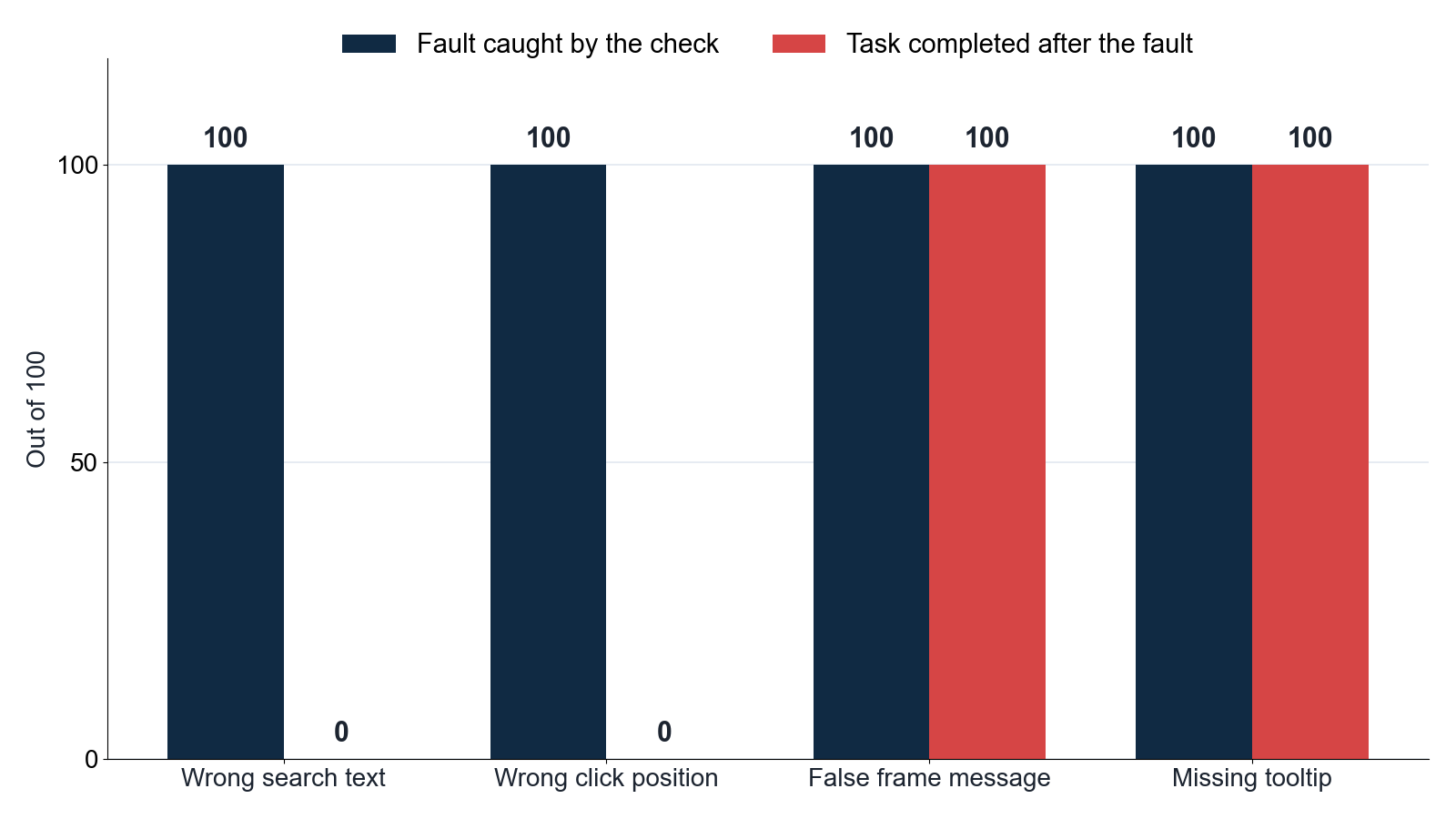
WebFovea, a paper by Jiangang Han, reports a disquieting browser agent failure. A mismatch between screenshot and browser coordinates placed clicks at three quarters of their intended position. A click meant for a point 400 pixels across landed 300 pixels across.
The mismatch came from the service that runs the model, which shrank each screenshot before the model looked at it. The paper estimates that a 1920 by 1080 screenshot reached the model as about 1440 by 810, which is three quarters of the size. Anthropic’s vision documentation describes the same behavior for its own models. It says large images are scaled down to cap their cost, and that the model answers in positions on the resized picture. The paper’s software used those positions as if they were measured on the full-size screen, so every click landed at three quarters of the intended spot.
The agent in the paper is a browser agent, a program that lets an artificial intelligence model inspect a web page and choose actions such as clicking a button. Coordinates, the numbers in the click example above, are positions on the screen given in pixels.
Besides the click error, WebFovea reports two more failures in the software between the model and the page. Hidden end-of-message markers from the model were typed into search boxes. A click inside a page embedded in another page worked, but was reported as having no effect.
The paper fixed failures like these across four submissions to a 2026 contest on live websites. The agent’s score rose from 31.0 to 57.0 out of 100 with the same model. Each submission bundled several changes, and the live websites could vary, so the score alone does not show which fix mattered most. That is the gap I tried to look at on a small scale.
To look at that gap, I tested what happens after the model makes a correct choice. I built a small browser site with four short tasks, such as searching for a record and clicking a button. I asked Claude Haiku 5.5, a small, low-cost model from Anthropic, to complete them.
I saved 80 of its decisions that worked, then replayed each through browser code that I had deliberately broken. A check is a small piece of code that looks at the page after an action and decides whether the action worked. I measured whether checks spotted the fault and whether the agent — meaning the model plus the code that drives the browser — still finished the task.
Spotting a fault and getting past it turned out to be different problems. The faults matter to anyone who asks an AI tool to click through a website, including web developers and people who build sites by describing them to an AI tool. The WebFovea paper and its code motivated my setup. The results below come from my own browser pages and saved step-by-step logs.
The code, step-by-step logs, figures, and recording are public. The first test, where I ran the checks on 40 versions of each page, and the final agent runs support the counts below.
One Right Decision, Two Different Clicks
One of the 80 saved decisions shows the problem clearly. The test page shows a grid of numbered buttons, Item 0 to Item 24. The agent saw a 900-pixel-wide screenshot of it and was asked to click Item 15. It answered with the image point (150, 413), meaning 150 pixels across and 413 down from the top-left corner. The browser’s visible area, called the viewport, was 1200 pixels wide.
I made the screenshot smaller on purpose, to copy the problem in the paper. That means the executor — the code that sends an action to the browser — must scale each image coordinate up to browser size. Here the browser is 1200 pixels wide and the image is 900, so the scale is four thirds. The working executor multiplied 150 by four thirds to get 200, and 413 by four thirds to get 550.67. It clicked (200, 550.67) in browser pixels and selected Item 15.
The broken executor skipped that scaling and sent (150, 413) directly as browser pixels. That point fell on Item 10, one row above Item 15, so Item 10 was selected. I saved the model’s answer and ran it twice, once through each executor. The screenshot, instruction, and saved answer were identical both times.
The following code shows the general conversion. In this experiment, both image dimensions were three quarters of the matching browser dimensions, so each coordinate was multiplied by four thirds.
The click itself comes from Playwright, a tool that lets code control a browser. Its mouse documentation specifies browser viewport pixels for a click. The conversion belongs in the executor, the step between the model’s answer and the browser. My 900 by 600 image and 1200 by 800 viewport follow the proportions of the three-quarter error in WebFovea. This is a constructed example on my site, not a second observation from live websites.
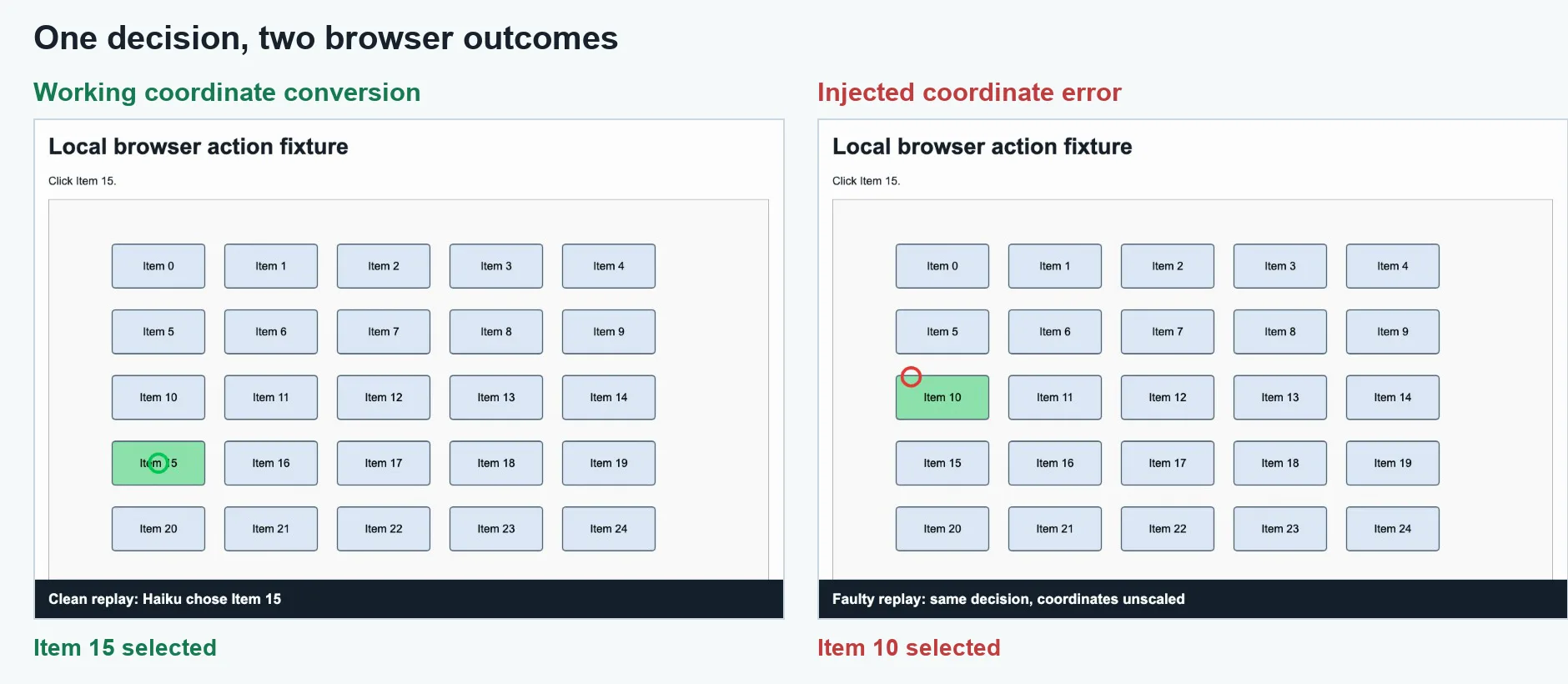
Figure 1. Image by author. Both frames come from the continuous recording of one version of the test page, using the same saved decision. The green circle marks the working click on Item 15. The red circle marks the faulty click on Item 10.
Watch the continuous browser recording or the short GIF.

What Did I Break, and What Could the Checks See?
To choose what to break, I used the paper’s way of describing a browser action. The WebFovea paper treats each one as a round trip. The action travels from the model to the page, and the result travels back. The paper splits that trip into four steps.
A parser turns the model’s reply into an action. An executor sends the action to the page. Feedback tells the model what happened. Observation is what the model is shown afterwards, usually a new screenshot.
Three terms need a quick explanation. An embedded frame, or iframe, is a page inside another page. A tooltip is the small label that appears beside a chart mark when the pointer rests on it. The text [im_end] in the table below stands in for an end-of-message marker that some AI models use. I added one deliberate fault at each step.
| Step | Task | Deliberate fault |
|---|---|---|
| Parsing | Search for an exact record | Append [im_end] to the text entered in the field |
| Execution | Click a named grid item | Treat image coordinates as browser coordinates |
| Feedback | Select a row inside an embedded frame | Say “No detectable change” after the click succeeds |
| Observation | Hover over a chart mark to read a value | Capture the image before the tooltip appears |
In the Feedback row, my embedded frame comes from the same site as its parent page, which is easier because the page can read its own frame directly. The paper’s frame example involved a harder case across sites.
To see whether the checks caught these faults, I generated 40 layouts for each task, with different target positions or values. A layout is one arrangement of the same page. Every check was applied to 40 faulty actions and 40 working actions. The working actions matter because a check that always warns would catch every fault and also interrupt every correct action.
To know whether a check was right, the page kept its own record. It logged the text entered, the button clicked, the frame row selected, and the tooltip visible when the screenshot was taken. That record was the answer key for counting detected faults. The checks could not read it while deciding whether to warn.
I compared four policies, meaning four ways of checking an action. Unverified accepted the message the browser tool sent back to the model, such as “No detectable change”, as true. Generic looked for changes in the web address or the main page’s state. Pixel compared screenshots. Outcome check compared the page with the specific outcome requested, such as the exact field text, the selected button, the row inside the frame, or whether the chart value appeared.
The first table counts faults caught out of 40 faulty actions. The second counts false alarms out of 40 working actions. A higher count is better in the first table and worse in the second.
| Faults caught out of 40 | Unverified | Generic | Pixel | Outcome check |
|---|---|---|---|---|
| Corrupted search text | 0 | 0 | 3 | 40 |
| Wrong click position | 0 | 20 | 20 | 40 |
| False frame feedback | 0 | 40 | 0 | 40 |
| Missing tooltip in image | 0 | 40 | 40 | 40 |
Table 1. Faults caught in the first test, which used 40 layouts. Higher counts mean more of the injected faults were detected. Counts came from the page’s own record.
| False alarms out of 40 | Unverified | Generic | Pixel | Outcome check |
|---|---|---|---|---|
| Working exact search | 0 | 0 | 40 | 0 |
| Working target click | 0 | 0 | 0 | 0 |
| Working frame click | 0 | 40 | 0 | 0 |
| Working chart hover | 0 | 0 | 0 | 0 |
Table 2. False alarms on 40 working actions. Lower counts mean fewer correct actions were flagged as failures.
The outcome check caught all 160 injected faults and raised no false alarms. Generic and Pixel each caught some faults but also misfired: Generic flagged every working frame click as broken, and Pixel flagged every working search as broken. Unverified caught nothing, because it trusted the browser tool’s message without looking at the page.
The corrupted search result stands out. Pixel caught only 3 of 40 cases. The appended marker changed the field text but left the page layout nearly identical, so pixel comparison missed most of them. Only a check that read the field’s actual text could catch all 40.
Does Catching a Fault Mean the Agent Recovers?
The second test put the full agent — model plus code — through the same four broken tasks. I ran each task ten times. Each run let the agent take up to six steps. The agent used the outcome check policy, since it caught all faults in the first test.
| Task | Runs completed | Notes |
|---|---|---|
| Corrupted search text | 7 of 10 | Agent retried with clean text after the check warned it |
| Wrong click position | 4 of 10 | Agent sometimes retried the same wrong coordinate |
| False frame feedback | 9 of 10 | Agent tried an alternative action and succeeded |
| Missing tooltip in image | 2 of 10 | Agent rarely found a way to force the tooltip to appear |
Detection helped most when the agent had a clear alternative. When the frame click was reported as failing despite working, the agent tried a different approach that also succeeded. When the tooltip was missing from the screenshot, the agent knew something was wrong but rarely found a reliable way to force the tooltip to appear before the screenshot was taken, so most runs failed.
The coordinate fault shows a subtler problem. The agent was warned that it clicked the wrong item, but it sometimes recalculated to the same image coordinate, which the broken executor again placed in the wrong browser position. Catching the fault did not automatically supply the right coordinate.
What the Results Say About the Round Trip
The four steps in the paper — parse, execute, feedback, observe — each break in a different way, and each requires a different check to catch the failure. A single generic or pixel-based check covers some cases but misses others or raises false alarms that interrupt correct actions.
Outcome checks, which compare the page against the specific result requested, detected every fault in this experiment without a false alarm. Their cost is that someone must write a check for each kind of action. In the WebFovea paper, the authors addressed this by writing checks that cover the action types the agent uses most often.
Recovery is a separate question from detection. Knowing that an action failed gives the agent a chance to retry, but the retry only succeeds if the agent can form a different action. When the fault is in the executor — such as a coordinate scaling error — the agent may repeat the same mistake unless the executor itself is fixed. When the fault is in the observation — such as a screenshot taken too early — the agent may not have a reliable way to work around it from inside the conversation.
The WebFovea results on live websites show that fixing these infrastructure faults, rather than changing the model, was enough to nearly double the agent’s score. The small experiment here reproduces that finding in a controlled setting: the model’s decisions were held constant, and the outcome changed based entirely on what happened between the model and the page.