Gemini 4 Hydrogen Review: Testing Google's Fast Multimodal Model
Google's Gemini 4 Hydrogen targets fast coding and agentic work. We tested it on audio transcription, video cataloguing, and PDF rule reasoning.
Google has introduced Gemini 4 Hydrogen, its latest AI model designed for faster execution, coding, and agentic workflows. Released on November 12, 2026, the model is rolling out across Google Search, the Gemini app, and developer tools. Alongside it, Google introduced Antigravity Orchestrator, which can switch between Hydrogen and a more powerful reasoning model within the same session.
But how capable is Hydrogen beyond Google’s claims? We tested it across five practical tasks, from audio transcription and video analysis to SQL queries, PDF reasoning, and multilingual writing. In this article, we examine its performance, strengths, and limitations through real-world results.
What Changes With Hydrogen
Hydrogen is built around rapid execution: repository work, debugging, short iteration loops and multimodal tasks. Google recommends it as an upgrade for Gemini 3.8 Flash workloads. That positioning makes it interesting for the work between the big decisions, such as implementing a plan or turning an uploaded file into a useful answer.
Its input range includes text, images, audio, video and PDFs. The native result is text. Understanding a recording does not make this an audio-generation model, and a product that generates an image can be using a separate capability behind its interface.
How to Access Hydrogen
You can build with Hydrogen through Google AI Studio and the Gemini API, including a rate-limited free tier. Its stable API identifier is gemini-4-hydrogen. The Google AI Studio guide gives you an interface tour; check the current Hydrogen controls when following it.
- Gemini app: Start a new chat, select Hydrogen where your plan allows, choose a thinking level, and send your prompt. Free accounts receive access through automatic model selection.
- Google AI Studio: Open Playground, select Gemini 4 Hydrogen, enter your prompt or upload files, and click Run.
- Gemini API: Create an API key in AI Studio and use the model ID
gemini-4-hydrogenin your application. A rate-limited free tier is available; paid API usage is separate from app subscriptions.
Gemini is available for free to all users of Gemini. No subscription required.
Five Practical Tasks for Hydrogen
These tasks use saved Gemini conversations with Medium thinking. Audio, video, PDF and SQL arrive as actual uploaded files; the story uses a direct text brief. We check the responses against the recording, visible frames, English game rules and independently executed SQL. Story mechanics and translation quality receive separate checks.
1. Transcribing an Uploaded Narration
Prompt
Transcribe the attached audio verbatim, using normal punctuation. Then classify the passage as narration, dialogue, or an instruction, with one short reason based on what is spoken. Return exactly two labelled paragraphs: Transcript and Classification. Keep the entire answer under 90 words. Use only the audio. Do not browse or use other tools. Do not identify the speaker, author, book, or recording origin. Keep the response anonymous: no personal names, organizations, account information, contact details, personal references, or signature.
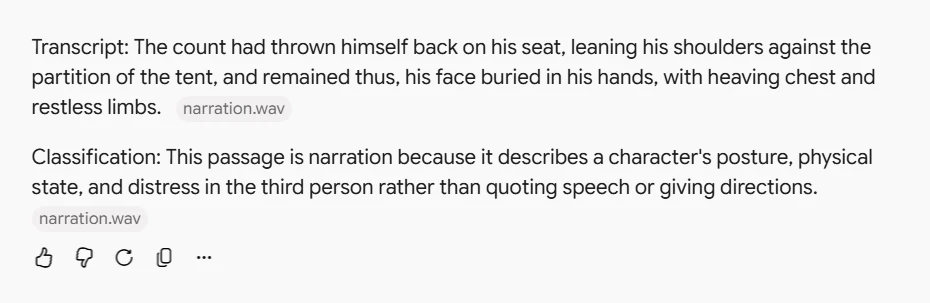
Hydrogen preserved all 33 spoken words, with no insertions, deletions or substitutions against the aligned transcript. It also identified narration for the right reason: the passage describes a character in the third person. The two labelled paragraphs totalled 60 words, comfortably inside the limit. This short, clean recording gave it no trouble.
2. Cataloguing a Wildlife Video
Prompt
Catalogue the attached wildlife clip without inventing a story. Return a table with one row per camera shot: approximate start-end time in MM:SS, colour or monochrome, maximum animals visible together, and one observed action. Then answer in one sentence whether the clip shows an encounter between animals from the different shots. Keep the whole answer under 110 words.
Use only the uploaded video. Do not browse or use other tools. Describe the animals cautiously; do not guess their location or an exact species. Keep every output anonymous: no personal names, organizations, account details, contact information, personal references, or signature.
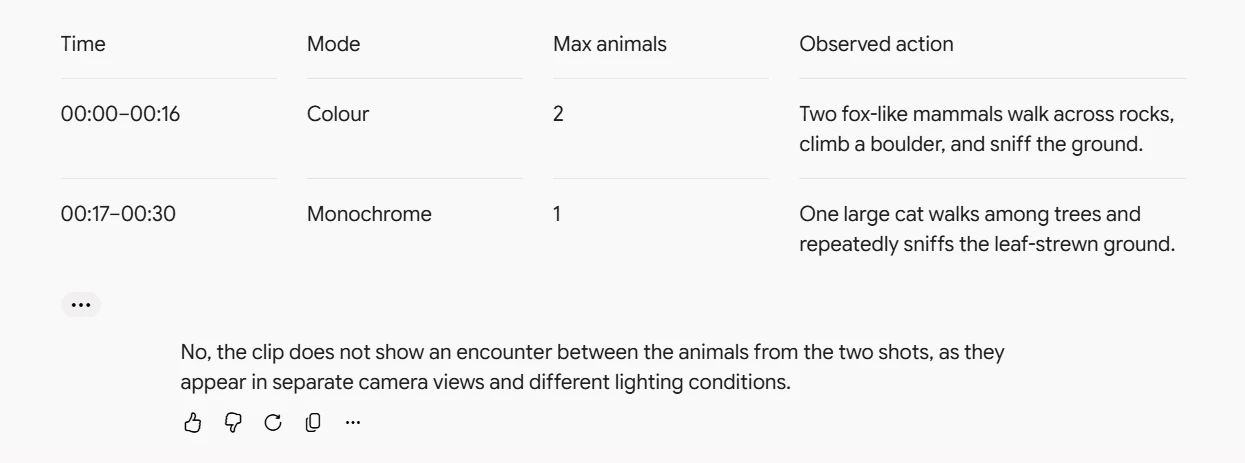
Hydrogen identified the two shots, counted two animals in colour and one in monochrome, and correctly declined to connect them as an encounter. Its timing was coarser: the first row ends at 00:16, about 1.27 seconds before the actual cut at 17.27 seconds. The next row starts at 00:17. A precise video edit would need tighter boundaries.
3. Applying the Exception in a SET Rulebook


Prompt
Use only the attached PDF’s English rules for normal multiplayer SET. Answer these four situations in four numbered points, no more than 130 words total:
- Starting with twelve face-up cards and cards still in the deck, a player removes a correct SET. How many cards does the dealer add, and how many remain on the table?
- Everyone agrees that those twelve cards contain no SET. What changes on the table?
- After the extra cards in situation 2, a correct SET is removed. How many cards are added now, and how many remain?
- A player calls SET and picks three cards, but the claimed SET is incorrect. What happens to the player’s score and the three cards?
Do not browse or substitute house rules. Keep the answer anonymous, without personal names, identity details, affiliations, contact information, or a signature. Give only the four answers.
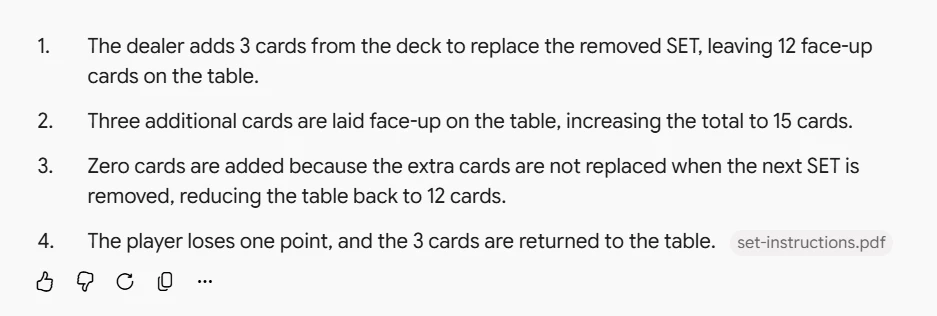
Hydrogen answers the four SET situations from the uploaded rulebook.
Hydrogen got all eight checked values and actions right. After the no-SET declaration raises the table to fifteen cards, it correctly leaves the next removal unreplenished, returning to twelve. It also applies the one-point penalty and returns the three wrongly claimed cards. All four numbered answers stayed within the length limit.
Conclusion
Gemini 4 Hydrogen is built for fast execution, and our tests show it handling uploaded files well. It transcribed a short narration word for word and classified it for the right reason. It also answered every checked point of a SET rulebook question correctly, including the exception for a table that has grown to fifteen cards. Its main weakness in these tests was timing precision in video: the shot boundary was off by about 1.27 seconds, so work that needs exact cuts will need tighter checks. For quick multimodal tasks that turn an uploaded file into a useful answer, Hydrogen is a capable option, and the free tier in the Gemini app, AI Studio and the Gemini API makes it easy to try.