Connect Your Demat Account to Claude for Stock Research
Brokers like Zerodha, Groww, Upstox, Dhan and FYERS offer MCP servers for Claude. Learn to connect your account, check holdings and screen stocks.

Claude has become one of the most widely used AI tools, and stock market investors are no exception. Many already use it to research companies, read financial results and follow market news.
Now, Claude can go a step further by connecting directly to your trading account. Brokers like Zerodha, Groww, Upstox, Dhan and FYERS offer MCP servers that link your demat account to Claude, so you can check holdings, screen stocks, review your portfolio and track news just by asking. Some brokers even let you place orders from the chat.
In this blog, we will walk through the setup and show how to use it, with a ready prompt and example for each task. Claude does the research, and you verify and confirm before acting. Treat it as a learning setup, not investment advice.
Connect your broker
In Claude, add the MCP URL as a custom connector, then sign in on the broker’s own page. Your broker password never goes through Claude.
| Broker | MCP URL | How to connect it to Claude |
|---|---|---|
| Zerodha Kite | mcp.kite.trade/mcp | Zerodha support guide · Kite MCP server on GitHub |
| Groww | mcp.groww.in/mcp | Groww MCP page · Claude setup steps (Groww engineering) |
| Upstox | mcp.upstox.com/mcp | Upstox MCP integration guide |
| Dhan | mcp.dhan.co/mcp | Dhan MCP docs · MadeForTrade step-by-step walkthrough |
| FYERS | mcp.fyers.in/mcp | FYERS MCP docs |
After connecting your demat account
Four things worth doing in your first session, in order. The screenshots in this section come from a Dhan MCP walkthrough published on MadeForTrade (linked in the Dhan row above) and are used here to show what each step looks like.
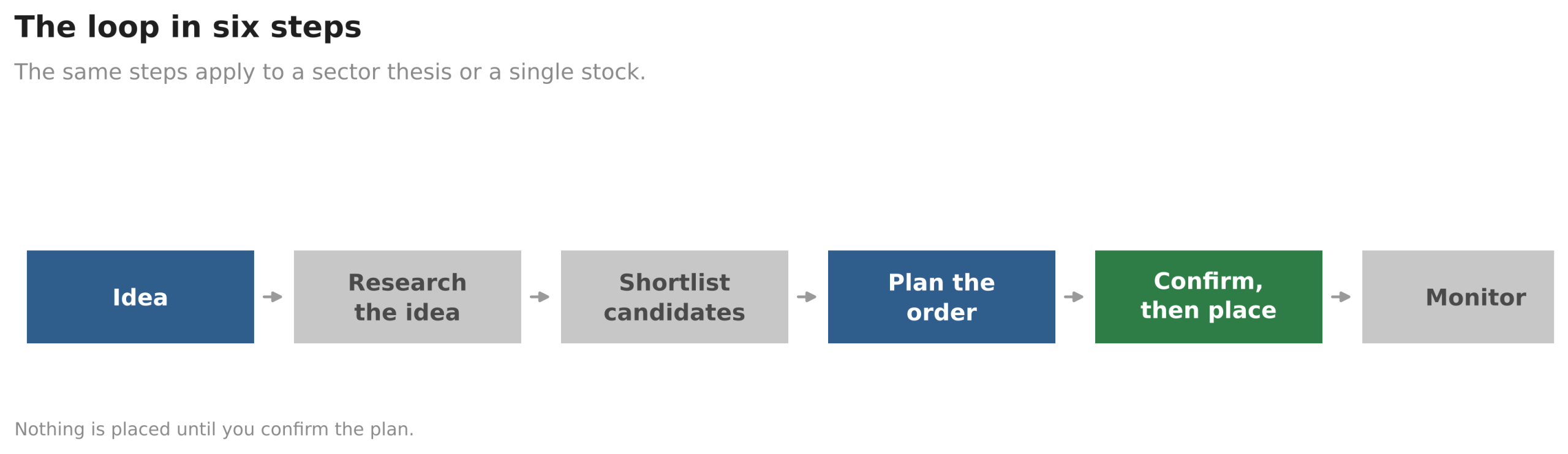
The assistant researches and drafts. You review and confirm.
1. Check you’re actually in
“am I logged in”
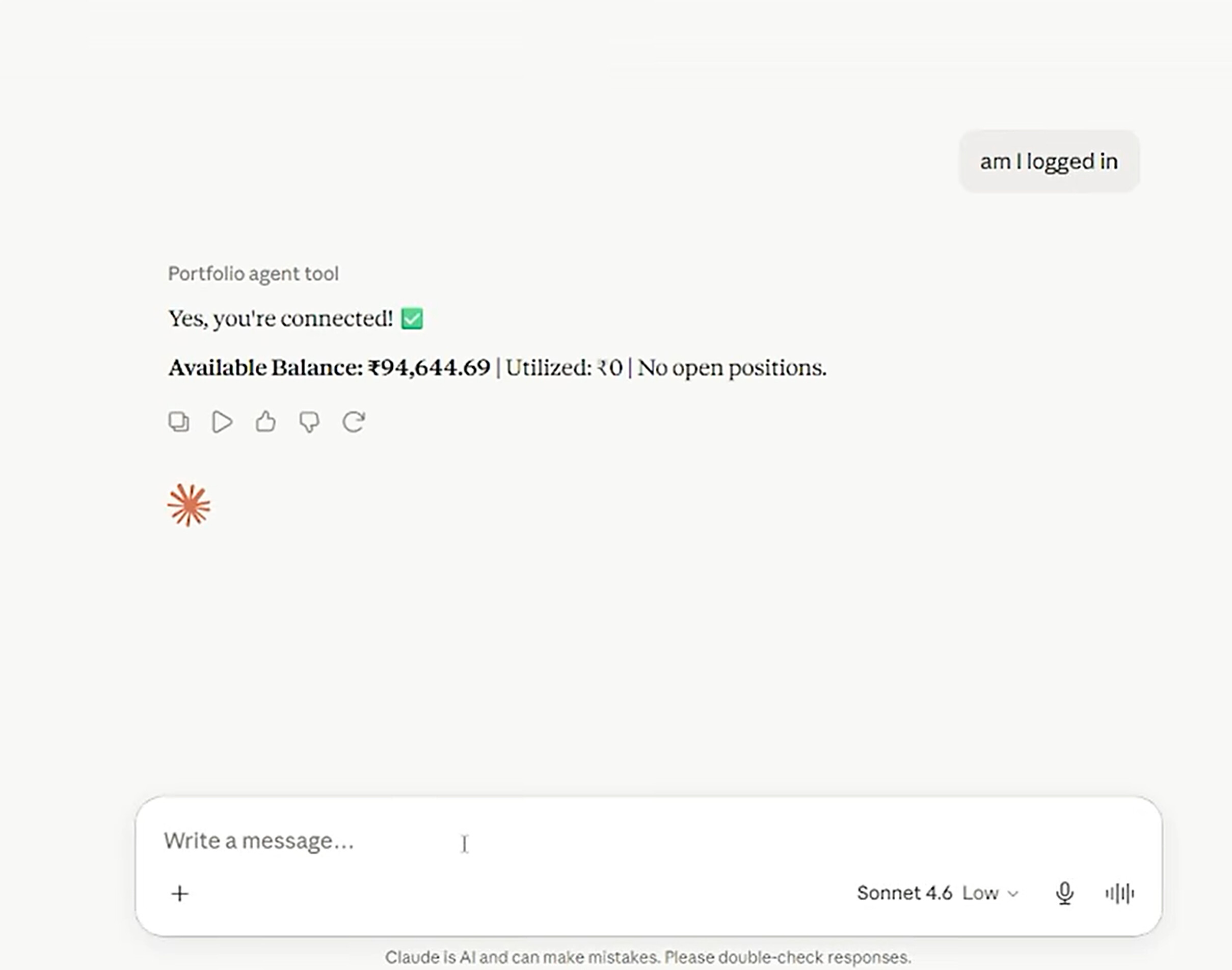
Yes, you’re connected. Available Balance: ₹94,644.69 | Utilized: ₹0 | No open positions.
One line and you know your session is live and how much you have to work with. Do this first, every morning.
2. See what you already hold
“check my holdings”
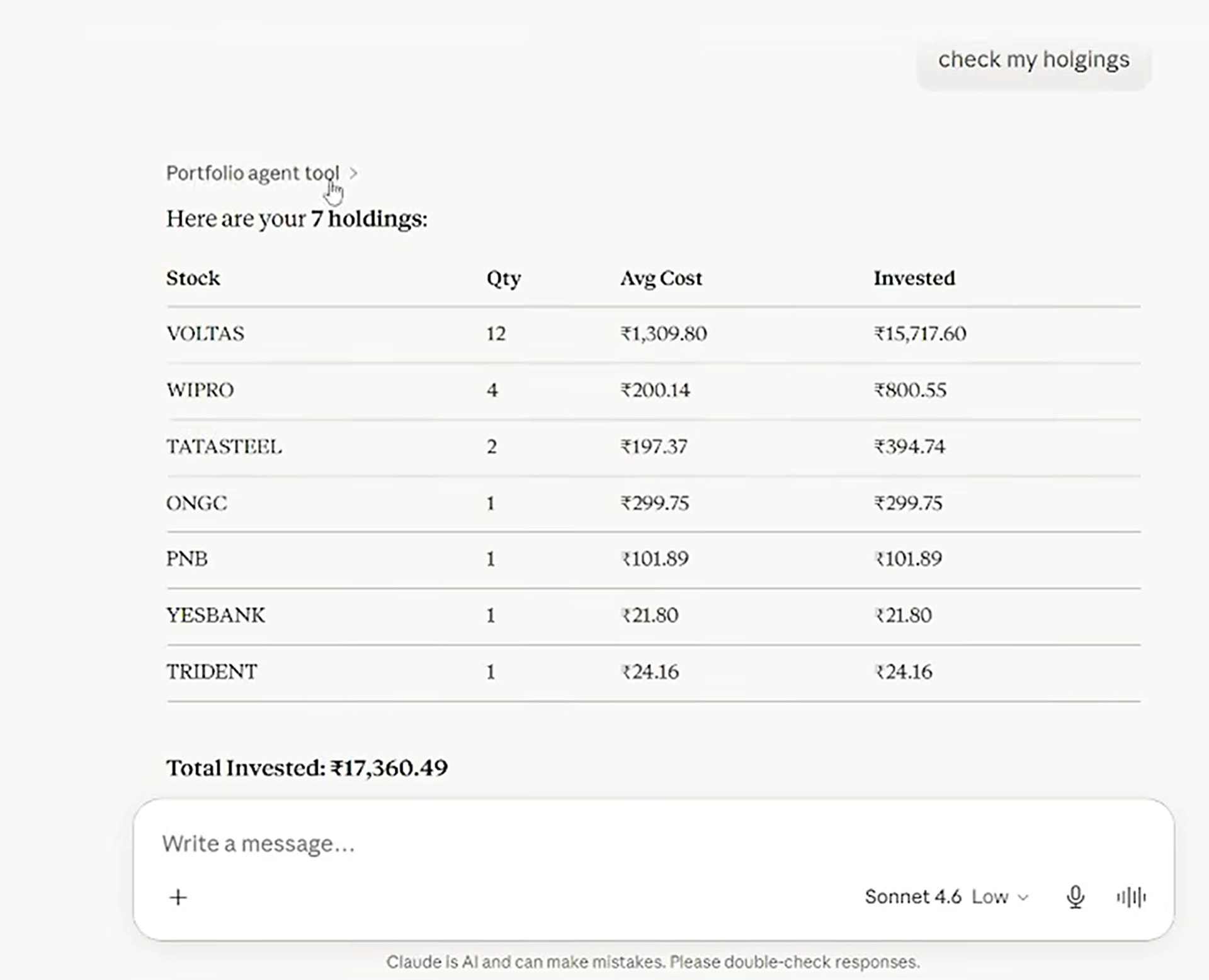
Seven holdings, quantity, average cost and invested value for each, total invested at the bottom.
No formatting, no exporting to Excel first. Just a straight read of the account.
3. State an idea in plain words
Start with a view, not a ticker. Ask for research first, so there is something concrete to trade:
“I expect a hot summer across India. Research which listed stocks are directly helped or hurt by it, sector by sector.”
Claude searches the web and comes back with likely winners and losers by sector. When you are happy with the shortlist, ask it to act:
“let us trade top 5 bullish stocks for it”
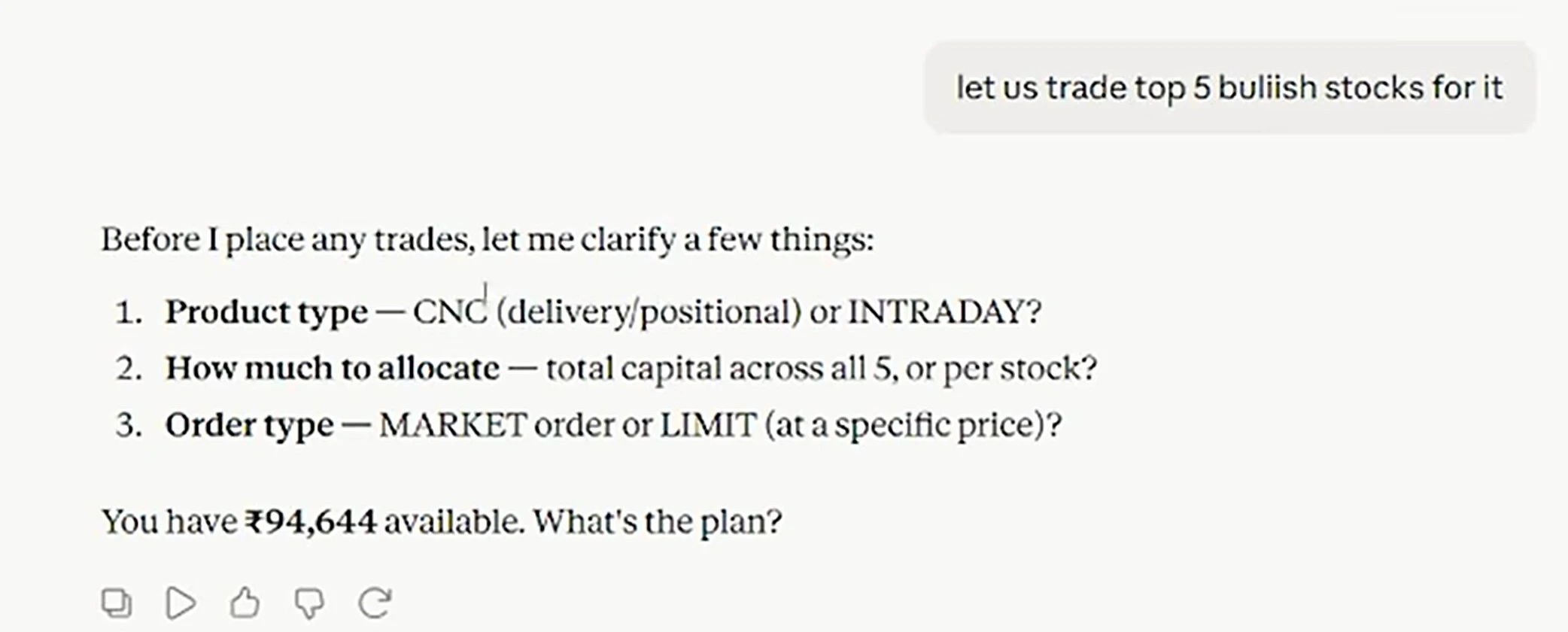
Before I place any trades, let me clarify: product type, how much to allocate, order type. You have ₹94,644 available. What’s the plan?
Notice what it did not do. It did not place five orders off one vague sentence. It asked the three questions that change the trade: the product type, how much to spend, and the order type. Answer CNC, which means delivery: you buy the shares and hold them. Then say how much, and whether you want a limit price.
4. Review the plan before anything is placed
With ₹10,000 allotted to each stock, the plan comes back as a table you can check line by line.
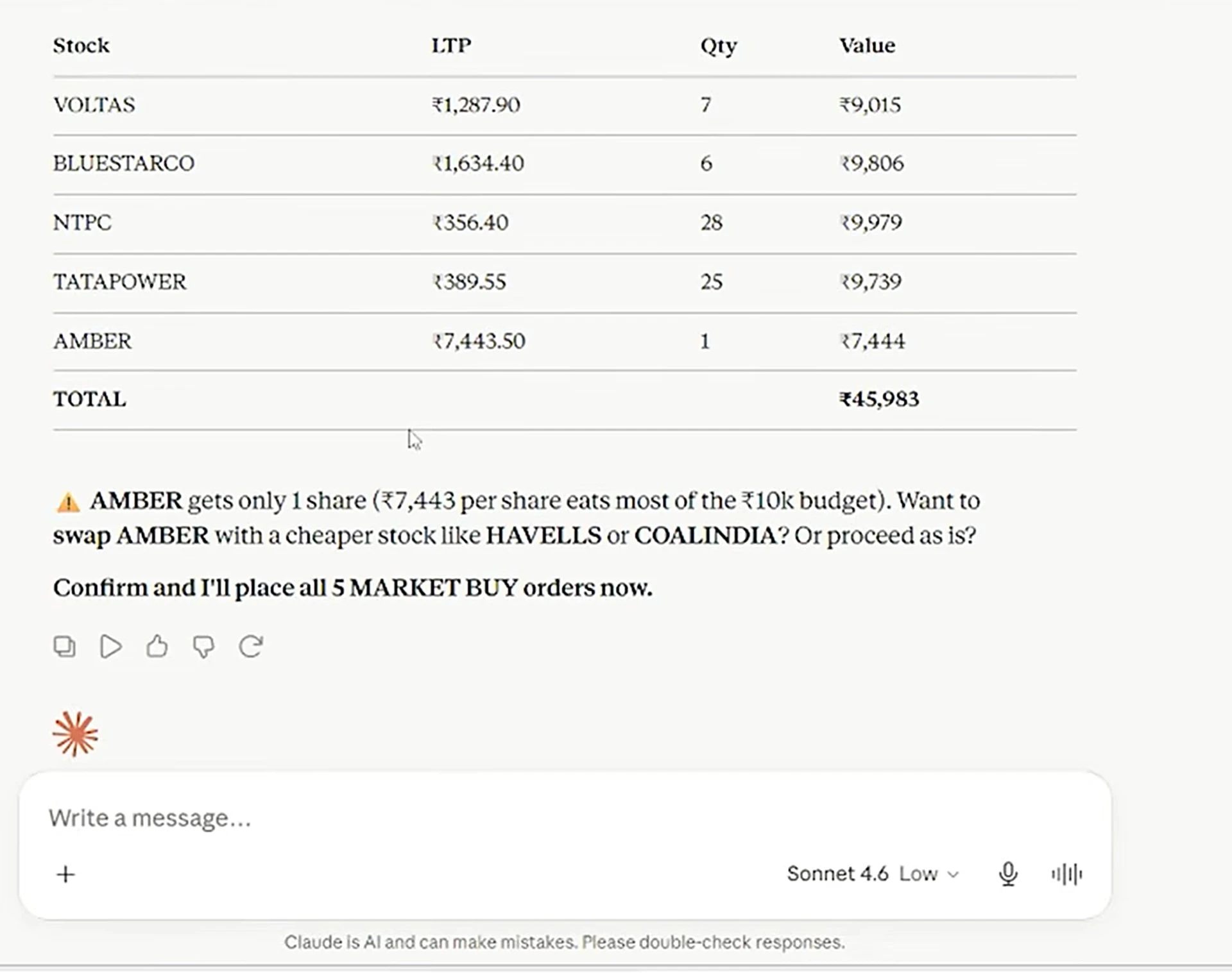
Stock, LTP, quantity and value for each of the five, total at the bottom.
It also caught a problem on its own: AMBER gets only 1 share, ₹7,443 per share eats most of the ₹10k budget. Want to swap AMBER with a cheaper stock like HAVELLS or COALINDIA? Or proceed as is? Confirm and I’ll place all 5 MARKET BUY orders now.
This is the pattern worth copying. The plan is a table you can read in five seconds, the one stock that does not fit the budget is flagged before you confirm, and nothing is placed until you say so. That gap between plan and confirm is where you catch a sizing mistake, not after it is filled. After you confirm, open your broker’s order book and check what was actually placed. The summary in chat and the order that reaches the broker can differ in order type or price.
Analysing a stock properly
You do not need to read balance sheets to screen a stock. Here is the short route.
- Start with the Nifty 50. These are India’s 50 largest listed companies, so they are the most traded and the most closely covered. That makes them the lower-risk place to begin. NSE publishes the current list on its Nifty 50 page. Lower risk is not no risk: HDFC Bank, a Nifty 50 stock, is down about 19% over the past year.
- Pick three to five from different sectors. One bank, one IT company, one consumer company. Five banks is one bet, not five.
- Run each one through the prompt below. It builds the full report for that stock.
- Read only the View tab. It gives a one-word verdict, Consider, Moderate or Avoid, with the reasons in plain words. Open the other tabs only if you want the detail.
- Use the verdicts to shorten your list. Drop the Avoids. Check the rest against your own horizon and your broker’s live price. The verdict is a filter, not an order to buy.
One prompt for the whole report
Paste the prompt below into a chat with web search on. It builds a single file with eight tabs: overview, valuation, growth, health, returns, peers, ownership and a one-page view.
It works on any listed Indian stock. Banks get bank checks (P/B, margins, bad loans). Other companies get debt and cash-flow checks.
Copy this prompt
The prompt asks for current numbers and tells Claude to flag anything it cannot find instead of guessing.
ROLE
You are a fundamental stock screening assistant for Indian listed companies. This is for education, not advice.

INPUT
The user gives two things: a company name or NSE symbol, and an investment horizon (for example 1 year, 3 years or 5+ years). If the horizon is missing, ask one short question, then continue.

DATA RULES
- Use web search to pull current data from NSE, BSE and Screener.
Whichever task you give it, the pattern stays the same: Claude researches and drafts, and you review and confirm before anything reaches your broker. Use the output to narrow your own thinking, not as investment advice.