Prompt Compression Techniques for LLMs: A Practical Guide
Prompt compression reduces token usage and cost while preserving answer quality. This guide covers the main techniques and how to apply them.
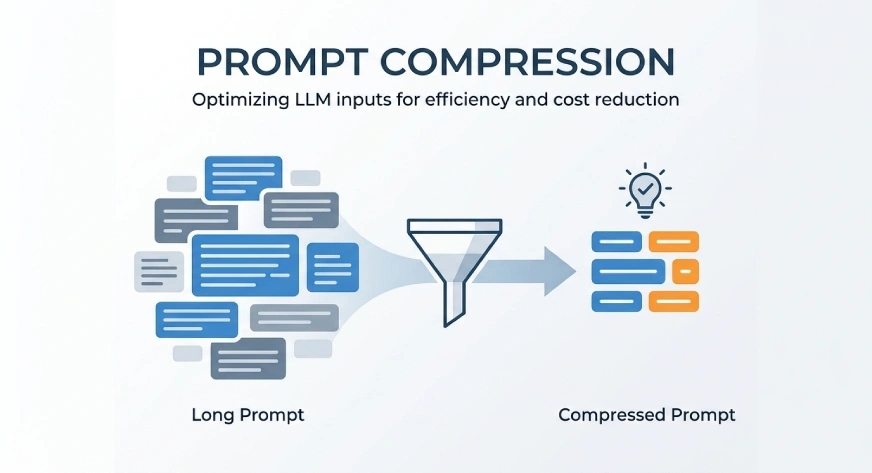
Large language models often receive more information than they need. A prompt may include long instructions, retrieved documents, chat history, examples, and tool descriptions. This increases token usage, cost, and response time. It can also make important details harder for the model to identify.
Prompt compression reduces the prompt while keeping the key meaning, instructions, and evidence. It helps the model focus on useful information and avoid unnecessary context. This is valuable in RAG systems, AI agents, customer support, document analysis, and long conversations. In this article, we will explore the main prompt compression techniques, how they work, and how to use them without reducing answer quality.
Table of Contents
- What is Prompt Compression?
- Types of Prompt Compression Techniques
- Prompt Compression in RAG Systems
- Prompt Compression for AI Agents
- How to Measure Prompt Compression
- Hands-On: Simple Prompt Compression in Python
- Practical Prompt Compression Workflow
- Advantages and Limitations of Prompt Compression
- Conclusion
- Frequently Asked Questions
What is Prompt Compression?
Prompt compression is the process of shortening a prompt without removing the information needed to complete the task. It removes repeated, irrelevant, or low-value content while keeping the main instructions, important facts, and useful context.
The goal is not to create the shortest possible prompt. The goal is to reduce tokens without reducing answer quality. A well-compressed prompt should still help the model understand the task, follow the instructions, and produce an accurate response.
Types of Prompt Compression Techniques
Prompt compression can be done in several ways. Some methods remove complete sentences or documents. Others shorten phrases, remove low-value tokens, or rewrite the full context as a summary.
The main techniques include:
1. Manual Prompt Rewriting
Manual prompt rewriting is the simplest compression technique. It removes repeated instructions, filler words, and unnecessary explanations.
For example:
You should carefully read the information given below and provide an answer based only on the available context.
Compressed version:
Answer using only the provided context.
This method works well for system prompts, reusable templates, evaluation prompts, and tool instructions. It is easy to apply and keeps the prompt readable. However, it requires manual effort and may not scale well for large or changing inputs.
2. Structural Compression
Structural compression changes long text into a compact format. It uses bullet points, tables, key-value pairs, JSON, or YAML.
For example:
The customer is on the Gold plan. They joined 18 months ago. Their monthly spending is $240. They contacted support five times last month.
Compressed version:
plan: Gold
tenure_months: 18
monthly_spend: 240
support_contacts_30d: 5
This method works well for customer records, claims, product details, and tool outputs. It reduces extra words while keeping important facts clear. However, field names should remain easy to understand.
3. Sentence-Level Filtering
Sentence-level filtering removes complete sentences that are not relevant to the task. It keeps only the sentences that help answer the user’s question.
For example, a retrieved document may contain ten sentences, but only three may be useful. The system can rank each sentence and keep the most relevant ones.
This technique is useful in RAG systems, reports, policies, and long conversations. It keeps the compressed text readable. However, removing too many sentences may also remove important supporting context.
4. Phrase-Level Compression
Phrase-level compression removes unnecessary words from a sentence while keeping its main meaning.
For example:
Due to the fact that the application was submitted after the deadline, it cannot be processed.
Compressed version:
The application was submitted after the deadline and cannot be processed.
This method removes filler words, repeated phrases, and long expressions. It keeps the text readable and reduces token usage. However, careless compression may remove important details or change the meaning of the sentence.
5. Token-Level Filtering
Token-level filtering removes individual words or tokens that carry little value. It keeps the terms that are most important for understanding the task.
For example:
The customer has a Gold membership and has contacted support five times during the last month.
Compressed version:
Customer Gold membership, five support contacts last month.
This method can reduce prompts more aggressively than sentence-level filtering. It is useful when working with very long contexts. However, it may make the text less readable. Important words such as “not,” “unless,” or “never” must be protected because removing them can completely change the meaning.
6. Extractive Compression
Extractive compression selects the most important parts of the original prompt. It keeps useful sentences, passages, examples, or facts without rewriting them.
For example, a long policy document may contain several sections. The system can extract only the clauses related to the user’s question.
This method is useful for RAG systems, document analysis, and policy-based applications. It reduces the risk of adding incorrect information because the selected text comes directly from the source. However, it may miss important details when the required information is spread across multiple sections.
7. Abstractive Compression
Abstractive compression rewrites long content into a shorter summary. It does not copy the original text directly. Instead, it keeps the main meaning in fewer words.
For example, a long conversation can be compressed into a short summary of the user’s problem, actions already taken, and the next required step.
This method is useful for chat history, reports, meeting notes, and long documents. It produces clear and readable text. However, the summarizing model may remove important details or add information that was not present in the original content.
8. Query-Aware Compression
Query-aware compression keeps information based on the user’s current question. It removes content that may be useful in general but is not relevant to the specific task.
For example, if a user asks about a product’s refund policy, the system keeps refund conditions, deadlines, and exceptions. It removes unrelated details about installation or maintenance.
This technique is highly useful in RAG systems and document question answering. It helps the model focus on the most relevant evidence. However, its quality depends on how accurately the system understands the user’s query.
9. Coarse-to-Fine Compression
Coarse-to-fine compression reduces a prompt in multiple stages. It first removes large irrelevant sections, such as documents or paragraphs. It then compresses the remaining content at the sentence, phrase, or token level.
For example, a RAG system may first remove unrelated documents. It can then select useful paragraphs and shorten them further.
This method gives better control over compression. It is also safer than removing tokens from the full prompt at once. However, it requires multiple processing steps and may increase system complexity.
10. Soft Prompt Compression
Soft prompt compression converts long text into a small set of learned vectors. These vectors represent the important information without using normal readable words.
This method can reduce context size significantly. It is useful in custom models and research systems where developers can access model embeddings or internal representations.
However, soft prompts are difficult to inspect and debug. They may also require model training and may not work easily with closed API models that only accept text input.
Prompt Compression in RAG Systems
Prompt compression is highly useful in Retrieval-Augmented Generation, or RAG. A RAG system retrieves documents and adds them to the prompt before generating an answer.
The retrieved content may contain repeated, outdated, or irrelevant information. Sending all of it increases token usage and can distract the model.
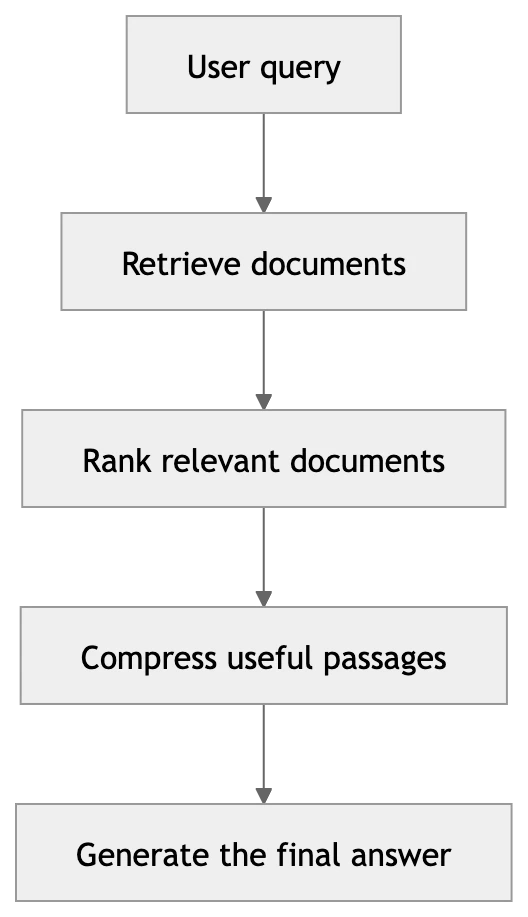
Compression can remove unrelated documents, select important paragraphs, and retain only the sentences that support the answer. This helps reduce cost and keeps the response focused. Source details should still be preserved when citations are required.
Prompt Compression for AI Agents
AI agents often build long prompts over time. They may include system instructions, tool descriptions, previous actions, tool outputs, errors, and conversation history.
Prompt compression helps agents keep only the information needed for the next step. Old tool outputs can be summarized, completed actions can be stored as short state updates, and repeated instructions can be removed.
For example:
Completed:
- Customer record retrieved
- Eligibility verified
- Email selected as the best channel

Pending:
- Generate the final message
This approach reduces token usage and prevents the agent’s context from growing continuously. However, important rules, safety instructions, decisions, and unresolved errors should never be removed.
How to Measure Prompt Compression
Prompt compression should not be measured by token reduction alone. A shorter prompt is useful only when the model still produces an accurate and complete response.
The main metrics include:
- Token reduction — the percentage decrease in prompt length after compression
- Compression ratio — the ratio of compressed tokens to original tokens
- Answer accuracy — whether the model’s response remains correct after compression
- Faithfulness — whether the compressed prompt preserves the facts and intent of the original
- Latency improvement — the reduction in response time resulting from a shorter prompt
Evaluating these metrics together gives a complete picture of whether a compression strategy is working effectively.
Hands-On: Simple Prompt Compression in Python
The following example demonstrates a basic sentence-level filtering approach using cosine similarity to retain only the sentences most relevant to a given query.
from sklearn.feature_extraction.text import TfidfVectorizer
from sklearn.metrics.pairwise import cosine_similarity
import numpy as np

def compress_prompt(document: str, query: str, top_k: int = 3) -> str:
    sentences = [s.strip() for s in document.split('.') if s.strip()]
    corpus = sentences + [query]
    vectorizer = TfidfVectorizer()
    tfidf_matrix = vectorizer.fit_transform(corpus)
    query_vector = tfidf_matrix[-1]
    sentence_vectors = tfidf_matrix[:-1]
    scores = cosine_similarity(query_vector, sentence_vectors).flatten()
    top_indices = np.argsort(scores)[::-1][:top_k]
    selected = [sentences[i] for i in sorted(top_indices)]
    return '. '.join(selected) + '.'

document = """
The company was founded in 2005. It operates in over 40 countries.
The refund policy allows returns within 30 days of purchase.
Items must be unused and in original packaging for a refund.
Customer support is available 24/7 via chat and email.
The annual revenue exceeded 2 billion dollars last year.
Late returns may be subject to a restocking fee.
"""

query = "What is the refund policy?"
compressed = compress_prompt(document, query, top_k=3)
print(compressed)
This approach is lightweight and requires no external LLM calls. For production systems, more advanced methods such as cross-encoder reranking or LLM-based summarization can improve selection quality further.
Practical Prompt Compression Workflow
A reliable compression workflow follows these steps:
- Identify the query or task — understand what the model needs to answer before deciding what to remove
- Segment the prompt — split the prompt into system instructions, retrieved context, chat history, and tool outputs
- Apply compression by segment — use different techniques for different parts; for example, summarize history and filter retrieved documents
- Protect critical content — never compress safety rules, key instructions, or unresolved errors
- Evaluate quality — test the compressed prompt against the original to confirm that answer accuracy is maintained
- Iterate — adjust compression aggressiveness based on evaluation results
Advantages and Limitations of Prompt Compression
Advantages:
- Reduces token usage and API cost
- Decreases response latency
- Helps the model focus on relevant information
- Enables longer effective context within fixed token limits
- Improves consistency in agent workflows by removing noise
Limitations:
- Aggressive compression can remove important details
- Abstractive methods may introduce hallucinated content
- Token-level filtering can reduce text readability
- Soft prompt methods are difficult to debug and may not work with closed APIs
- Compression quality depends on how well the system understands the query and content
Conclusion
Prompt compression is a practical technique for reducing token usage while maintaining the quality of model responses. The right approach depends on the use case, the type of content being compressed, and the acceptable trade-off between brevity and completeness. Techniques range from simple manual rewriting to query-aware filtering and multi-stage coarse-to-fine pipelines. Regardless of the method, compression should always be validated against answer quality metrics before being deployed in production systems.
Frequently Asked Questions
Q: Does prompt compression always reduce answer quality? Not necessarily. When applied carefully, compression removes only low-value content and can actually improve focus. The key is to evaluate accuracy before and after compression.
Q: Which compression technique works best for RAG? Query-aware compression and sentence-level filtering are both well-suited to RAG systems. Coarse-to-fine compression works well when dealing with large numbers of retrieved documents.
Q: Can prompt compression be applied to system prompts? Yes. Manual rewriting and structural compression are effective for system prompts. Redundant instructions and verbose explanations can usually be shortened without affecting model behavior.
Q: Is soft prompt compression practical for production use? Soft prompt compression is more common in research settings. It requires model-level access and is not straightforward to use with standard API-based deployments.