Grok Bot Automation: Build Bug and Churn Detection Bots
Grok Bot executes workflows autonomously using skills, routines, and plugins. This tutorial walks through building two practical automation bots step by step.

Last week, a GitHub notification arrived while I was asleep: a bug had been reproduced in staging, documented with screenshots, and assigned to the right engineer. A bot I set up four days earlier did the work overnight.
That is the gap Grok Bot is designed to close. Instead of suggesting what to do, it can execute the workflow itself. In this article, we build two practical bots: one for reproducing bugs and another for catching churn before renewal.
What is Grok Bot?
Grok Bot provides customized cloud computing machines for every agent. These computers can be used to browse the web and execute commands. The bot takes care of logging into your apps and completing your assignments. It is not just a text display.
The finished job is delivered to the appropriate place. xAI launched the first beta version of the product on August 11, 2026. Use the desktop or iOS client to access the program.
In order to understand how all of this works, three concepts need to be defined:
- Skills refer to the instructions used to complete a particular task.
- Routines are the events or schedules that trigger the bot to start working.
- Plugins refer to the approved connections to applications such as Slack, GitHub, users’ emails, etc.
Get that right and the bot runs itself. Get them wrong and you’ll babysit it forever.
What Does Grok Bot Cost?
There is no free Grok Bot plan. The free version of Grok allows for about ten queries every two hours. You will need a paid plan to access it. Here is what to be careful with in terms of pricing:
| Plan | Price | Notes |
|---|---|---|
| Cursor Pro+ | $60/month | Entry point, tightest allowance |
| Cursor Ultra | $200/month | Most common Grok Bot tier |
| Cursor Teams Standard | $40/seat/month | Shared billing and admin |
| Cursor Teams Premium | $120/seat/month | Higher allowance per seat |
| SuperGrok Plus | $100/month | Links to your Cursor account |
| SuperGrok Heavy | $300/month | Grok 4 Heavy, parallel compute |
This plan has changed pricing one time already, so check the plans page before subscribing. There is a 7-day free trial provided. You will have to provide your credit card but won’t be charged until the eighth day.
The subscription fee is the price per seat, which is not the same as the invoice price. The usage price is calculated based on a weekly limit; if you exceed it, you will have to pay token fees.
Setting Up Grok Bot: A Step-by-Step Walkthrough
The installation process is straightforward. There is no need for any configurations or commands.
- Locate the app in your application store or download it from the X platform. Any compatible platform will work; early versions were designed with compatibility as a priority.
- Log in using the account with a paid subscription. If you need to change the account later, you will need to rebuild your agents from scratch.
- Verify the plan and switch to the Grok Bot version if you are eligible. If you are a SuperGrok customer, you can continue using it.
- To set up the agent, give it a name, choose a color and type, and set the description. Follow the steps to connect it to plugins through settings.
Hands-on Task: Grok Bot on My Own Repo, Screen by Screen
I created an agent called Bug-Repro with the aim of building a bot that can reproduce bugs reported in a bug tracking system. Here’s what actually happened.
The agent initiated by saying: “Give me a bug and I would try to reproduce it.”
There is no way to give a direct reply to it in a useful way. A one-time request for assistance is not the same as a developed capability. That is why I used the first message as a full specification:
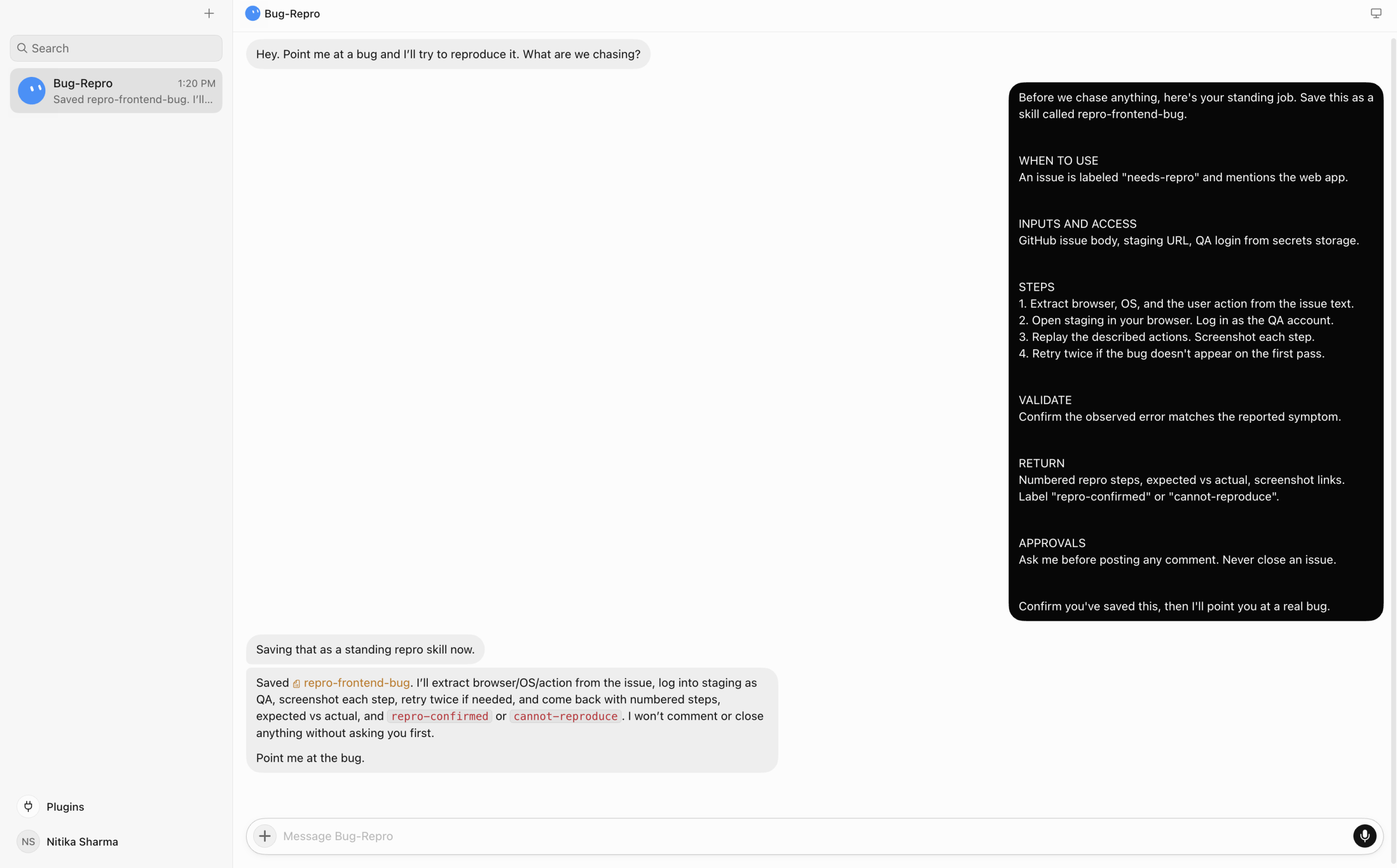
It ran through the entire contract, including the approvals clause. Those six headings correspond to the requirements of a skill as outlined in xAI’s documentation. Validation and approvals ensure that a bot does not make erroneous statements with too much confidence.
Step 2: Connect GitHub through Plugins
Search “github” under Plugins and hit Add.
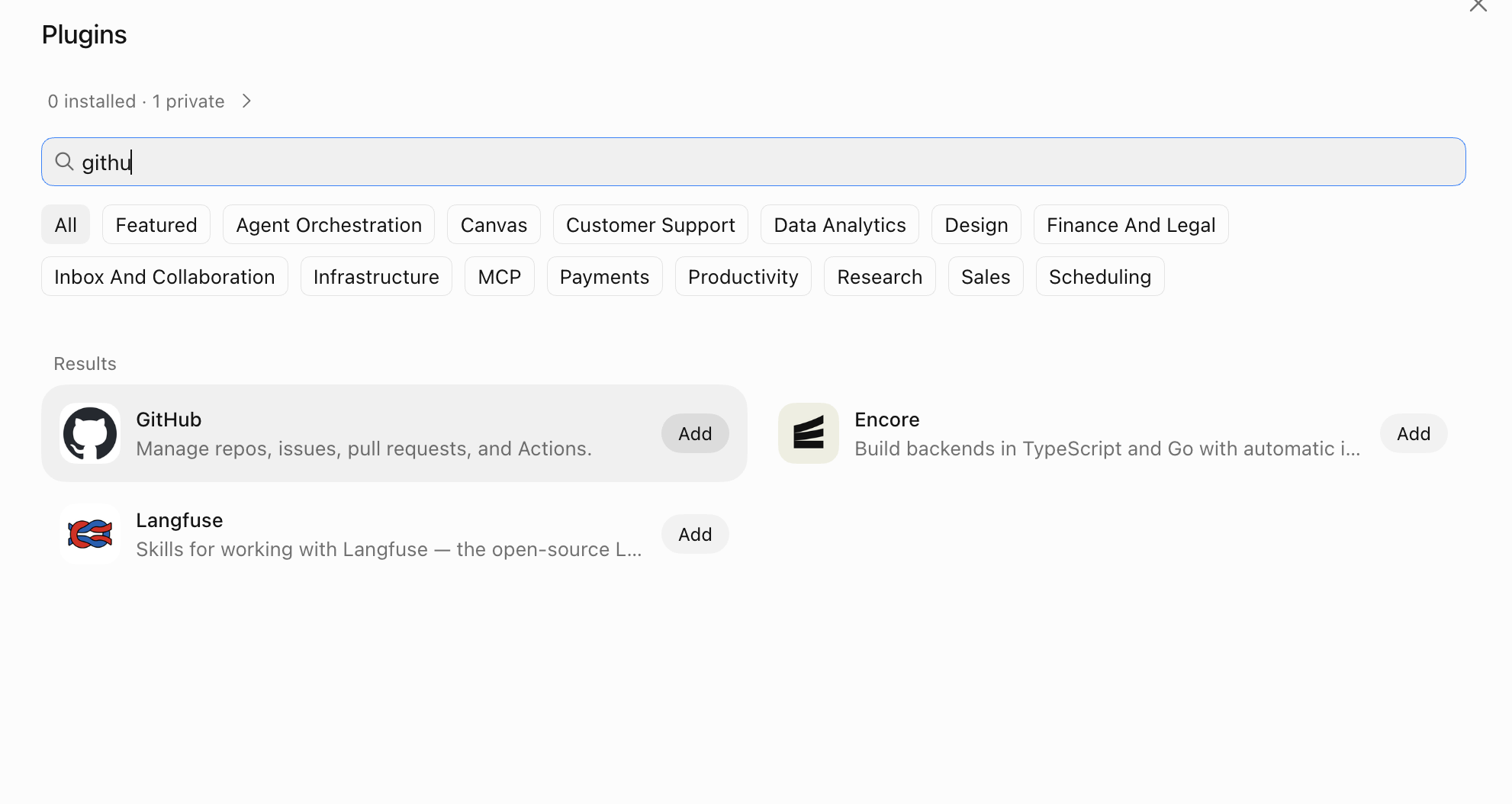
The connector then asks for a personal access token.
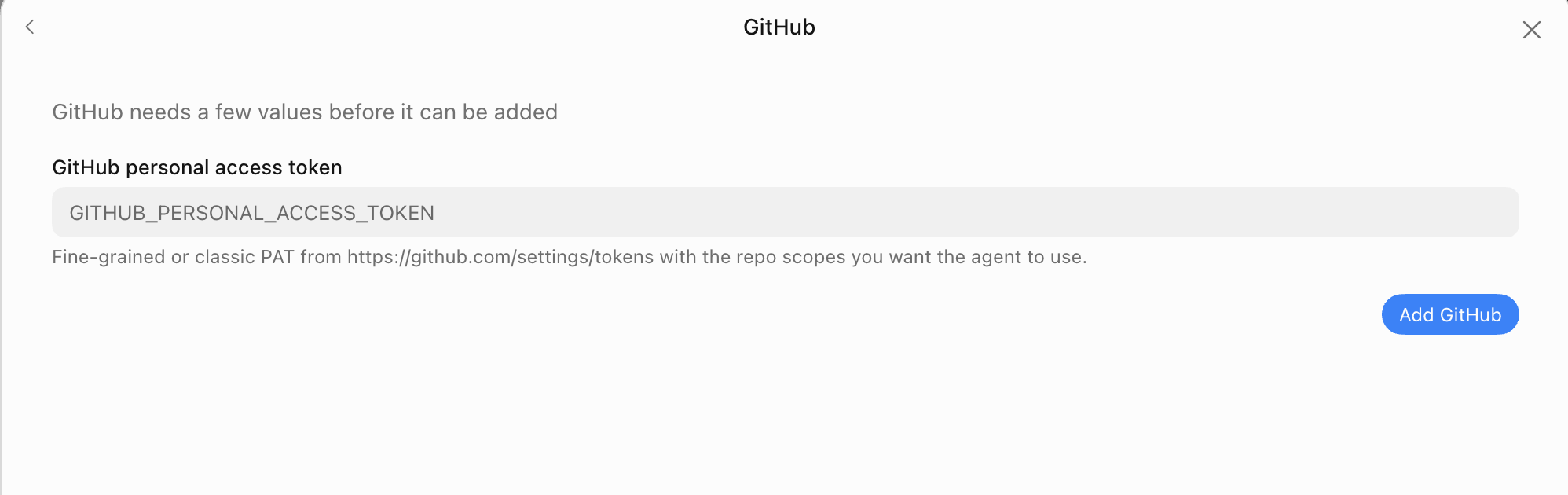
Insert the token in the field. It’s kept as a secret. Writing it into a chat is a mistake, as that message lives on a cloud server that every bot can access.
Keep your scope limited while testing:
Repository access: Only select repositories → your-org/your-repo

Permissions:
  Issues     → Read and write
  Metadata   → Read-only
Issues and metadata only — nothing else. The bot never needs access to your code to recreate UI errors.
Step 3: Scoping before reproduction
I’m not ready to report it as an issue just yet. My repository is for a multiplayer setup, so it doesn’t fit the usual assumptions. Many of the bugs need to be tested with two clients running at the same time.
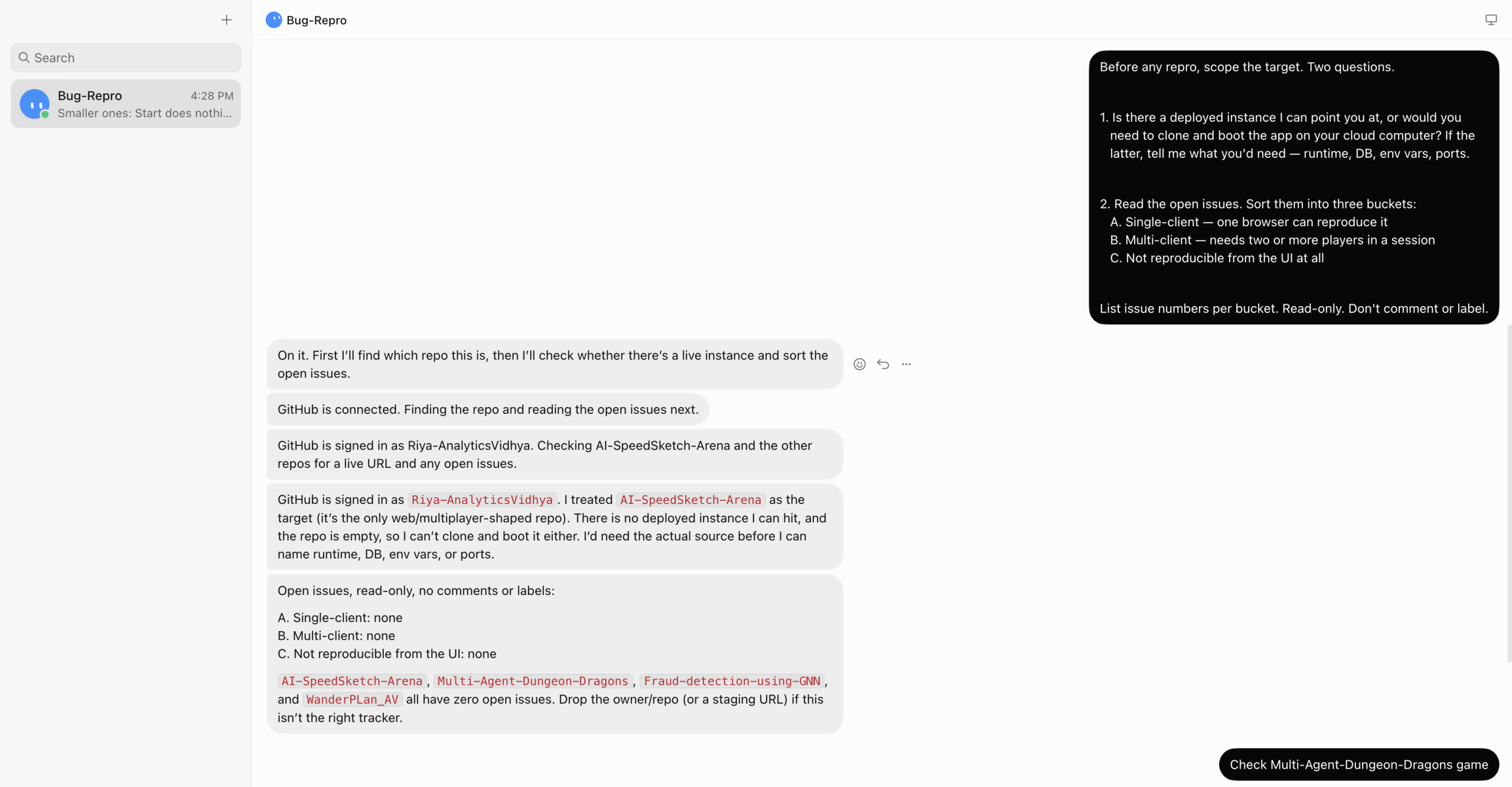
Good thing I asked. It guessed the wrong repo and found no deployed instance, then reported zero open issues across four repos.
Step 4: Point it at the right repo
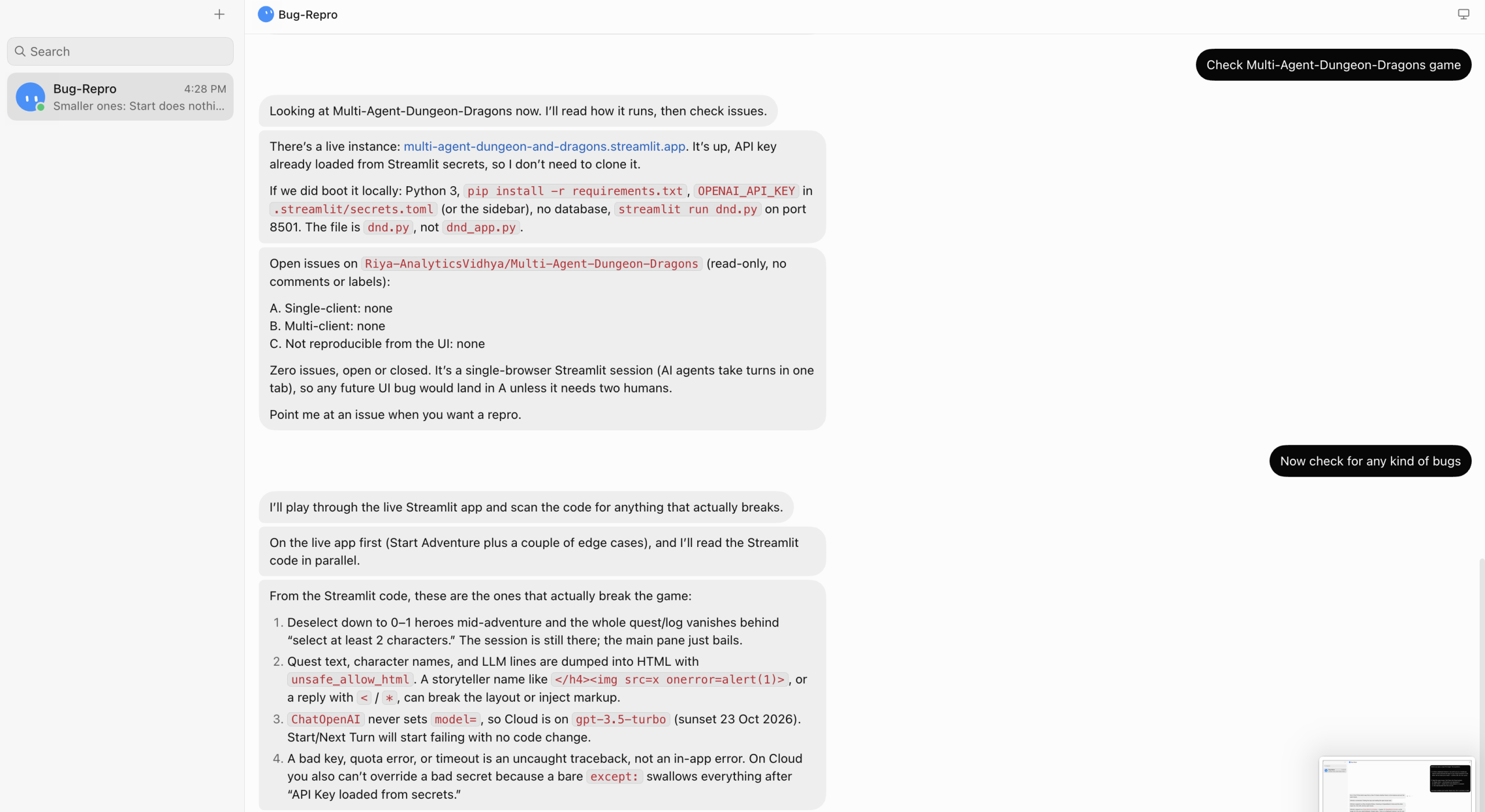
Once directed to the correct repository, the agent was able to locate the relevant issues and begin the reproduction workflow as intended.
Can Grok Bot Agents Hand Work to Each Other?
Yes. Agents can be chained so that the output of one becomes the trigger for another. For example, a churn-detection agent can flag an at-risk account and pass that context directly to a follow-up agent that drafts and sends a renewal email. This handoff happens through shared plugin connections and routine triggers configured in each agent’s settings. The key requirement is that both agents have access to the same data source — whether that is a CRM, a database, or a shared Slack channel.
What Trips People Up with Grok Bot
The most common mistakes fall into a few categories:
- Overly broad plugin permissions. Granting full repository access when read-only on issues is sufficient creates unnecessary risk. Scope permissions to the minimum required for the task.
- Vague skill definitions. A skill that says “handle bug reports” will produce inconsistent results. Skills need explicit steps, edge cases, and approval conditions spelled out.
- Skipping validation rules. Without validation, the bot will act on incomplete or malformed inputs and post confidently wrong outputs. Always define what a valid input looks like before the skill runs.
- Hardcoding secrets in chat. As noted above, tokens or credentials typed into the chat window are stored on shared infrastructure. Use the plugin secrets field instead.
- No routine scope. A routine that fires on every new issue without filtering will burn through your weekly token allowance quickly. Add conditions such as label, assignee, or repository filters to keep it targeted.
Conclusion
Grok Bot moves AI assistance from suggestion to execution. The setup is low-friction — no CLI commands, no infrastructure to manage — but the decisions you make in the first hour, particularly around skill definitions, plugin permissions, and validation rules, determine whether the bot runs reliably or requires constant supervision. Start with a single, well-scoped agent, verify its behavior on real inputs before enabling routines, and expand from there. The bug reproduction workflow described here is a practical first project that delivers measurable value with minimal risk.
Frequently Asked Questions
Q: Does Grok Bot work without a paid subscription? A: No. A paid plan is required. The free tier of Grok does not include Grok Bot access.
Q: Can I use Grok Bot on Android? A: At launch, Grok Bot is available on desktop and iOS. Android support was not included in the initial beta release.
Q: What happens if I exceed the weekly token limit? A: Usage beyond the weekly limit is billed at token rates on top of the subscription fee. Monitor usage in the account dashboard to avoid unexpected charges.
Q: Is my GitHub token stored securely? A: Tokens entered through the plugin secrets field are stored encrypted. Do not enter tokens directly in the chat interface.
Q: Can I transfer agents between accounts? A: No. Agents are tied to the account used at setup. Switching accounts requires rebuilding agents from scratch.