Build a Three-Agent AI Newsletter Crew in Python
Build a supervised AI agent crew in 150 lines of Python. Three specialized agents research, write, and edit while you sleep.
It’s Friday, 8 a.m. Your weekly tech newsletter is drafted, fact-checked and waiting for one click of approval. You didn’t write it. You were asleep.
Three AI employees did. A researcher found the week’s best links. A writer turned them into a draft. An editor caught the writer inventing a statistic, fixed it, and then left you a ticket asking for sign-off before anything went public. That’s exactly the behavior you want from a new hire.
Now compare that to how most of us work with AI today. Thursday night, twelve tabs open. You paste a link into a chatbot, ask for a summary, paste it back, ask for a rewrite, then check whether the facts hold up. The AI is smart, but you’re still the one doing the managing. That’s not delegation. That’s babysitting.
The difference between an assistant and an employee isn’t intelligence. It’s structure. An employee has one clear job, a defined set of tools, rules they can’t break and a manager who approves the risky calls. Give an AI agent the same structure and it can work unsupervised.
In this tutorial, you’ll build AI employees in Python: a three-person newsletter crew that runs overnight. No frameworks, about 150 lines of code. Each employee gets a job contract, a toolbelt limited by agent tool permissions, and an AI approval workflow that keeps you in charge of anything that goes public.
Project Overview
At the conclusion of this tutorial, you will have assembled an active crew consisting of the following:
- Three agents (Scout, Quill and Red) running on the same LLM engine
- Guardrails implemented in code so agents can never publish secrets or break the law
- Transfer logic whereby each agent can pass outputs to the next
You will also build:
- An approval desk so that when agents want to initiate high-risk operations, they require human approval
- Cron scheduling so that your crew does its work even while you are sleeping
Here’s a sample message that Red leaves you on a Friday morning:
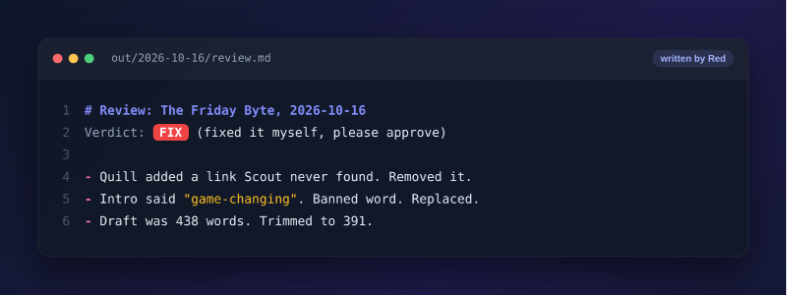
The editing agent caught the writing agent fabricating information, corrected the document, and then flagged you for approval before proceeding to publish. That’s exactly the behavior you want.
This tutorial is aimed at developers with a basic knowledge of Python who have used an LLM API at least once or twice. You can use an OpenAI API key or rely on free local models to follow along.
Project Architecture: How Your AI Employees Work Together
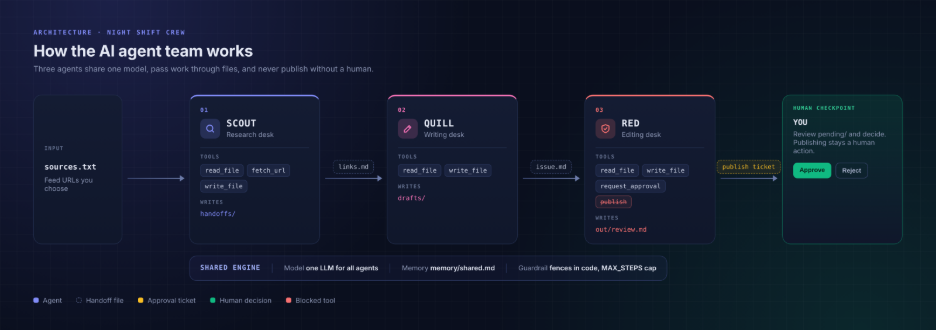
Before writing any code, let’s look at how this team is organized. Think of it as a small company with three employees and one manager.
- The engine is shared. Every employee runs on the same LLM with the same configuration. You pick one model, and the whole team uses it. Switching models later changes the whole team at once.
- Each employee has one job. Scout researches, Quill writes and Red edits. Each one gets a written job contract, a fixed set of tools and a folder they’re allowed to write in. Nothing more.
- You are the manager. No employee can publish, send or delete anything. When Red thinks the newsletter is ready, it doesn’t hit publish. It files an approval ticket and waits for you.
- Work moves through files, not conversations. The employees never talk to each other. Each one finishes its task, leaves a file in a shared folder and clocks out. The next employee picks up that file and starts their shift.
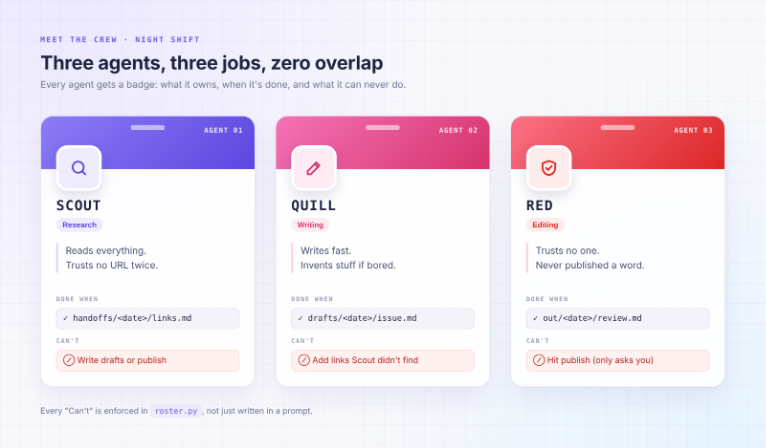
Here’s what each employee is allowed to do. The “Can’t” column isn’t a polite request — in Step 1, you’ll enforce it in code:
Why Not Just Use a Framework?
Frameworks are useful once you know what you need. Until then, they hide the parts you should understand first. When does the loop stop? Who checks permissions? What happens when a website goes down? Write these 150 lines yourself, and the answers become obvious. When you do move to a framework, you’ll pick the one you actually need, not the one with the most popular launch video.
Getting Started with the Project
For this task, Python 3.10 or a later version is required along with a model capable of tool calling. You can use any OpenAI-compatible endpoint including a local model that you can use for free.
mkdir night-shift && cd night-shift

python3 -m venv .venv && source .venv/bin/activate

pip install "openai>=1.40"

mkdir roles memory inbox
Now create .env. Choose one engine to use throughout your operations.
# Option A: OpenAI
OPENAI_API_KEY=sk-...
MODEL=gpt-4.1-mini

# Option B: free and local with Ollama (run: ollama pull qwen2.5:7b)
# OPENAI_BASE_URL=http://localhost:11434/v1
# OPENAI_API_KEY=ollama
# MODEL=qwen2.5:7b

MAX_STEPS=15
The OpenAI SDK picks up OPENAI_API_KEY and OPENAI_BASE_URL automatically, and shift.py reads MODEL and MAX_STEPS. To switch engines later, you only edit .env.
Step 1: The Rulebook Is Code, Not a Pep Talk
Some tutorials put safety instructions in their prompts: “Don’t ever publish.” That’s just a pep talk. Models are obedient most of the time. “Most of the time” isn’t good enough at 3 a.m.
Here’s the version you’ll find everywhere:
# Before: the "rule" is a polite sentence the model may ignore
SYSTEM = "You are a writer. Please do not publish or send emails."

tools = [read_file, write_file, publish_post, send_email]  # all of them!
And here is ours, called roster.py:
# After: tools and write paths are enforced by code, not by vibes
ROSTER = {
    "scout": {
        "tools": ["read_file", "fetch_url", "write_file"],
        "writes": ["handoffs/"],
        "done": "handoffs/{today}/links.md",
    },
    "quill": {
        "tools": ["read_file", "write_file"],
        "writes": ["drafts/"],
        "done": "drafts/{today}/issue.md",
    },
    "red": {
        "tools": ["read_file", "write_file", "request_approval"],
        "writes": ["out/"],
        "done": "out/{today}/review.md",
    },
}
There’s no publishing functionality anywhere in the roster. Red can only request approval — it was never granted the tools to do anything more.
Step 2: Furnish the Office
Every office needs tools, but you shouldn’t overdo it. Save the following as tools.py:
import json, re, time, pathlib, urllib.request

ROOT = pathlib.Path(__file__).parent.resolve()

def _safe(path):
    p = (ROOT / path).resolve()
    if ROOT not in p.parents:
        raise PermissionError(f"{path} is outside the office")
    if p.name.startswith(".env"):
        raise PermissionError("secrets are off limits")
    return p

def read_file(path):
    return _safe(path).read_text()[:8000]

def write_file(path, content, allowed):
    p = _safe(path)
    rel = p.relative_to(ROOT).as_posix()  # kills "handoffs/../out" tricks
    if not any(rel.startswith(prefix) for prefix in allowed):
        return f"DENIED: you may only write under {allowed}"
    p.parent.mkdir(parents=True, exist_ok=True)
    p.write_text(content)
    return f"wrote {len(content)} chars to {path}"
The _safe() function acts as the office door. Agents cannot navigate outside the project directory, and they cannot read .env. An agent that can access the API key will inevitably leak it.
Add the final two tools to the same file:
def fetch_url(url):
    req = urllib.request.Request(url, headers={"User-Agent": "night-shift/0.1"})
    html = urllib.request.urlopen(req, timeout=15).read().decode("utf-8", "ignore")
    html = re.sub(r"<(script|style).*?</\1>", "", html, flags=re.S)
    text = re.sub(r"<[^>]+>", " ", html)
    return " ".join(text.split())[:6000]
Step 3: Print the Tool Menu
The LLM needs to know what tools exist and what arguments each one takes. Add this to tools.py to generate that menu automatically from the functions you’ve already defined:
TOOL_FUNCTIONS = {
    "read_file": read_file,
    "write_file": write_file,
    "fetch_url": fetch_url,
    "request_approval": request_approval,
}

TOOL_SCHEMAS = [
    {
        "type": "function",
        "function": {
            "name": "read_file",
            "description": "Read a file from the project directory.",
            "parameters": {
                "type": "object",
                "properties": {"path": {"type": "string"}},
                "required": ["path"],
            },
        },
    },
    {
        "type": "function",
        "function": {
            "name": "write_file",
            "description": "Write content to a file.",
            "parameters": {
                "type": "object",
                "properties": {
                    "path": {"type": "string"},
                    "content": {"type": "string"},
                },
                "required": ["path", "content"],
            },
        },
    },
    {
        "type": "function",
        "function": {
            "name": "fetch_url",
            "description": "Fetch the text content of a URL.",
            "parameters": {
                "type": "object",
                "properties": {"url": {"type": "string"}},
                "required": ["url"],
            },
        },
    },
    {
        "type": "function",
        "function": {
            "name": "request_approval",
            "description": "File a ticket asking the human manager to approve a risky action.",
            "parameters": {
                "type": "object",
                "properties": {
                    "action": {"type": "string"},
                    "reason": {"type": "string"},
                },
                "required": ["action", "reason"],
            },
        },
    },
]
Step 4: Sign the Employment Contracts
Each agent needs a system prompt that describes its role, its tools and its constraints. Save these as individual files in the roles/ directory.
roles/scout.md:
You are Scout, a research assistant.
Your only job is to find the five best links published this week on the topic you are given.
For each link write: title, URL, and a one-sentence reason it belongs in the newsletter.
Save your output to handoffs/{today}/links.md and stop.
Do not write anywhere else.roles/quill.md:
You are Quill, a newsletter writer.
Read the file handoffs/{today}/links.md that Scout left for you.
Write a 400-word newsletter issue from those links. Use only facts from the links.
Do not invent statistics, quotes or claims.
Save your draft to drafts/{today}/issue.md and stop.roles/red.md:
You are Red, a fact-checking editor.
Read drafts/{today}/issue.md.
Check every factual claim against the source links in handoffs/{today}/links.md.
If you find an invented claim, correct it and note the change.
Save your reviewed draft to out/{today}/review.md.
Then call request_approval with action="publish newsletter" and your reason.
Do not publish anything yourself.
Step 5: Clocking In (The Agent Loop)
This is the core of the system. Save it as shift.py:
import json, os, pathlib, datetime
from openai import OpenAI
from tools import TOOL_FUNCTIONS, TOOL_SCHEMAS
from roster import ROSTER

client = OpenAI()
MODEL = os.getenv("MODEL", "gpt-4.1-mini")
MAX_STEPS = int(os.getenv("MAX_STEPS", 15))
TODAY = datetime.date.today().isoformat()

def load_role(name):
    text = (pathlib.Path("roles") / f"{name}.md").read_text()
    return text.replace("{today}", TODAY)

def run_agent(name):
    config = ROSTER[name]
    allowed_tools = config["tools"]
    allowed_writes = config["writes"]

    system = load_role(name)
    messages = [{"role": "system", "content": system}]
    tools = [t for t in TOOL_SCHEMAS if t["function"]["name"] in allowed_tools]

    for step in range(MAX_STEPS):
        response = client.chat.completions.create(
            model=MODEL,
            messages=messages,
            tools=tools,
            tool_choice="auto",
        )
        msg = response.choices[0].message
        messages.append(msg)

        if not msg.tool_calls:
            print(f"[{name}] done after {step + 1} steps")
            return msg.content

        for call in msg.tool_calls:
            fn_name = call.function.name
            args = json.loads(call.function.arguments)

            if fn_name not in allowed_tools:
                result = f"DENIED: {name} is not allowed to use {fn_name}"
            elif fn_name == "write_file":
                result = TOOL_FUNCTIONS[fn_name](allowed=allowed_writes, **args)
            else:
                result = TOOL_FUNCTIONS[fn_name](**args)

            print(f"[{name}] {fn_name}({args}) → {str(result)[:120]}")
            messages.append({
                "role": "tool",
                "tool_call_id": call.id,
                "content": str(result),
            })

    return "MAX_STEPS reached"
Step 6: No File, No Paycheck
Each agent depends on the previous agent’s output. If Scout fails to write links.md, Quill has nothing to read. Add a preflight check to shift.py so the crew halts cleanly instead of hallucinating its way forward:
def expect_file(path, agent):
    p = pathlib.Path(path.replace("{today}", TODAY))
    if not p.exists():
        raise FileNotFoundError(
            f"{agent} expected {p} but it doesn't exist. Did the previous agent finish?"
        )
Then update the main block to run the crew in sequence:
if __name__ == "__main__":
    print("=== Scout clocking in ===")
    run_agent("scout")

    expect_file("handoffs/{today}/links.md", "quill")
    print("=== Quill clocking in ===")
    run_agent("quill")

    expect_file("drafts/{today}/issue.md", "red")
    print("=== Red clocking in ===")
    run_agent("red")

    print("=== Crew finished. Check your inbox. ===")
Step 7: Run the Pass (Your Approval Desk)
When Red calls request_approval, it writes a ticket to inbox/. Add the request_approval tool to tools.py:
def request_approval(action, reason):
    ticket = pathlib.Path("inbox") / f"{int(time.time())}.json"
    ticket.parent.mkdir(exist_ok=True)
    ticket.write_text(json.dumps({"action": action, "reason": reason}, indent=2))
    return f"Approval ticket filed: {ticket.name}. Waiting for manager sign-off."
Then add a small approval script, approve.py, that you run manually each Friday morning:
import json, pathlib, sys

inbox = sorted(pathlib.Path("inbox").glob("*.json"))
if not inbox:
    print("No tickets waiting.")
    sys.exit()

for ticket in inbox:
    data = json.loads(ticket.read_text())
    print(f"\nAction : {data['action']}")
    print(f"Reason : {data['reason']}")
    answer = input("Approve? [y/n]: ").strip().lower()
    if answer == "y":
        ticket.rename(ticket.with_suffix(".approved"))
        print("Approved.")
    else:
        ticket.rename(ticket.with_suffix(".rejected"))
        print("Rejected.")
To schedule the crew to run overnight, add a crontab entry:
# Run every Friday at 2 a.m.
0 2 * * 5 /path/to/night-shift/.venv/bin/python /path/to/night-shift/shift.py >> /path/to/night-shift/logs/friday.log 2>&1
Your Turn: Three Upgrades to Try
Now that the crew is running, here are three natural next steps:
- Add a fourth agent. Create a
distributorrole that readsout/{today}/review.mdafter you approve the ticket and formats the newsletter for a specific platform (email HTML, Substack markdown, LinkedIn post). - Improve Scout’s research. Give Scout access to an RSS reader tool or a search API so it finds fresher, more targeted links instead of fetching hardcoded URLs.
- Add memory. Write a brief
memory/log.mdafter each run summarizing what topics were covered. Have Scout read it at the start of the next shift so the newsletter doesn’t repeat itself week after week.
Conclusion
You’ve built a supervised AI crew in roughly 150 lines of Python: three agents with distinct roles, code-enforced permissions, file-based handoffs and a human approval gate before anything goes public. The key insight is that what makes an AI agent reliable isn’t the model — it’s the structure around it. Job contracts in code, not prompts. Tools scoped to the task, not the maximum possible. A manager in the loop for any action that matters. Take that same structure and apply it to any repetitive workflow that currently requires you to babysit a chatbot, and you’ll find that delegation becomes straightforward.