Building a Human-in-the-Loop AI Refund Agent with LangGraph
Learn how to build a LangGraph refund agent that pauses for human approval before executing financial actions using interrupt() checkpoints.

Autonomous AI agents can read requests, retrieve data, reason through options, and trigger actions in seconds. That speed is useful, but it also creates risk when the next step affects money, customer records, or external systems.
Human-in-the-loop checkpoints add control at the moment an agent’s recommendation is about to become a real-world action. In this article, we’ll build a LangGraph refund agent that investigates a request, proposes a refund, pauses for human approval, and only executes the action after review.
What Is a Human-in-the-Loop Checkpoint?
A human-in-the-loop checkpoint is a deliberate pause inside an AI workflow before the agent performs an action that could have meaningful consequences.
The agent can continue working autonomously up to that point. It may understand the request, retrieve information, call tools, and prepare a recommendation. But before executing a sensitive action, the workflow stops and asks a person to review the proposal.
A useful review step should clearly show:
- What the agent wants to do
- Why it chose that action
- What information supports the decision
- What will happen if the action is approved
The timing of the checkpoint is critical.
If an agent sends an email, updates a customer account, or issues a refund and asks for approval afterward, the review is no longer useful.
The checkpoint must happen before execution.
In LangGraph, this can be implemented using interrupt(). The graph pauses at that point, stores its state through a checkpointer, and waits for an external decision before continuing.
Conceptually:
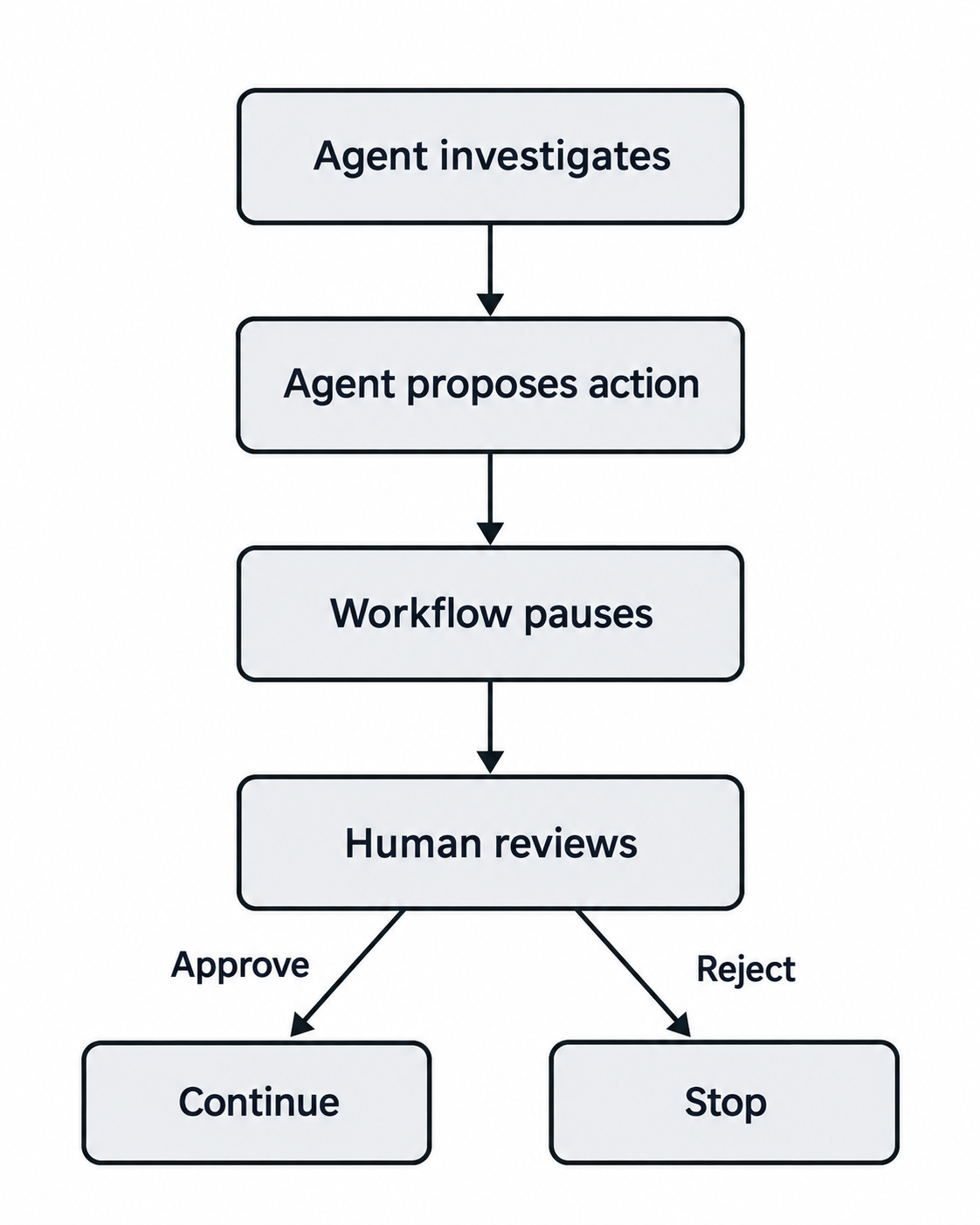
This separates two important responsibilities. The agent decides what it recommends. The application controls whether that recommendation is allowed to become a real-world action.
When Should an Agent Ask for Approval?
Not every action performed by an AI agent needs human approval.
If an agent is only reading information, searching a knowledge base, or preparing a draft, human intervention may add unnecessary friction. But once the agent is about to change data, contact a customer, move money, or perform another consequential action, a review step becomes valuable.
A simple way to think about it is to separate low-risk actions from actions that affect the outside world.
| Agent action | Example | Possible checkpoint |
|---|---|---|
| Read information | Search a knowledge base | Usually no approval |
| Retrieve data | Check an order status | Usually no approval |
| Prepare content | Draft a customer response | Review before sending |
| Change a record | Update customer information | Approval based on impact |
| Financial action | Issue a refund | Approval before execution |
| Destructive action | Delete data | Approval before execution |
For our refund agent, retrieving an order is a read-only action, so the agent can do it autonomously.
Issuing the refund is different because it changes a financial state. That is where we place the human checkpoint.
The basic principle is:
- Low-risk action → Agent can continue
- High-impact action → Human review before execution
Each organization should define these boundaries based on its own policies, risk tolerance, and the consequences of an incorrect action.
How the Refund Agent Workflow Works
Before writing the code, let’s understand how the complete refund workflow operates.
The process has four main stages: Prepare, Review, Decide, and Act.
1. Prepare
The customer sends a refund request in natural language. The LLM agent reads the request and determines whether additional information is required. If an order ID is available, the agent calls the get_order tool to retrieve verified details such as the product, amount, delivery status, and refund status. Using the customer request and the retrieved order information, the agent prepares a structured refund proposal.
2. Review
The proposal is passed to a human approval checkpoint.
Instead of immediately executing the refund, LangGraph pauses the workflow using interrupt().
The reviewer can inspect the proposed refund amount, order ID, and the reason provided by the agent.
3. Decide
The reviewer approves or rejects the proposal. If the request is approved, the workflow continues to the refund execution step. If it is rejected, the workflow ends without calling the refund tool.
4. Act
Only an approved request reaches the issue_refund tool. The tool performs the mock refund and returns the result. This separation is important: the LLM is responsible for investigation and reasoning, while the application and human reviewer control whether a consequential action is executed.
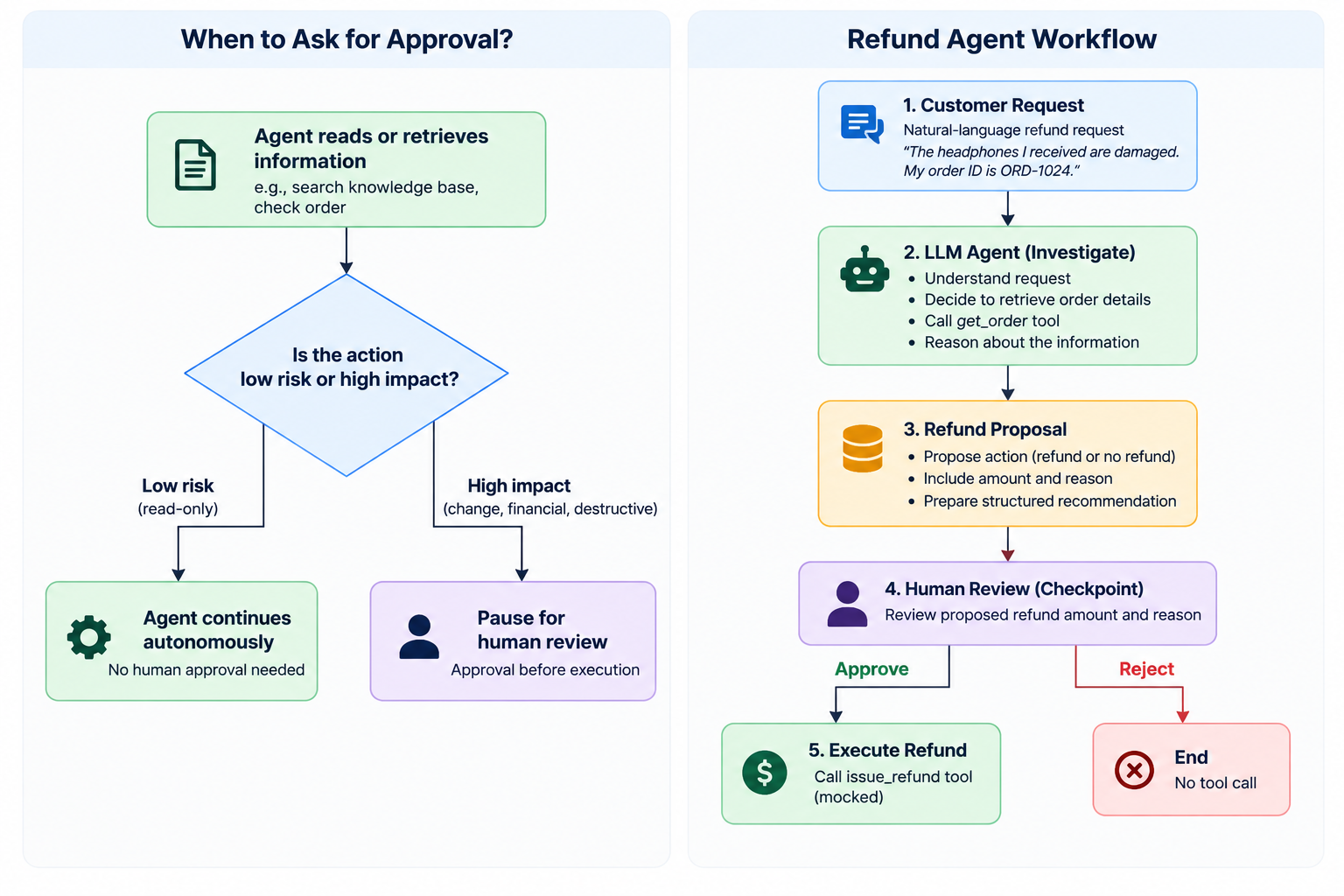
This architecture allows the agent to work autonomously during investigation while placing human oversight exactly where the workflow begins to affect the outside world.
Prerequisites
Before building the refund agent, make sure you have the following:
- Python 3.10 or later
- An OpenAI API key
- Basic familiarity with Python
- Basic understanding of LLM agents and tool calling
Install the required libraries:
pip install -U langchain langgraph langchain-openai pydanticWe’ll use:
langchainto define tools and create the agentlangchain-openaito connect the agent to an OpenAI modellanggraphto orchestrate the workflow and pause it for human approvalpydanticto define the structured refund proposal
Set your OpenAI API key before running the code.
On macOS or Linux:
export OPENAI_API_KEY="your-api-key"On Windows PowerShell:
$env:OPENAI_API_KEY="your-api-key"Once the environment is ready, we can start by creating the mock order data that our agent will inspect.
1: Create Mock Order Data
We’ll begin with a small in-memory order store, so the agent has something to inspect.
ORDERS = {
    "ORD-1024": {
        "product": "Wireless Headphones",
        "amount": 79.99,
        "status": "delivered",
        "refunded": False
    },
2: Create the Order Lookup Tool
The order lookup tool gives the agent a way to retrieve verified order information by ID. This is a read-only operation, so no human approval is needed at this step.
3: Define the Refund Proposal Structure
Using Pydantic, define a structured schema for the refund proposal. This ensures the agent’s output is consistent and machine-readable before it reaches the approval checkpoint.
4: Create the LLM and Build the Refund Agent
Initialize the OpenAI model and bind the order lookup tool to the agent. The agent uses this tool during its investigation phase before generating a proposal.
5: Run the Agent Investigation
Invoke the agent with the customer’s refund request. The agent retrieves relevant order details and prepares its reasoning for the proposal.
6: Convert the Investigation into a Structured Refund Proposal
Parse the agent’s output into the Pydantic refund proposal schema. This structured object is what the human reviewer will inspect at the checkpoint.
7: Create the Refund Tool
Define the issue_refund tool that performs the actual refund operation. This tool is only called after human approval is granted.
8: Define the LangGraph State
Define a typed state object that the LangGraph workflow will carry between nodes. This state holds the customer request, the refund proposal, and the approval decision.
9: Create the Agent Node
Create the investigation node that runs the agent, retrieves order data, and writes the structured refund proposal into the workflow state.
10: Add the Human Approval Checkpoint
Insert the interrupt() call at the approval node. When the workflow reaches this node, it pauses and surfaces the refund proposal to a human reviewer. The graph state is persisted by the checkpointer until a decision is received.
11: Route the Approval Decision
Add a conditional routing function that reads the approval decision from state and directs the workflow to either the refund execution node or the rejection node.
12: Create the Refund Execution and Rejection Nodes
Define two outcome nodes. The execution node calls issue_refund and records the result. The rejection node logs that the request was declined and ends the workflow without taking any financial action.
13: Build the Complete LangGraph Workflow
Assemble the nodes and edges into a complete graph. Connect the investigation node to the approval checkpoint, the checkpoint to the routing function, and the routing function to the execution and rejection nodes.
14: Add a Checkpointer and Compile the Graph
Attach a checkpointer to the graph so that workflow state is preserved across the pause. Compile the graph to produce a runnable workflow.
15: Run the Workflow and Pause for Approval
Invoke the compiled workflow with a customer refund request and a thread ID. The workflow runs through investigation, generates a proposal, and then pauses at the interrupt() checkpoint, waiting for a human decision.
16: Resume the Workflow After Human Review
After the reviewer inspects the proposal, resume the workflow by passing the approval decision back into the graph using the same thread ID. LangGraph restores the saved state and continues from the checkpoint.
17: Test the Workflow End to End
Run the complete workflow with both an approval and a rejection to verify that the routing logic and outcome nodes behave correctly in each case.
18: Move the Workflow Toward Production
To move from a notebook prototype toward production, consider the following:
- Replace the in-memory checkpointer with a persistent store such as a database-backed checkpointer so that state survives restarts
- Surface the refund proposal through a review interface rather than a console prompt, so human reviewers can act without touching code
- Add logging at each node to create an audit trail of every proposal, decision, and outcome
- Define escalation rules for edge cases such as high refund amounts or repeat requests that may warrant additional review
Conclusion
Human-in-the-loop checkpoints allow autonomous AI agents to operate at full speed during investigation and reasoning while keeping humans in control of consequential actions. By using LangGraph’s interrupt() mechanism, you can pause a workflow at precisely the right moment, persist its state, collect a human decision, and resume execution — all within a structured and auditable graph. The refund agent built in this article demonstrates how to apply this pattern to a financial use case, and the same approach can be adapted to any workflow where an AI recommendation should require explicit human approval before becoming a real-world action.
Frequently Asked Questions
Q: Can the agent still be useful if every action requires human approval? Yes, but the value comes from reducing how much work the reviewer has to do. The agent handles investigation, data retrieval, and proposal generation. The reviewer only needs to confirm or reject a well-structured summary.
Q: What happens to the workflow state while it is paused? LangGraph persists the state through the checkpointer. The workflow can remain paused for seconds or hours without losing context. When the decision arrives, the graph resumes from the exact point it stopped.
Q: How do I connect the approval step to a real review interface?
The interrupt() call pauses the graph and returns the proposal to the calling application. Your application can then display this proposal in a web UI, a Slack message, or an email. The workflow resumes when the application sends back the decision using the thread ID.
Q: Can multiple agents share the same human approval checkpoint? Yes. If several agents write proposals into a shared queue, a single reviewer interface can surface them one at a time. Each graph instance uses its own thread ID, so decisions are routed back to the correct workflow.