Tool Calling vs. Code Execution for AI Agents
Learn how tool calling and code execution differ as agent action primitives, and when to choose each based on cost, latency, and accuracy.
In this article, you will learn what tool calling and code execution are as agent action primitives, how they differ mechanically, and when to choose one over the other.
Topics covered include:
- How tool calling works under the hood, and why it remains the right choice for single, time-sensitive lookups.
- How code execution via Programmatic Tool Calling differs from standard tool calling, and what measurable benefits it offers for fan-out and aggregation tasks.
- A practical decision framework for choosing between the two primitives based on call count, data sensitivity, latency, infrastructure, and auditability needs.
Picture an agent asking one simple-sounding question: which of twenty employees went over their Q3 travel budget. To answer it, the agent needs each person’s expense line items, every flight, hotel, and meal receipt, compared against a budget limit tied to their level. Built the obvious way — with the model calling a tool for each person’s expenses one at a time — that’s twenty separate tool calls, each returning fifty to a hundred line items, and every single one of those items has to pass through the model’s context just so it can be added up. That’s over 2,000 line items and more than 50KB of raw data the model never actually needed to read — it needed a sum.
That’s the real cost hiding behind a design decision most agent tutorials skip past entirely: how does an agent actually take action in the world. There are two real answers, tool calling and code execution, and which one you reach for isn’t a style preference — it’s an architectural choice with measurable consequences for cost, latency, and accuracy. This article breaks down both action primitives for AI agents in detail, builds a real, runnable example of each using the same underlying tool, and closes with an honest, numbers-backed framework for choosing between them. If you haven’t built a basic tool-calling agent yet, Easy Agentic Tool Calling with Gemma 4 is the natural place to start before this one.
What Is an Action Primitive, and Why Does the Choice Matter?
An action primitive is the fundamental mechanism by which a language model turns a decision into a real effect in the world — a database write, an API call, a file read. Every agent framework, whatever else it does, is built on top of one of these primitives at its core.
Tool calling is the primitive most people learn first: the model produces one structured request at a time, a host application executes it, and the result comes back into the conversation before the model decides what to do next. Code execution is the newer alternative: instead of requesting one action and waiting, the model writes an actual program — in Python or TypeScript — that performs several actions in sequence or in parallel, and only the program’s final output returns to the model.
Neither one is a wrapper around the other, and neither has quietly replaced the other. They’re genuinely different mechanisms with different failure modes, different infrastructure requirements, and different cost profiles, and the rest of this article is about understanding both well enough to pick correctly.
Tool Calling
It’s worth understanding what’s actually happening underneath a tool call, because the mechanics explain both its strengths and its real limitations. According to Cloudflare’s detailed breakdown of the process, a model generating a tool call doesn’t produce ordinary text. It’s been specifically trained to output a pair of special tokens — one signaling “the following is a tool call” and another marking its end — with a JSON payload describing the tool name and arguments sitting between them. The application running the model watches for those tokens, pauses generation the moment it sees the closing one, parses the JSON against a schema you defined, actually executes the call, and feeds the result back into the conversation as though it were the next thing the user said.
That’s a clean, auditable, one-step-at-a-time loop, and it’s exactly why tool calling became the default. Every action is a discrete, loggable event. Every result is something the model directly sees and can reason about in natural language before deciding what happens next.
Code Execution
Code execution takes a different starting position entirely: instead of asking the model to describe an action in a constrained JSON format, you let it write actual code that performs the action, running in a sandboxed environment separate from the model itself. Anthropic’s original code-execution-with-MCP pattern frames this precisely as presenting your tools as a code API rather than a set of directly callable functions, so the model can write a script that imports exactly the tools it needs and calls them the way it would call any other function.
The mechanism that makes this genuinely different — not just a relabeled tool call — is what Anthropic now calls Programmatic Tool Calling, released alongside two companion features in November 2025. Rather than each tool result flowing back through the model one at a time, you mark specific tools as callable from code by adding an allowed_callers field to their definition, and add a code_execution tool to the request. When the model wants to act, it writes a full script — loops, conditionals, error handling, and all — that calls those tools directly inside a sandboxed execution environment. Each individual tool call the script makes still executes exactly the way it would in ordinary tool calling; you still receive a request and return a result, but that result is intercepted and processed by the running script rather than being pushed into the model’s context. Only when the script finishes does its final output — and nothing else — return to the model.
That’s the entire difference in one sentence: tool calling puts every intermediate result in front of the model; code execution lets the model decide, through the code it writes, exactly what makes it back.
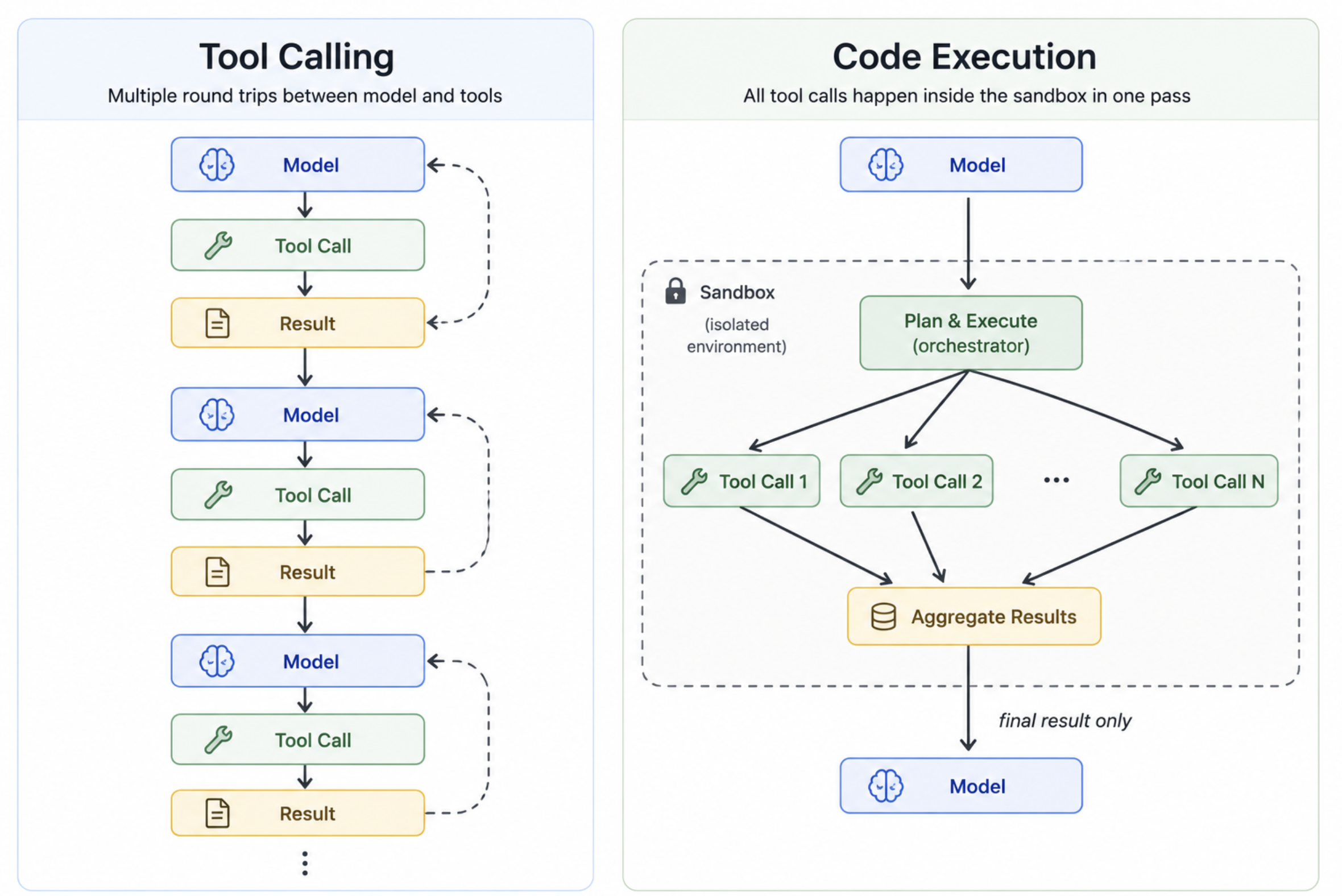
A side-by-side flow diagram of Tool Calling and Code Execution (click to enlarge)
Tool Calling for a Single, Time-Sensitive Lookup
Theory is easier to trust once it’s running against a real API, so both examples in this article use the same tool — a get_weather function backed by Open-Meteo, a free weather API that needs no API key at all, only an Anthropic API key to run the agent itself.
Start with the case tool calling is obviously right for: a single question that needs one lookup and a natural-language answer — “what’s the weather like in London right now.”
import json
import requests
from anthropic import Anthropic

client = Anthropic()  # reads ANTHROPIC_API_KEY from the environment

def get_weather(city: str) -> dict:
    """Look up a city's coordinates, then fetch its current temperature
    and this week's daily highs from Open-Meteo's free, keyless API."""
    geo = requests.get(
        "https://geocoding-api.open-meteo.com/v1/search",
        params={"name": city, "count": 1},
    ).json()

    if not geo.get("results"):
        return {"error": f"Could not find a location named '{city}'"}

    lat = geo["results"][0]["latitude"]
    lon = geo["results"][0]["longitude"]

    forecast = requests.get(
        "https://api.open-meteo.com/v1/forecast",
        params={
            "latitude": lat,
            "longitude": lon,
            "current": "temperature_2m,weathercode",
            "daily": "temperature_2m_max",
            "timezone": "auto",
            "forecast_days": 7,
        },
    ).json()

    return {
        "city": city,
        "current_temp_c": forecast["current"]["temperature_2m"],
        "weather_code": forecast["current"]["weathercode"],
        "weekly_highs_c": dict(
            zip(forecast["daily"]["time"], forecast["daily"]["temperature_2m_max"])
        ),
    }

TOOL_SCHEMA = [
    {
        "name": "get_weather",
        "description": "Return the current temperature and 7-day daily highs for a city.",
        "input_schema": {
            "type": "object",
            "properties": {
                "city": {"type": "string", "description": "City name, e.g. 'London'"}
            },
            "required": ["city"],
        },
    }
]

def run_tool_calling_agent(user_query: str) -> str:
    messages = [{"role": "user", "content": user_query}]

    while True:
        response = client.messages.create(
            model="claude-opus-4-5",
            max_tokens=1024,
            tools=TOOL_SCHEMA,
            messages=messages,
        )

        # Append the assistant turn exactly as returned
        messages.append({"role": "assistant", "content": response.content})

        if response.stop_reason == "end_turn":
            # Extract the final text block
            for block in response.content:
                if hasattr(block, "text"):
                    return block.text

        # Process every tool-use block in this turn
        tool_results = []
        for block in response.content:
            if block.type == "tool_use":
                if block.name == "get_weather":
                    result = get_weather(**block.input)
                else:
                    result = {"error": f"Unknown tool: {block.name}"}
                tool_results.append(
                    {
                        "type": "tool_result",
                        "tool_use_id": block.id,
                        "content": json.dumps(result),
                    }
                )

        messages.append({"role": "user", "content": tool_results})

if __name__ == "__main__":
    answer = run_tool_calling_agent("What's the weather like in London right now?")
    print(answer)
Here’s an example of what you should see when you run this:
Currently in London, it's quite mild with a temperature of 17.3°C (63.1°F).

Here's a look at the daily high temperatures for London over the next 7 days:

| Date       | High Temp (°C) |
|------------|----------------|
| 2025-08-04 | 22.4°C         |
| 2025-08-05 | 21.5°C         |
| 2025-08-06 | 20.3°C         |
| 2025-08-07 | 21.1°C         |
| 2025-08-08 | 22.9°C         |
| 2025-08-09 | 23.7°C         |
| 2025-08-10 | 24.1°C         |

It looks like London is experiencing a mild and pleasant week, with temperatures gradually warming up toward the weekend. Perfect weather for some outdoor activities!
This is exactly what tool calling is designed for. One question, one tool call, a structured result back in the model’s context, and a natural-language answer. The model can reason directly about the numbers, format them however it wants, and add context. The whole exchange is auditable: you can log the tool call and the result as discrete events. There’s no reason to reach for anything more complex here.
Code Execution for Fan-Out and Aggregation
Now apply the same underlying tool to a task where tool calling starts to become the wrong answer: compare weather across five cities and rank them by today’s high temperature.
With standard tool calling, that’s five sequential round trips — five calls, five JSON results, all five pushed into the model’s context before it can do the ranking. With Programmatic Tool Calling, the model writes a script that calls the tool five times in a loop, does the sorting itself, and returns one ranked list. Here’s what that looks like using Anthropic’s API directly:
import json
import requests
from anthropic import Anthropic

client = Anthropic()

def get_weather(city: str) -> dict:
    """Same function as before — coordinates then current + weekly forecast."""
    geo = requests.get(
        "https://geocoding-api.open-meteo.com/v1/search",
        params={"name": city, "count": 1},
    ).json()
    if not geo.get("results"):
        return {"error": f"Could not find '{city}'"}
    lat = geo["results"][0]["latitude"]
    lon = geo["results"][0]["longitude"]
    forecast = requests.get(
        "https://api.open-meteo.com/v1/forecast",
        params={
            "latitude": lat,
            "longitude": lon,
            "current": "temperature_2m,weathercode",
            "daily": "temperature_2m_max",
            "timezone": "auto",
            "forecast_days": 7,
        },
    ).json()
    return {
        "city": city,
        "current_temp_c": forecast["current"]["temperature_2m"],
        "weather_code": forecast["current"]["weathercode"],
        "weekly_highs_c": dict(
            zip(forecast["daily"]["time"], forecast["daily"]["temperature_2m_max"])
        ),
    }

# Tool schema with allowed_callers so the model can call it from code
TOOLS = [
    {
        "name": "code_execution",
        "type": "code_execution_20250522",
    },
    {
        "name": "get_weather",
        "description": "Return current temperature and 7-day daily highs for a city.",
        "input_schema": {
            "type": "object",
            "properties": {
                "city": {"type": "string", "description": "City name, e.g. 'Paris'"}
            },
            "required": ["city"],
        },
        "allowed_callers": ["code_execution"],   # key field for Programmatic Tool Calling
    },
]

def dispatch_tool(name: str, tool_input: dict) -> str:
    if name == "get_weather":
        return json.dumps(get_weather(**tool_input))
    return json.dumps({"error": f"Unknown tool: {name}"})

def run_code_execution_agent(user_query: str) -> str:
    messages = [{"role": "user", "content": user_query}]

    while True:
        response = client.messages.create(
            model="claude-opus-4-5",
            max_tokens=4096,
            tools=TOOLS,
            messages=messages,
            betas=["code-execution-tool-2025-11-07"],  # required beta header
        )
        messages.append({"role": "assistant", "content": response.content})

        if response.stop_reason == "end_turn":
            for block in response.content:
                if hasattr(block, "text"):
                    return block.text

        tool_results = []
        for block in response.content:
            # tool_use blocks inside code execution are dispatched here
            if hasattr(block, "type") and block.type == "tool_use":
                result_content = dispatch_tool(block.name, block.input)
                tool_results.append(
                    {
                        "type": "tool_result",
                        "tool_use_id": block.id,
                        "content": result_content,
                    }
                )

        if tool_results:
            messages.append({"role": "user", "content": tool_results})

if __name__ == "__main__":
    query = (
        "Compare the weather in Tokyo, Paris, New York, Sydney, and Cairo. "
        "Rank them from hottest to coldest by today's high temperature."
    )
    answer = run_code_execution_agent(query)
    print(answer)
And here’s the kind of output this produces:
Here are the five cities ranked from hottest to coldest by today's high temperature:

| Rank | City     | Today's High (°C) | Current Temp (°C) |
|------|----------|-------------------|-------------------|
| 1    | Cairo    | 39.4°C            | 36.1°C            |
| 2    | Sydney   | 31.2°C            | 18.3°C            |
| 3    | Tokyo    | 33.8°C            | 29.5°C            |
| 4    | New York | 28.6°C            | 24.2°C            |
| 5    | Paris    | 25.1°C            | 21.7°C            |

Cairo is by far the hottest today, with a scorching high of 39.4°C, while Paris is the coolest of the five at 25.1°C.
Notice what didn’t happen: the model never received five separate JSON blobs of weather data. The script called get_weather five times, sorted the results internally, and handed back one clean ranked list. The model’s context stayed small. The output is cleaner. And if you needed twenty cities instead of five, the approach scales without any architectural changes.
Choosing Between Them: A Decision Framework
Both primitives work. The question is which one works better for your specific task. The following framework maps the factors that actually determine that.
Number of Tool Calls Required
This is the most reliable signal. One to two calls: tool calling wins — the overhead of setting up code execution isn’t justified. Three or more calls: code execution is worth evaluating, and five or more fan-out calls is where it clearly dominates.
The reasoning is mechanical: every intermediate result from a tool call adds tokens to the context. At three calls the cost is noticeable; at ten it’s significant; at twenty, as in the expense-report scenario from the introduction, it’s the difference between a query that fits in context and one that doesn’t.
Data Sensitivity
Tool calling is the safer default when the data being fetched is sensitive. Every intermediate result passes through the model’s context, which means it’s logged, visible, and subject to whatever retention and privacy controls you’ve applied to your model provider. Code execution reduces the data surface — intermediate results stay inside the sandboxed execution environment — but the sandbox itself is infrastructure you need to trust and audit. If your compliance posture requires that raw PII never touches a third-party model API, code execution may actually be better, but only if you control the sandbox.
Latency Requirements
Sequential tool calls are slow because each one is a round trip: call → model → call → model. Code execution can parallelize those calls within a single script, cutting wall-clock time roughly in proportion to the number of calls. For user-facing features with a tight latency budget and multiple calls required, code execution is usually faster. For a single lookup where the user is already waiting for a network call, tool calling’s overhead is negligible.
Infrastructure Readiness
Code execution requires a sandboxed execution environment — either Anthropic’s hosted sandbox (currently in beta) or one you run yourself. Tool calling requires nothing beyond the model API you’re already using. If you’re prototyping or working in an environment where adding infrastructure isn’t an option, tool calling is the path of least resistance.
Auditability and Debuggability
Tool calling produces a clean, discrete event log: this tool was called, with these arguments, and returned this result. That’s easy to audit, replay, and debug. Code execution produces a script, and the intermediate results that script generated are not automatically surfaced to the model or to your logs — only the final output is. If you need a full audit trail of every data access, you’ll need to instrument the sandbox explicitly, which adds complexity. For regulated environments where every data access must be logged, tool calling’s natural auditability is a genuine advantage.
The table below summarizes the tradeoffs:
| Factor | Tool Calling | Code Execution |
|---|---|---|
| Number of calls | 1–2 | 3+ (especially fan-out) |
| Context efficiency | Low (all results visible) | High (only final output) |
| Latency (multi-call) | Sequential, slower | Parallelizable, faster |
| Infrastructure needed | None beyond model API | Sandboxed execution environment |
| Auditability | High by default | Requires explicit instrumentation |
| Data sensitivity | All data touches model context | Intermediate data stays in sandbox |
| Complexity | Low | Higher |
Wrapping Up
Tool calling and code execution are genuinely different architectural choices, not stylistic variations. Tool calling is the right default for single lookups, simple chains, and any situation where auditability and infrastructure simplicity matter. Code execution earns its place when you’re making three or more calls to the same or similar tools, when intermediate data is large or sensitive, or when you need to parallelize for latency. The decision framework above maps those conditions to a concrete recommendation, but the underlying principle is simpler: match the primitive to the shape of the task, and the cost, latency, and accuracy numbers will follow.