Learn Vectorized Thinking in Python with NumPy Examples
Replace slow Python loops with efficient NumPy vectorized operations. Learn element-wise ops, boolean masking, broadcasting, and axis-based aggregation.
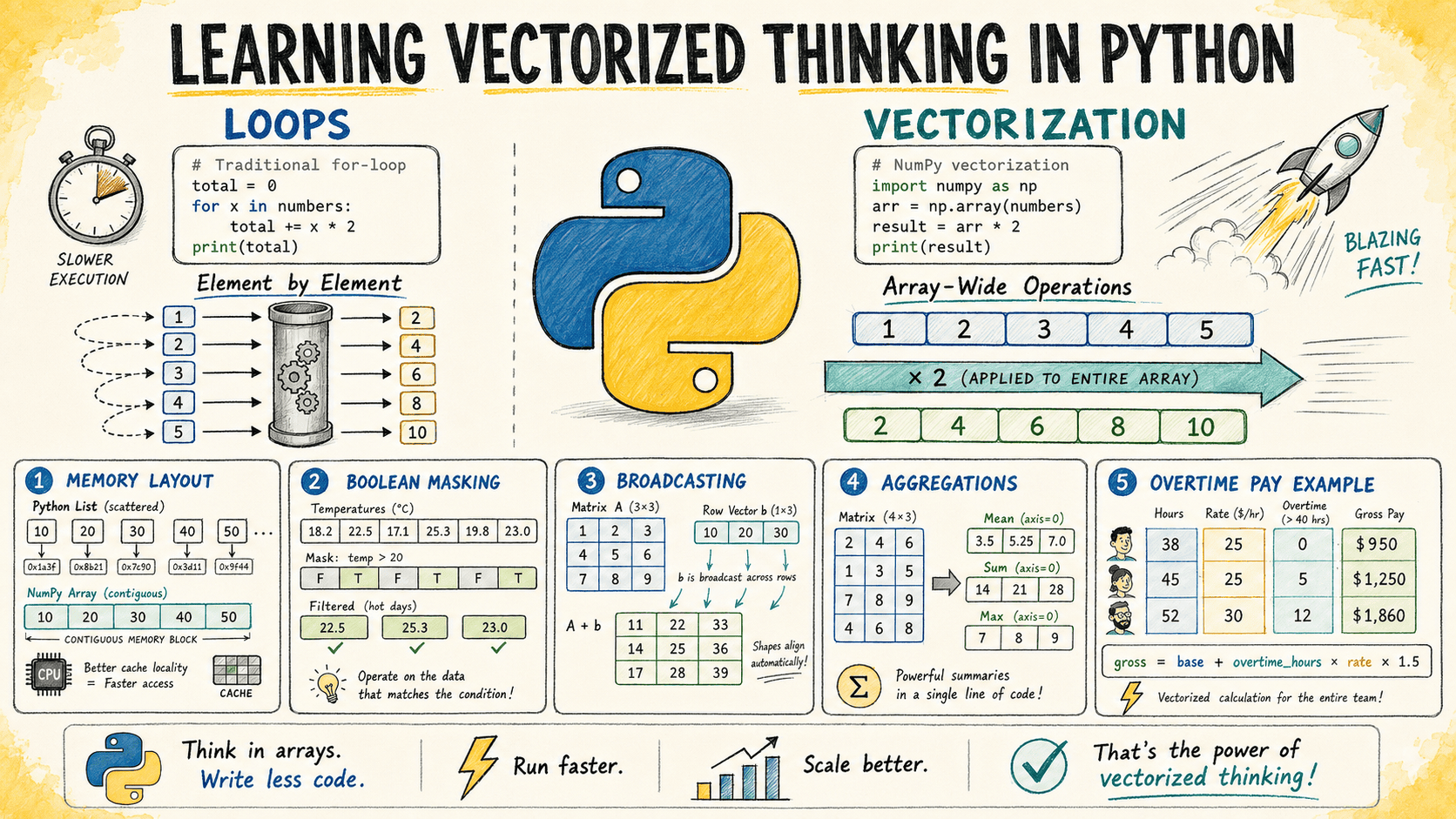
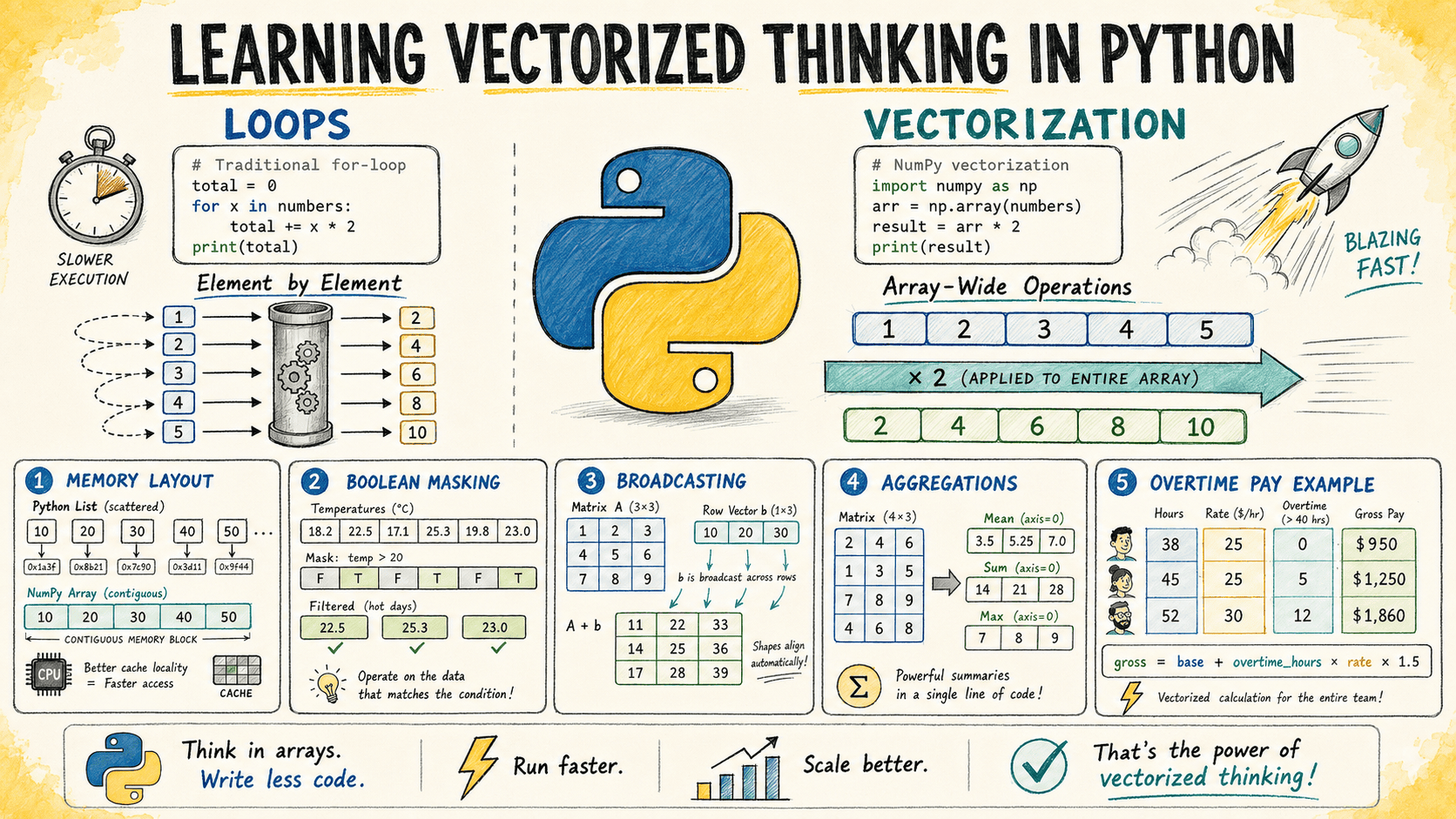
In this article, you will learn how to think in terms of vectorized operations using NumPy, replacing slow Python loops with efficient array-level computations.
Topics we will cover include:
- Why Python loops are slow for numeric data and how NumPy’s C-backed engine addresses this.
- How to apply element-wise operations, boolean masking, and broadcasting to eliminate common loop patterns.
- How to handle multi-condition branching and axis-based aggregation entirely with NumPy functions.
Introduction
You already know how to loop in Python. Loops are simple, readable, and they do exactly what they say. The problem is that at scale, Python loops become too slow. At some point, every developer working with numeric data starts looking for a better approach.
NumPy’s vectorized operations provide that alternative. Instead of telling Python what to do element by element, you describe the transformation at the array level and let NumPy’s C-backed engine apply it across all elements efficiently.
This article teaches vectorized thinking through a set of examples. You’ll see the loop-based version, its vectorized equivalent, and the reasoning behind translating one into the other.
You can find the complete code for these examples on GitHub.
Understanding Why Loops Are Slow in Python
It helps to start by understanding why the loop you are replacing is slow.
Python is dynamically typed. Every time you write an operation like x * 2 inside a loop, Python must determine the type of x, find the correct multiplication method, execute it, and create a new Python object for the result.
That overhead is insignificant when working with a small number of elements. But when the same operation runs across millions of values, those repeated Python-level operations add up quickly.
NumPy arrays work differently. They store elements as raw numbers in a contiguous block of memory, similar to how arrays are stored in C. When you write arr * 2, NumPy passes the entire array to a compiled C routine that applies the operation without Python overhead for each individual item.
The computation runs closer to compiled code speed rather than interpreted Python speed.
Applying Operations Element by Element
A common first step with numeric data is applying the same formula to every value in a list.
Consider a simple example: you have a list of product prices and need to apply a 12% tax rate to each item.
Loop Version
The traditional approach iterates through each price, calculates the taxed value, and appends the result to a new list.
prices = [12.99, 45.00, 7.49, 129.99, 3.25, 89.50]
taxed = []
for price in prices:
    taxed.append(round(price * 1.12, 2))
print(taxed)
Output:
[14.55, 50.4, 8.39, 145.59, 3.64, 100.24]Vectorized Version
The vectorized approach replaces the loop with a single operation on a NumPy array. When you write prices * 1.12, NumPy applies the multiplication to every element automatically.
import numpy as np
prices = np.array([12.99, 45.00, 7.49, 129.99, 3.25, 89.50])
taxed = np.round(prices * 1.12, 2)
print(taxed)
Output:
[ 14.55 50.4 8.39 145.59 3.64 100.24]The output is identical, but the approach scales much better. For large arrays containing millions of prices, the vectorized version can be dramatically faster than the loop-based equivalent.
The important mental shift is moving from:
“For each price, perform this calculation.”
to:
“Apply this transformation to the entire array of prices.”
The array becomes the unit of computation rather than the individual element.
Using Boolean Masking for Conditional Logic
Loops often contain if statements that check each value individually. The vectorized equivalent is a boolean mask: an array of True and False values generated from a comparison.
A boolean mask can then be used to filter values or update selected elements without writing a loop.
Consider a weather monitoring system that records hourly temperatures. You want to flag every reading above 38°C as a heat alert.
Loop Version
The loop approach checks each temperature value and builds a separate list of alert flags.
readings = [34.1, 38.5, 37.2, 39.0, 36.8, 40.1, 35.5]
alerts = []
for temp in readings:
    alerts.append(temp > 38.0)
print(alerts)
Output:
[False, True, False, True, False, True, False]Vectorized Version
With NumPy, comparing an array directly creates the boolean mask automatically. There is no explicit loop and no repeated append() operation.
import numpy as np
readings = np.array([34.1, 38.5, 37.2, 39.0, 36.8, 40.1, 35.5])
alerts = readings > 38.0
print(alerts)
print("Alert readings:", readings[alerts])
Output:
[False  True False  True False  True False]
Alert readings: [38.5 39.  40.1]
The mask alerts is itself an array that can be used immediately to index into readings and extract only the values that triggered the alert. This pattern — create a mask, use it to select elements — replaces a large class of conditional loops in numeric code and is one of the most useful tools in vectorized thinking.
Summary
Vectorized thinking with NumPy means working at the array level rather than the element level. By replacing Python loops with element-wise operations, boolean masks, broadcasting, and axis-based aggregation, you gain both cleaner code and significantly better performance at scale. The examples in this article illustrate the core mental shift: instead of iterating over individual values, describe the transformation you want applied to the entire array and let NumPy’s compiled engine handle the rest.