How to Build a Simple AI Web Scraper with Python
Learn how to fetch, clean, and convert webpages to Markdown, then use an LLM to return focused answers from page content.
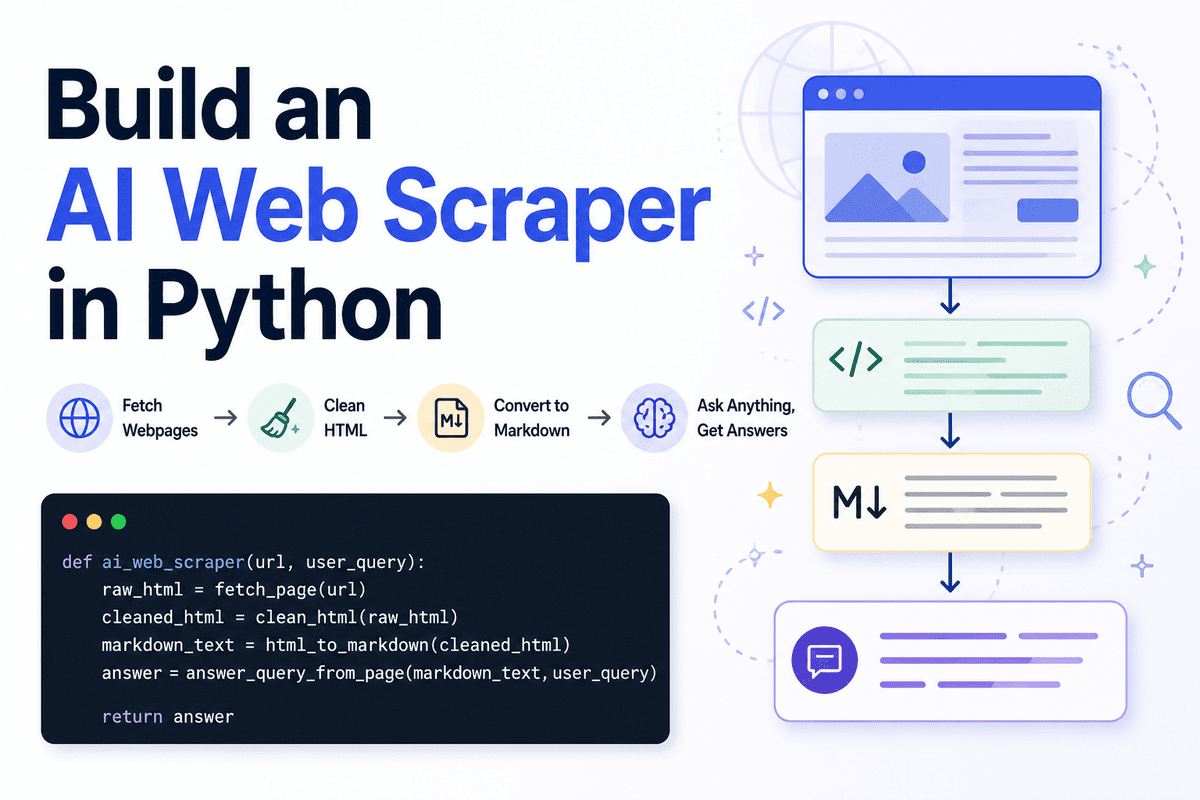
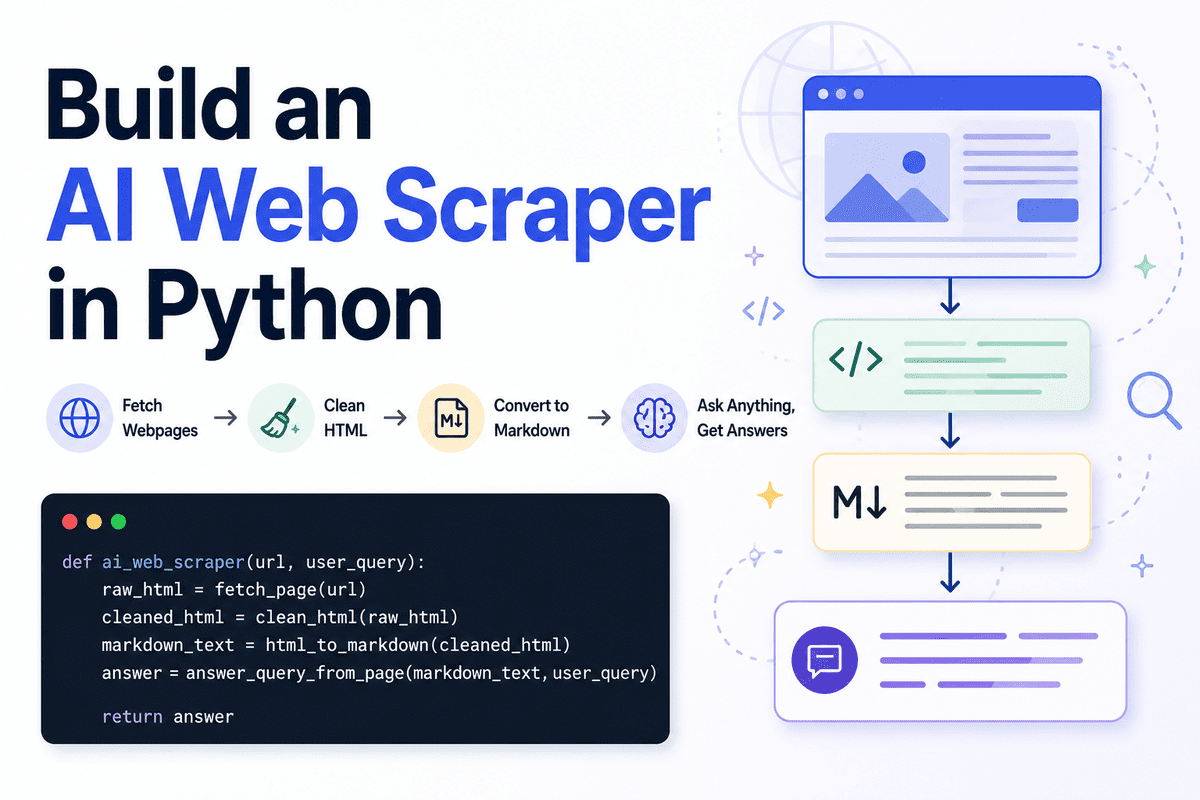
Web scraping is the process of collecting information from websites automatically. A normal scraper usually extracts raw text, HTML elements, or the full page content. But when you are building AI agents or large language model (LLM) applications, sending the entire webpage to the model is not always the best approach.
A better way is to first clean the page, convert it into Markdown, and then use an LLM to understand the content and return only the answer the user needs. This makes the output cleaner, easier to read, and easier to use in another workflow.
It also helps reduce token usage. Instead of passing a messy webpage full of navigation links, buttons, scripts, footers, and repeated content, we only send the useful page content to the model. The LLM then returns a focused answer in Markdown instead of dumping the whole page back to the user.
In this guide, we will build a simple AI web scraper in Python using Jupyter Notebook. It will fetch a webpage, clean the HTML, convert it into Markdown, accept a user query, and return a clear Markdown answer based on the page content.
Setting Up
We will use Jupyter Notebook for this project. It makes it easier to test each step first before turning the scraper into a proper application programming interface (API) or application.
Start by installing the required Python packages:
!pip install requests beautifulsoup4 markdownify openai ftfy python-dotenvWe will use:
- requests to fetch the webpage.
- BeautifulSoup to remove noisy HTML elements.
- markdownify to convert HTML into Markdown.
- OpenAI to answer the user query.
- ftfy to fix broken or messy text.
- python-dotenv to load the API key safely.
In the next cell, import the required libraries:
import os
import re
import requests

from bs4 import BeautifulSoup, Comment
from ftfy import fix_text
from markdownify import markdownify as markdownify_html
from openai import OpenAI
from dotenv import load_dotenv
from IPython.display import Markdown, display
Next, make sure your OpenAI API key is available as an environment variable. The safer way is to create a .env file in the same folder as your notebook and add your key there:
OPENAI_API_KEY=your_api_key_hereThen load it inside the notebook:
load_dotenv()

client = OpenAI(api_key=os.getenv("OPENAI_API_KEY"))
You can also check that the key was loaded correctly:
if not os.getenv("OPENAI_API_KEY"):
    raise ValueError("OPENAI_API_KEY is missing. Add it to your .env file first.")
Also make sure your OpenAI platform account has billing set up. For new API accounts, you may need to add prepaid credits before you can run API calls. If a model is not available in your account, use another model from your OpenAI dashboard.
Now define the model name:
MODEL_NAME = "gpt-5.4-nano"We are using a smaller model here because this task does not need a large reasoning model. The goal is simple: read the cleaned webpage content, understand the user query, and return a focused Markdown answer.
Fetching the Webpage
Now we will create the first function. This function will fetch the webpage using the requests package and return the raw HTML.
def fetch_page(url: str) -> str:
    """
    Download the HTML content from a webpage.
    """
    headers = {
        "User-Agent": "SimpleAIScraper/1.0"
    }

    response = requests.get(url, headers=headers, timeout=15)
    response.raise_for_status()

    return response.text
The User-Agent header tells the website that the request is coming from our scraper. Some websites block requests that do not include a user agent, so adding one makes the request a bit more reliable.
We also use timeout to avoid waiting indefinitely if the website does not respond. The raise_for_status() call will stop the code if the request fails — for example, if the page returns a 404 or 500 error.
Now let’s test the function with a real website:
raw = fetch_page("https://www.olostep.com/")
print(raw[:500])
This will download the raw HTML from the webpage and print the first 500 characters.

At this stage, the output will still look messy because it contains the full page HTML, including tags, scripts, layout elements, and other content we do not need.
Cleaning the HTML
The raw HTML from a webpage usually contains a lot of content we do not need. It can include scripts, styling, navigation menus, buttons, forms, headers, footers, popups, and other layout elements.
Before sending the page content to the LLM, we need to clean the HTML. This helps reduce noise and makes the final Markdown much easier for the model to understand.
We will use BeautifulSoup to parse the HTML and remove unnecessary elements.
def clean_html(html):
    html = fix_text(html)

    soup = BeautifulSoup(html, "html.parser")

    # Remove obvious noisy tags
    for tag in soup([
        "script", "style", "noscript", "svg", "img", "iframe",
        "nav", "header", "footer", "aside", "form", "button"
    ]):
        tag.decompose()

    noise_words = [
        "cursor",
        "modal",
        "popup",
        "floating",
        "signup",
        "login",
        "cookie",
        "banner",
        "navbar",
        "menu",
        "footer",
        "header",
        "subscribe",
        "newsletter",
        "loading",
        "wait",
        "success",
        "auth",
        "w-nav",
        "w-form"
    ]

    # First collect noisy tags
    tags_to_remove = []

    for tag in soup.find_all(True):
        if tag.attrs is None:
            continue

        class_value = tag.get("class", [])
        id_value = tag.get("id", "")

        if isinstance(class_value, list):
            class_text = " ".join(class_value).lower()
        else:
            class_text = str(class_value).lower()

        id_text = str(id_value).lower()

        if any(word in class_text or word in id_text for word in noise_words):
            tags_to_remove.append(tag)

    # Then remove them safely
    for tag in tags_to_remove:
        tag.decompose()

    body = soup.body if soup.body else soup

    return str(body)
First, we use fix_text() to clean any broken or strange text encoding issues. Then BeautifulSoup parses the HTML so we can remove the parts we do not need.
We remove obvious noisy tags like script, style, nav, header, footer, form, and button. These sections usually do not help answer the user query and can waste tokens.
After that, we look for noisy class names and IDs. Many websites use words like popup, cookie, navbar, newsletter, or modal inside their HTML. If a tag contains those words, we collect it and remove it safely.
Now let’s run the function on the raw HTML:
clean = clean_html(raw)
print(clean[:500])
As you can see, the webpage is now much cleaner. It still contains useful HTML tags and text, but most of the noisy layout, scripts, navigation, and popups have been removed.

Converting HTML to Markdown
Now we will convert the cleaned HTML into Markdown. Markdown is easier to read, easier to save, and easier for the LLM to understand compared to raw HTML.
This step also helps reduce input tokens because we remove unnecessary formatting, images, blank lines, and repeated text. For the conversion, we will use markdownify.
def html_to_markdown(html):
    markdown_text = markdownify_html(
        html,
        heading_style="ATX",
        bullets="-"
    )

    markdown_text = fix_text(markdown_text)

    # Remove image markdown
    markdown_text = re.sub(r"!\[.*?\]\(.*?\)", "", markdown_text)

    # Remove extra spaces and blank lines
    markdown_text = re.sub(r"[ \t]+", " ", markdown_text)
    markdown_text = re.sub(r"\n{3,}", "\n\n", markdown_text)

    lines = []

    skip_lines = [
        "click to try",
        "wait...",
        "you've successfully reserved your spot.",
        "thank you! your submission has been received!",
        "oops! something went wrong while submitting the form.",
        "product",
        "resources",
        "company"
    ]

    for line in markdown_text.splitlines():
        line = line.strip()

        if not line:
            continue

        if line.lower() in skip_lines:
            continue

        lines.append(line)

    return "\n".join(lines)
First, we use markdownify to convert the cleaned HTML into Markdown. We set the heading style to ATX, which means headings will use standard Markdown syntax with #, ##, and ###.
Then we run fix_text() again to clean any remaining encoding issues. After that, we remove image Markdown because image links are usually not useful for answering text-based questions.
We also remove extra spaces and blank lines so the final content is compact. This makes the page easier to inspect and helps reduce the number of tokens sent to the model.
The skip_lines list removes repeated website text such as form messages, navigation labels, and small call-to-action text. You can update this list based on the website you are scraping.
Now let’s run the function:
md = html_to_markdown(clean)
print(md[:500])
The text is now much cleaner and formatted in standard Markdown, ready to be passed to the LLM alongside the user’s query. With the fetch, clean, and convert steps in place, you have a solid foundation for building more advanced AI-powered scraping workflows.