Materialized Lake Views in Microsoft Fabric: GA Features Explained
Materialized lake views in Microsoft Fabric simplify medallion pipelines into declarative SQL. Here's what changed from preview to general availability.
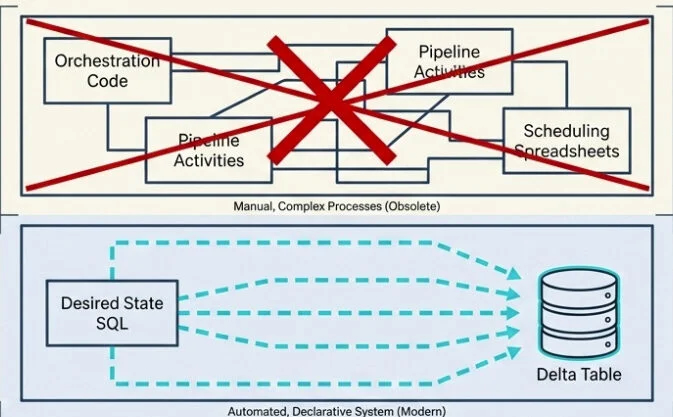
Building a medallion architecture in Microsoft Fabric once meant stitching together a small orchestra of moving parts: notebooks for transformations, pipelines for orchestration, schedules for refresh, custom code for data quality checks, and the Monitor Hub for keeping an eye on whether anything actually worked. Every layer worked — until something didn’t, and then you had to figure out which layer broke, why, and which downstream layers got affected along the way.
If you’ve ever tried to debug a silver layer that didn’t update because the bronze notebook failed three hours ago, you know exactly what I’m talking about.
Then, at FabCon Atlanta in March 2026, materialized lake views (MLVs) went generally available. And the story they’re telling is simple: what if your entire medallion pipeline could be a few SELECT statements?
This article covers what MLVs are, how they work, what changed between preview and GA, and where they fit — and where they don’t — in your architecture.
What Is a Materialized Lake View?
A materialized lake view is a persisted, automatically refreshed view defined in Spark SQL or PySpark. You write a SELECT query that describes the transformation you want, and Fabric takes care of execution, storage, refresh, dependency tracking, and data quality enforcement.
The result is stored as a Delta table in your lakehouse. Downstream consumers — Power BI Direct Lake, Spark notebooks, SQL endpoints — can query it just like any other Delta table. No special handling, no different syntax.
In plain terms: an MLV is a SELECT statement that learned to materialize itself, manage its own dependencies, schedule its own refresh, and check its own data quality.

Before MLVs, building a single bronze-to-silver-to-gold flow meant writing a notebook for each transformation, setting up a Data Factory pipeline to call them in the right order, configuring schedules, building custom validation logic, and wiring up the Monitor Hub to watch for failures. Five different surfaces, five different things to debug when something breaks.
With MLVs, all of that collapses into declarative SQL. You describe what you want. Fabric figures out the rest.
The Four Stages of an MLV’s Life
Every MLV moves through four stages. According to the Microsoft documentation, understanding them is the foundation for everything else:
- Create — You write the Spark SQL (or PySpark) that defines the transformation. Fabric stores the definition and materializes the initial result as a Delta table.
- Refresh — When source data changes, Fabric chooses the optimal strategy: incremental (process only changes), full (rebuild), or skip (no changes detected).
- Query — Any application or tool reads the materialized result. They don’t need to know it’s an MLV.
- Monitor — Refresh history, execution status, data quality metrics, and lineage are all tracked and visualized natively in Fabric.
Create: The Syntax
Here’s the full Spark SQL syntax for creating an MLV, straight from the Microsoft Learn reference:
CREATE [OR REPLACE] MATERIALIZED LAKE VIEW [IF NOT EXISTS]
[workspace.lakehouse.schema].MLV_Identifier
[(CONSTRAINT constraint_name CHECK (condition) [ON MISMATCH DROP | FAIL], ...)]
[PARTITIONED BY (col1, col2, ...)]
[COMMENT "description"]
[TBLPROPERTIES ("key1"="val1", ...)]
AS select_statement
A real example — cleaning order data joined from products and orders, with a data quality constraint and partitioning:
CREATE OR REPLACE MATERIALIZED LAKE VIEW silver.cleaned_order_data
(
  CONSTRAINT valid_quantity CHECK (quantity > 0) ON MISMATCH DROP
)
PARTITIONED BY (category)
COMMENT "Cleaned order data joined from products and orders"
AS
SELECT
  p.productID, p.productName, p.category,
  o.orderDate, o.quantity, o.totalAmount
FROM bronze.products p
INNER JOIN bronze.orders o ON p.productID = o.productID
Two things worth noting: MLV names are case-insensitive (MyView becomes myview), and all-uppercase schema names (like MYSCHEMA) aren’t supported — use mixed or lowercase instead.
You also need a schema-enabled lakehouse and Fabric Runtime 1.3 or higher. If your lakehouse doesn’t have schemas turned on, MLVs aren’t available.
Refresh: The Brain of MLVs
When source data changes, Fabric’s optimal refresh engine evaluates every MLV in the lineage and asks: Did anything actually change? Can I process just the changes? Or do I need to rebuild from scratch?
Three possible outcomes:
- Skip refresh — source data hasn’t changed; no compute is wasted.
- Incremental refresh — only new or changed rows are processed. Fast, cheap, and ideal.
- Full refresh — the entire view is rebuilt. The slowest path, used when incremental isn’t safe or possible.

Incremental refresh has prerequisites:
- Delta change data feed (CDF) must be enabled on every source table (
delta.enableChangeDataFeed=true). - The source must be a Delta table — non-Delta sources always trigger a full refresh.
- The data must be append-only. Updates or deletes cause Fabric to fall back to a full refresh.
- The query must use only supported SQL constructs.
Without CDF enabled, optimal refresh can only choose between skip and full. With CDF on, the full incremental path opens up. Enabling CDF on source tables has no measurable storage or performance impact for append-only workloads:
ALTER TABLE bronze.orders SET TBLPROPERTIES (delta.enableChangeDataFeed = true);
ALTER TABLE bronze.products SET TBLPROPERTIES (delta.enableChangeDataFeed = true);
What’s New in General Availability
MLVs were introduced in preview at Build 2025. Between then and GA in March 2026, Microsoft closed the most important gaps. Five major changes turned MLVs from “interesting” into “production-ready”:
- Multi-schedule support
- Broader incremental refresh coverage
- PySpark authoring (preview)
- In-place updates with Replace
- Stronger data quality controls
1. Multi-Schedule Support
In preview, you could only refresh all MLVs in a lakehouse on a single schedule. If finance needed hourly updates but analytics needed updates every six hours, you had to work around it with notebooks — which broke dependency awareness, error reporting, and retry logic. Notebook-triggered refreshes don’t surface MLV error details; failures appear only in cell output, and dependent views have no awareness of them. Errors can persist week after week without anyone knowing the pipeline is broken.
Now you can define named schedules within a single lakehouse, each targeting a specific subset of views. Finance pipeline hourly. Analytics every six hours. Marketing every 15 minutes. All in the same lakehouse, no custom code.

When a named schedule runs, Fabric still refreshes all upstream dependencies in the correct order, runs independent views in parallel, and surfaces errors centrally. If a run is already in progress when a schedule fires, the new run is skipped and the next window proceeds as expected — no overlapping runs stomping on each other.
2. Broader Incremental Refresh Coverage
Incremental refresh used to fall back to full quite often because the list of supported SQL constructs was narrow. At GA, that list expanded significantly. MLVs now refresh incrementally when the definition includes:
- Aggregations like
COUNTandSUMwithGROUP BY - Left outer joins and left semi joins
- Common table expressions (CTEs)
Most real-world medallion pipelines use exactly these patterns, and now they qualify for incremental processing without being rewritten. The built-in optimal refresh engine examines each refresh, evaluates the volume of changed data against the cost of a full recomputation, and automatically chooses the faster path.
Using unsupported constructs doesn’t prevent you from creating the MLV — it only means Fabric uses a full refresh instead of an incremental one. Optimal refresh automatically falls back to full when needed. If you want to force a full refresh manually (for example, to reprocess data after a correction), there’s a one-liner:
REFRESH MATERIALIZED LAKE VIEW silver.cleaned_order_data FULL;3. PySpark Authoring (Preview)
SQL is great until your transformation logic involves a custom Python library, an ML inference call, or a UDF that wraps complex business rules. Previously, MLVs were SQL-only, and that was a hard wall.
With PySpark authoring, you can now create, refresh, and replace MLVs from Fabric notebooks using PySpark and the familiar DataFrameWriter API. The fmlv module exposes a decorator-based pattern, documented in the official PySpark MLV reference:
import fmlv
from pyspark.sql import functions as F

@fmlv.materialized_lake_view(
    name="LH1.silver.customer_silver",
    comment="Cleaned & enriched customer silver MLV",
    partition_cols=["year", "city"],
    table_properties={"delta.enableChangeDataFeed": "true"},
    replace=True
)
@fmlv.check(name="non_null_sales", condition="sales IS NOT NULL", action="DROP")
def customer_silver():
    df = spark.read.table("bronze.customer_bronze")
    cleaned_df = df.filter(F.col("sales").isNotNull())
    return cleaned_df
This decorator pattern allows PySpark-defined MLVs to participate in the same dependency tracking, refresh scheduling, and data quality enforcement as their SQL counterparts, while giving you the full flexibility of Python for complex transformation logic.
PySpark authoring remains in preview at GA, but its inclusion signals that MLVs are being designed for the full range of real-world use cases — not just the ones that fit neatly into a SQL statement.