Building Vector Similarity Search in PostgreSQL with pgvector
Learn how to implement vector similarity search in PostgreSQL using the pgvector extension. Find semantically similar results based on meaning, not keywords.
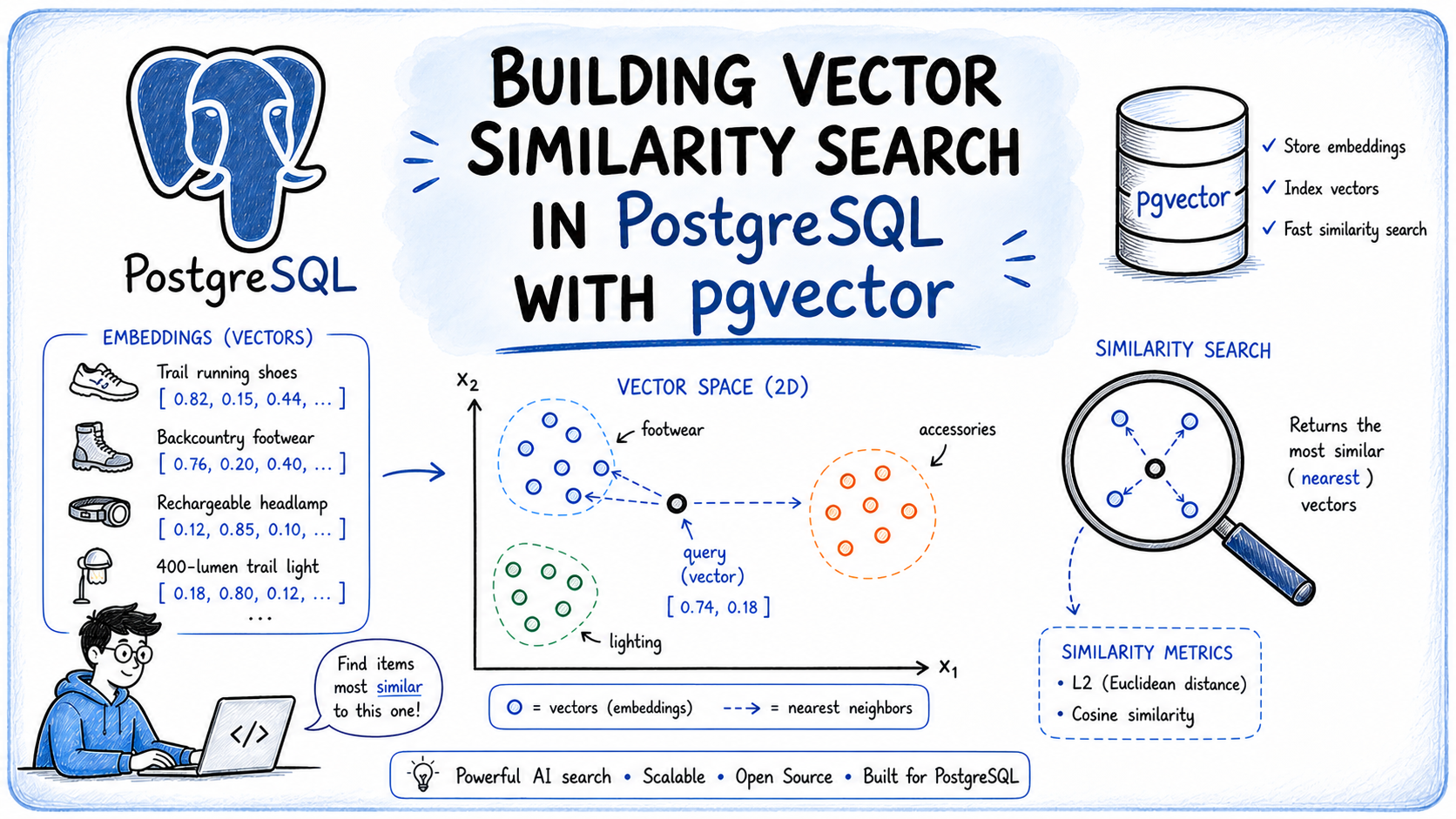
In this article, you will learn how to implement vector similarity search in PostgreSQL using the pgvector extension, allowing you to find semantically similar results based on meaning rather than keyword matching.
Topics we will cover include:
- What vector embeddings are and how they enable semantic similarity search.
- How to install and configure pgvector, store embeddings in PostgreSQL, and query them using SQL distance operators.
- How to choose the right distance metric and index type for your workload, and how to combine similarity search with standard SQL filters.
Introduction
Search works well when users know exactly what they are looking for, but it breaks down when intent is described in natural language. A user searching for “something warm and breathable for high-altitude trekking” will get poor results from a keyword index, because the words in that query rarely align with the words in your data.
This is where similarity search becomes useful. Instead of matching keywords, it finds results based on meaning — connecting user intent to relevant records even when the wording differs entirely.
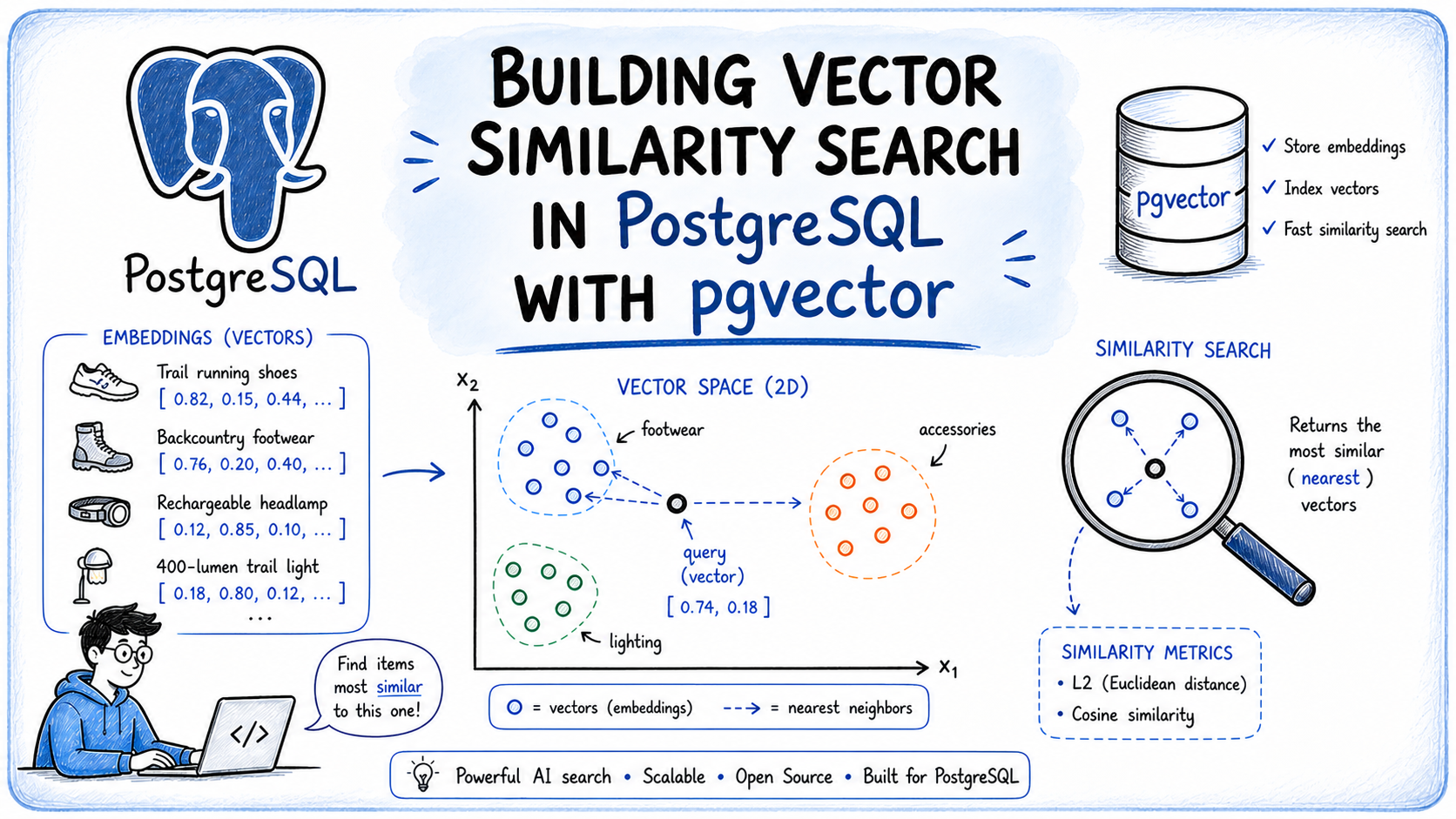
This article shows how to implement similarity search in PostgreSQL using pgvector. You will learn how to set up the extension, store vector embeddings in your database, and run similarity queries using plain SQL without a separate vector database.
What Is a Vector Embedding?
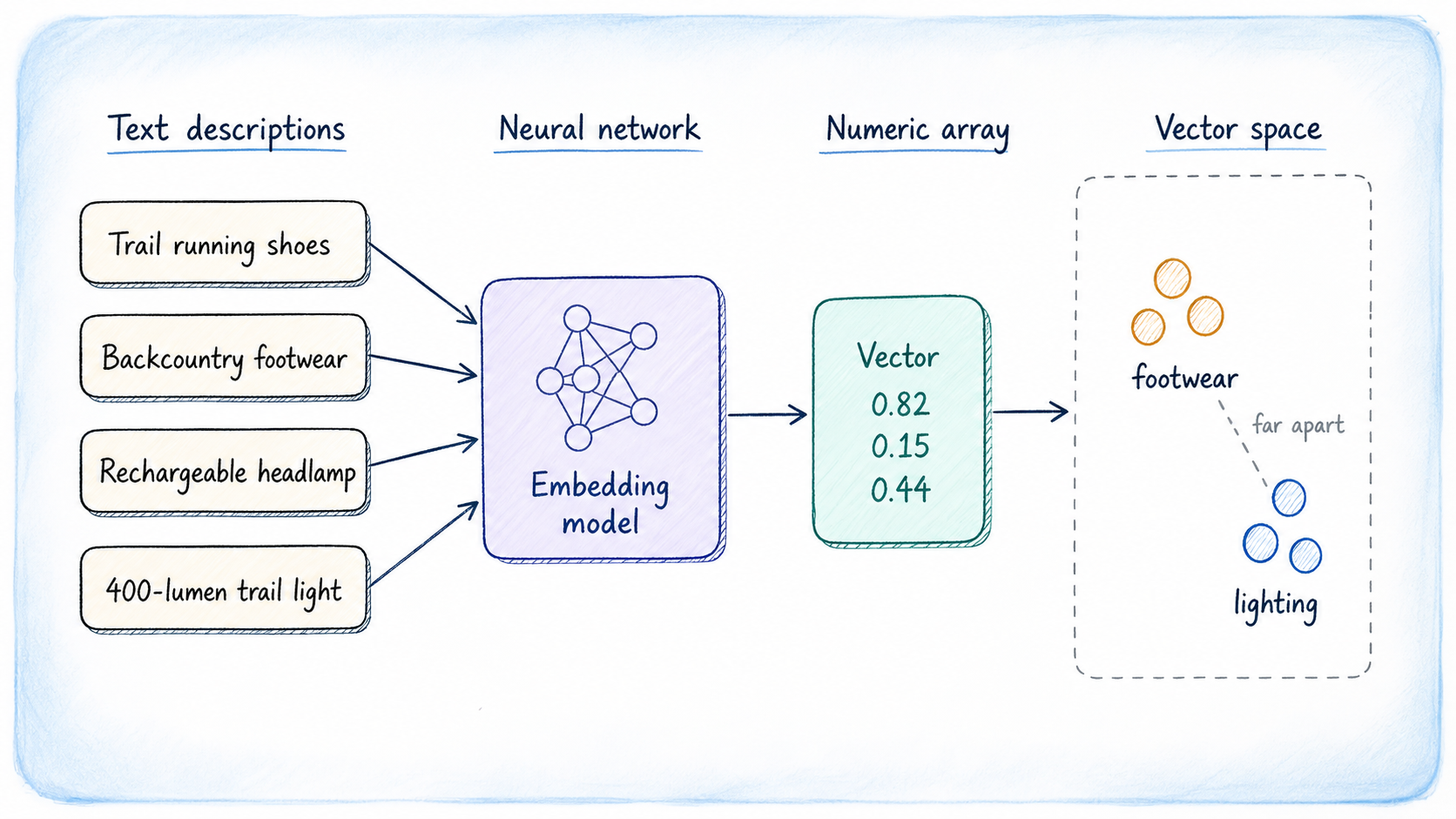
A vector embedding is a list of floating-point numbers that represents the meaning of a piece of data, not its characters or keywords. The numbers are produced by a machine learning model trained to place semantically similar content close together in a high-dimensional numeric space. Two sentences that talk about the same concept will produce embeddings that are numerically close, even if they share no words.
Consider these two phrases:
- “Lightweight trail runners for long-distance hiking”
- “Running shoes built for backcountry endurance”
An embedding model would place their vectors near each other in that space. That proximity is what makes similarity search work: you embed the user’s query, find the stored vectors closest to it, and return those rows.
The vector dimension depends on which model you use. You can choose from several options; the most common ones to try are:
- OpenAI text-embedding-3-small / text-embedding-3-large: 1536 and 3072 dimensions respectively.
- Cohere Embed v4: Multilingual and multimodal, covering text and images in a shared vector space.
- EmbeddingGemma: A 308M parameter open model from Google built on Gemma 3, producing 768-dimensional vectors with Matryoshka truncation support, coverage of 100+ languages, and fully on-device inference.
- BAAI/BGE-M3: Open-source and self-hostable, supporting over 1,000 languages and sequences up to 8,192 tokens.
- Sentence Transformers: Lightweight open-source models that run on CPU, suitable for local development where retrieval accuracy is secondary to speed.
The MTEB Leaderboard is a standard reference for comparing embedding models. One rule applies regardless of your choice: the dimension configured in your PostgreSQL column must exactly match the dimension the model produces.
What Is pgvector?
pgvector is an open-source PostgreSQL extension that adds native vector search to your existing database. Rather than moving your embeddings to a dedicated vector store, pgvector keeps them alongside your relational data, preserving PostgreSQL’s transactional guarantees, JOIN semantics, point-in-time recovery, and the full SQL query language.
The extension adds a vector data type for storing embeddings, SQL distance operators for ordering query results by similarity, and two index types — HNSW and IVFFlat — for accelerating nearest-neighbor lookups at scale. It also supports half-precision, binary, and sparse vector types.
Installing pgvector
pgvector supports PostgreSQL 13 and newer. The installation guide in the repository covers every platform in detail; the most common paths are shown below.
On Linux
On Debian and Ubuntu, the APT package is the quickest route. Replace 18 with your PostgreSQL major version:
sudo apt install postgresql-18-pgvectorTo compile from source instead, which works on any Linux distribution, use:
cd /tmp
git clone --branch v0.8.2 https://github.com/pgvector/pgvector.git
cd pgvector
make
make install
On macOS
If you’re on a Mac, Homebrew is the simplest option:
brew install pgvectorThe source compilation steps above work identically on macOS with Xcode Command Line Tools installed.
For Windows, Docker, and conda-forge, see the installation notes in the repository. Once installed, enable the extension in your target database. You only need to do this once per database:
CREATE EXTENSION IF NOT EXISTS vector;Creating a Table with a Vector Column
We will build a product catalog for an outdoor gear store. Each product has a text description, and we will store an embedding of that description so users can search by meaning.
CREATE TABLE products (
    id          SERIAL PRIMARY KEY,
    name        TEXT NOT NULL,
    category    TEXT,
    description TEXT,
    price       NUMERIC(8,2),
    embedding   vector(1536)
);
The vector(1536) column holds one embedding per row. That number must match the output dimension of your model; adjust it accordingly if you use a different one.
For this article we will use a smaller test table with 3-dimensional vectors to keep the examples readable:
CREATE TABLE gear (
    id          SERIAL PRIMARY KEY,
    name        TEXT NOT NULL,
    category    TEXT,
    description TEXT,
    embedding   vector(3)
);
Insert a few rows with hand-crafted 3-dimensional vectors to illustrate the concepts:
INSERT INTO gear (name, category, description, embedding) VALUES
    ('Trail Running Shoes',  'Footwear',  'Lightweight shoes for trail running',        '[0.9, 0.1, 0.2]'),
    ('Hiking Boots',         'Footwear',  'Durable boots for mountain hiking',           '[0.8, 0.2, 0.3]'),
    ('Sleeping Bag',         'Camping',   'Warm sleeping bag for cold weather camping',  '[0.1, 0.9, 0.2]'),
    ('Tent',                 'Camping',   'Lightweight backpacking tent',                '[0.2, 0.8, 0.3]'),
    ('Trekking Poles',       'Gear',      'Adjustable poles for stability on trails',   '[0.7, 0.3, 0.4]');
Querying by Similarity
pgvector adds three distance operators to SQL:
| Operator | Distance metric | Use case |
|---|---|---|
<-> | Euclidean (L2) | General-purpose numeric similarity |
<=> | Cosine | Text embeddings; direction matters more than magnitude |
<#> | Inner product (negated) | When embeddings are normalized to unit length |
To find the three products most similar to a query vector, order by distance and limit the results:
SELECT name, category, description,
       embedding <=> '[0.8, 0.2, 0.1]' AS distance
FROM gear
ORDER BY distance
LIMIT 3;
A lower distance means higher similarity. The query returns whichever rows have vectors closest to [0.8, 0.2, 0.1].
Choosing a Distance Metric
Cosine distance (<=>) measures the angle between two vectors, ignoring magnitude. It is the standard choice for text embeddings because a longer document and a shorter one on the same topic should score as similar even if their raw vector magnitudes differ.
Euclidean distance (<->) measures the straight-line distance between two points. It works well when the absolute position of a vector in space carries meaning, which is more common in image or tabular embeddings than in text.
Inner product (<#>) is equivalent to cosine similarity when vectors are normalized to unit length, and is often the fastest option in that case. pgvector negates the result so that smaller values still mean higher similarity, consistent with the other operators.
If you are unsure, start with cosine distance for text and switch only if benchmarking reveals a reason to.
Filtering with SQL
Because pgvector lives inside PostgreSQL, you can combine similarity search with any standard SQL predicate. To restrict results to a specific category before ranking by distance:
SELECT name, category, description,
       embedding <=> '[0.8, 0.2, 0.1]' AS distance
FROM gear
WHERE category = 'Footwear'
ORDER BY distance
LIMIT 3;
You can join to other tables, filter on price ranges, apply date windows, or use any other SQL construct alongside the distance operator.
Adding an Index
Without an index, every similarity query performs an exact scan of the entire table. This is fine during development, but becomes slow as the table grows. pgvector provides two index types.
HNSW
Hierarchical Navigable Small World (HNSW) builds a multi-layer graph structure that supports fast approximate nearest-neighbor search. It offers lower query latency than IVFFlat and does not require a training step, making it the better default for most workloads.
CREATE INDEX ON gear USING hnsw (embedding vector_cosine_ops);Use vector_cosine_ops for cosine distance, vector_l2_ops for Euclidean, or vector_ip_ops for inner product. The operator class must match the distance operator used in your queries.
IVFFlat
IVFFlat partitions the vector space into a fixed number of clusters (lists) and searches only the nearest clusters at query time. It uses less memory than HNSW but requires that the table contain data before the index is built, because the cluster centroids are computed from existing rows.
CREATE INDEX ON gear USING ivfflat (embedding vector_cosine_ops) WITH (lists = 100);A common starting point for lists is the square root of the number of rows. You can tune the number of clusters probed at query time by setting ivfflat.probes in your session; higher values improve recall at the cost of speed.
When to Index
For tables under roughly 100,000 rows, the sequential scan is often fast enough that an index adds little benefit. Add an index when query latency becomes a concern, and benchmark both index types against your actual data distribution before committing.
Putting It Together
The workflow for a production similarity search system follows four steps:
- Generate embeddings — pass each document or product description through your chosen embedding model and store the resulting vector in the
embeddingcolumn. - Embed the query — at query time, pass the user’s input through the same model to produce a query vector.
- Run the similarity query — use the appropriate distance operator, apply any SQL filters, and limit to the number of results you need.
- Re-rank if necessary — for high-accuracy use cases, retrieve a larger candidate set (e.g., top 50) and apply a cross-encoder or other re-ranking model before returning the final results to the user.
pgvector handles steps 3 and 4 entirely within PostgreSQL, which means your embeddings stay in the same transactional store as the rest of your data. There is no synchronization lag between your relational records and your vector index, and you do not need to operate a separate infrastructure component.
Summary
pgvector turns PostgreSQL into a capable vector search engine without requiring a dedicated vector database. You add a vector(n) column to any table, store embeddings generated by an external model, and query them with distance operators in standard SQL. HNSW indexing keeps queries fast as data volume grows, and standard SQL predicates let you combine semantic search with relational filtering in a single query. For most applications that already run on PostgreSQL, this is the lowest-friction path to adding semantic search capabilities.