AI Agent Tool Design: What Works and What Doesn't
Tool design — not model capability — causes most AI agent failures. Learn the patterns that improve reliability and the failure modes to avoid.
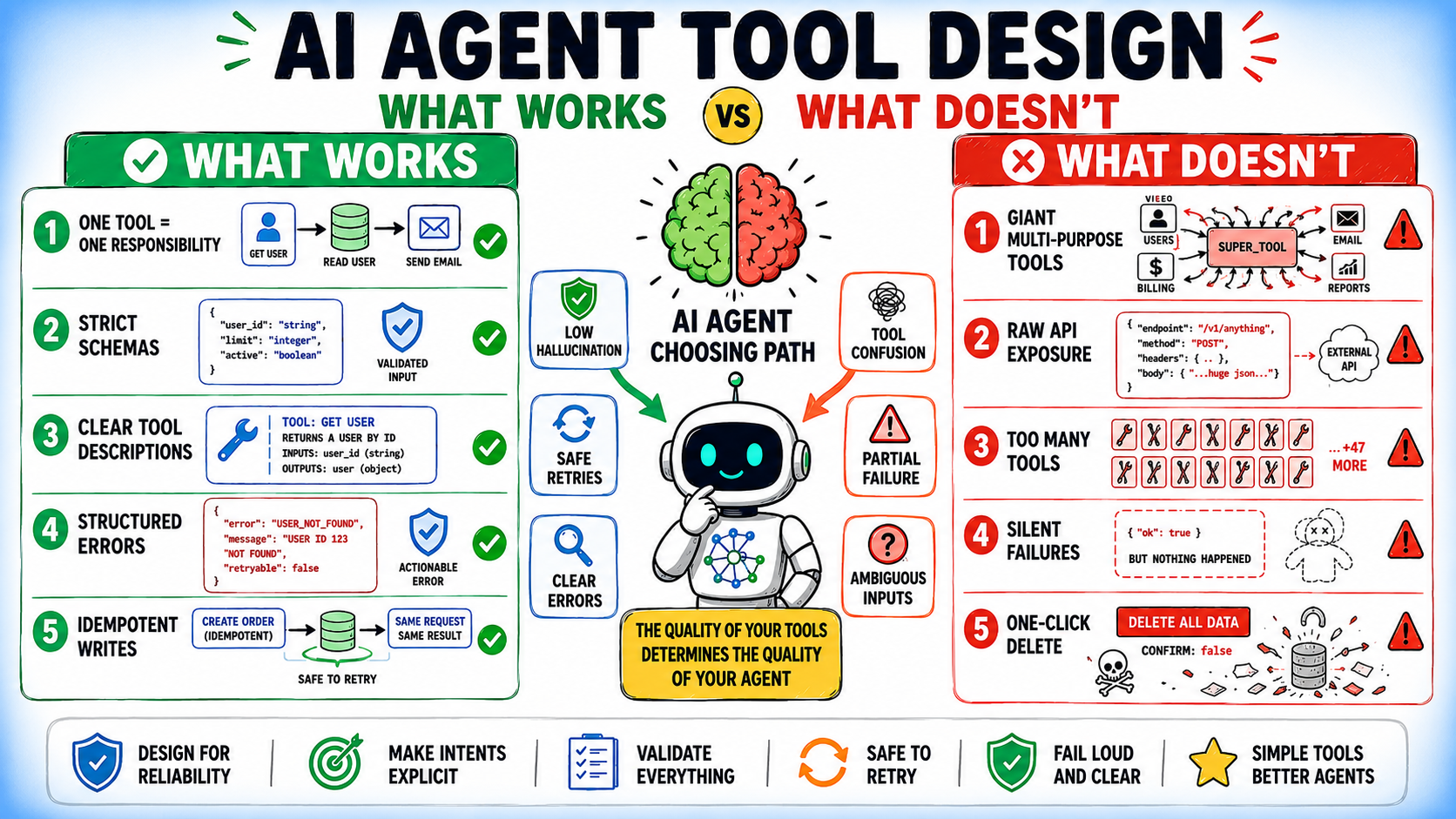
In this article, you will learn how tool design — not model capability — is the root cause of most AI agent failures, and what concrete design patterns you can apply to fix it.
Topics we will cover include:
- Tool design practices that improve agent reliability, including single-responsibility tools, tight schemas, and structured error returns.
- Common failure modes such as unfiltered API exposure, silent partial success, and overlapping tool names that break real-world workloads.
- Schema and error handling patterns that reduce hallucination and unreliable behavior at the tool boundary.
Introduction
Most AI agent failures look like model mistakes: choosing the wrong tool, passing bad arguments, or mishandling errors. But in practice, the model is usually working with the interface it was given. The underlying issue is often the tool design itself.
A model can only reason from the information exposed through the tool interface: the tool name, its description, the parameter schema, and the parameter descriptions. Those details shape how the model interprets intent, plans actions, and executes tasks. When the tool design is unclear, incomplete, or loosely structured, failures become predictable rather than accidental.
Problems like vague naming, ambiguous instructions, inconsistent schemas, weak parameter definitions, and poor error handling all increase the likelihood of failures. Stronger models can reduce some mistakes, but they cannot reliably compensate for a flawed interface. This article covers:
- Tool design practices that improve reliability
- Failure modes that look fine in demos but break under real workloads
- Schema and error design that reduces hallucination at the tool boundary
Each pattern is paired with its failure counterpart, because understanding why a design fails is as important as knowing what to replace it with.
What Works in AI Agent Tool Design
1. One Tool, One Responsibility
In most agent systems, a tool should represent a single, clear operation. When one tool handles multiple behaviors through an action parameter, the model must first figure out which mode to invoke before it can solve the actual task.
The difference becomes clearer when comparing a multi-action tool against dedicated single-purpose tools:
# Avoid: action-based multi-behavior tool
@tool
def manage_customer(
    action: str,
    customer_id: str | None = None,
    data: dict | None = None
):
    """
    action: create | get | update | delete | suspend
    """
    ...

# Prefer: single-responsibility tools
@tool
def create_customer(data: CustomerInput) -> Customer:
    """Create a new customer record."""
    ...

@tool
def get_customer(customer_id: str) -> Customer:
    """Retrieve a customer by ID."""
    ...

@tool
def suspend_customer(customer_id: str, reason: str) -> SuspensionResult:
    """Suspend a customer account."""
    ...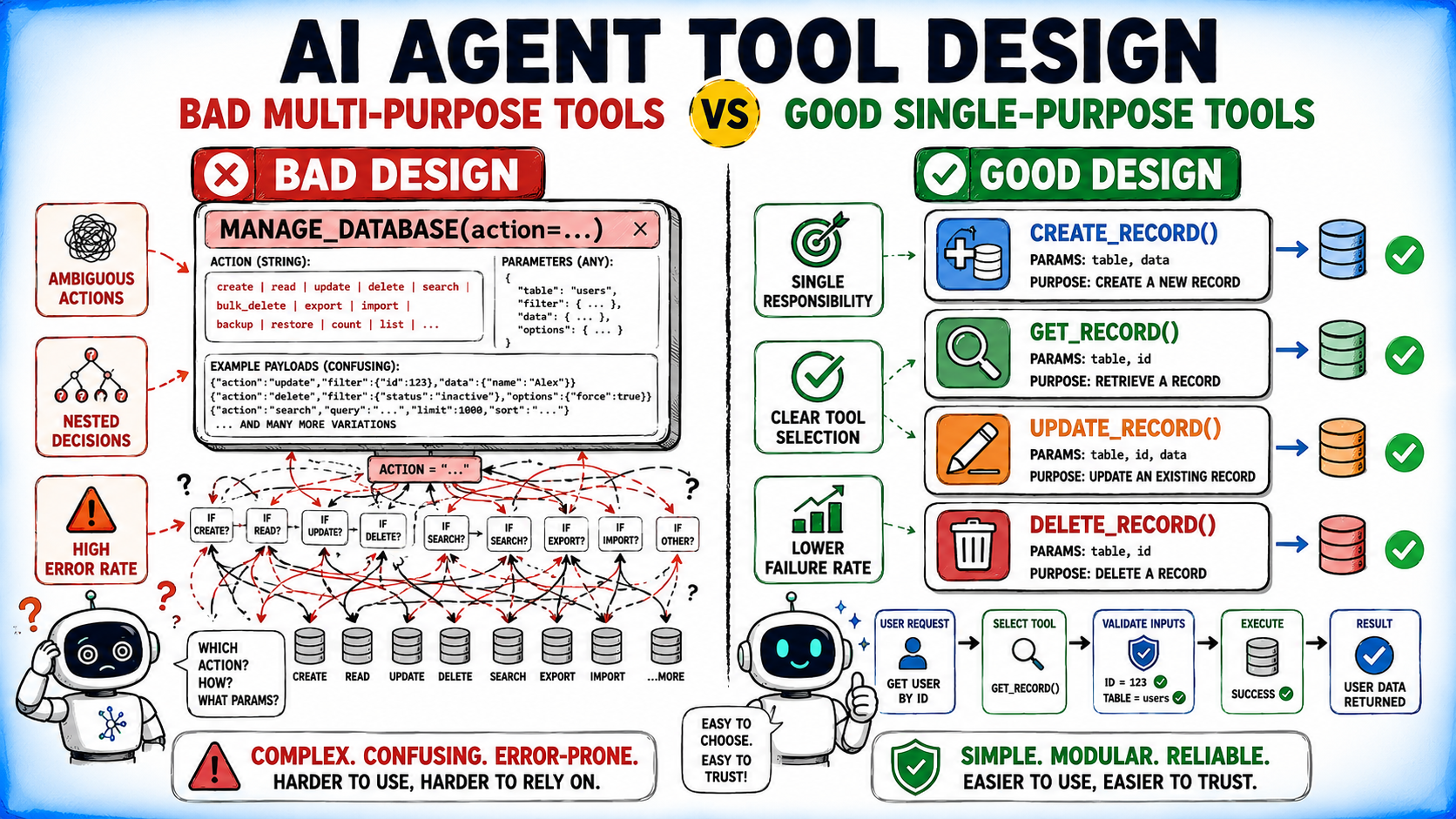
Single-responsibility tools give the model an unambiguous function and give you cleaner error handling and easier observability.
⚠️ Note: This is a useful default rather than a universal rule. Some domains — such as shell, filesystem, browser, or calendar tools — may benefit from a constrained multi-action interface because the action space itself is part of the underlying abstraction.
2. Schemas That Make Invalid States Impossible
In tool-calling agents, the model constructs tool call arguments by reasoning from your schema.
- A loose schema means the model guesses at constraints.
- A tight schema encodes those constraints so no guessing is needed.
Here’s an example:
from pydantic import BaseModel, Field
from enum import Enum

class Priority(str, Enum):
    LOW = "low"
    MEDIUM = "medium"
    HIGH = "high"

class CreateTaskInput(BaseModel):
    title: str = Field(
        description="Short, actionable task title. Use imperative form: 'Review PR', not 'PR Review'.",
        min_length=5,
        max_length=100
    )
    priority: Priority = Field(
        description="Task priority. Use HIGH only for blockers affecting other work.",
        default=Priority.MEDIUM
    )
    due_date: str = Field(
        description="Due date in ISO 8601 format: YYYY-MM-DD. Must be a future date.",
        pattern=r"^\d{4}-\d{2}-\d{2}$"
    )
Enums are particularly useful for fields with a small set of valid values because they eliminate a class of plausible-but-invalid outputs. Validation failures surface at the tool boundary rather than as cryptic downstream errors.
3. Descriptions That Define Scope, Not Just Purpose
Tool descriptions are model-facing documentation. They need to do two things: explain when to use the tool, and explain when not to. Most descriptions only do the first.
# Weak: explains what it does, not when not to use it
"""Search for documents in the knowledge base."""

# Strong: defines purpose, scope, and boundaries
"""
Search the internal knowledge base for documents, policies, and reference material.
Use this when the user asks about company procedures, internal guidelines, or product documentation.
Do NOT use for real-time data, customer records, or external web content.
Returns ranked results with source citations.
"""
The stronger description reduces the chance of the model reaching for this tool in situations where a different tool is the better fit.
4. Errors as Structured Feedback
When a tool fails, the error message becomes part of the model’s reasoning context for the next step. Unstructured error strings force the model to parse and interpret failure before it can decide what to do next. Structured errors make that decision easier.
from pydantic import BaseModel
from enum import Enum

class ErrorCode(str, Enum):
    NOT_FOUND = "not_found"
    PERMISSION_DENIED = "permission_denied"
    RATE_LIMITED = "rate_limited"
    INVALID_INPUT = "invalid_input"
    PARTIAL_SUCCESS = "partial_success"

class ToolError(BaseModel):
    error_code: ErrorCode
    message: str
    retryable: bool
    suggested_action: str | None = None

# Example usage
raise ToolError(
    error_code=ErrorCode.RATE_LIMITED,
    message="API rate limit reached. 47 requests remaining after reset.",
    retryable=True,
    suggested_action="Wait 60 seconds before retrying, or reduce request frequency."
)
A retryable flag tells the model whether to retry immediately, wait, or abandon the approach. A suggested_action field reduces the number of reasoning steps required to recover.
5. Idempotency by Default
Agents frequently retry tool calls after failures or timeouts. If a tool is not idempotent, retries can cause duplicate writes, double-charged transactions, or repeated side effects that are difficult to detect and roll back.
import hashlib
import json

@tool
def send_notification(
    user_id: str,
    message: str,
    idempotency_key: str = Field(
        description="Unique key to prevent duplicate sends. Generate from user_id + message content hash if not provided."
    )
) -> NotificationResult:
    """Send a notification to a user. Safe to retry with the same idempotency_key."""
    ...

def generate_idempotency_key(user_id: str, message: str) -> str:
    content = f"{user_id}:{message}"
    return hashlib.sha256(content.encode()).hexdigest()[:16]
Including idempotency key generation instructions in the parameter description gives the model a concrete strategy for constructing the key rather than leaving it to guess.
6. Progressive Disclosure for Complex Tools
When a tool has many parameters, exposing all of them at once increases the chance of the model hallucinating values for fields it cannot fill. Progressive disclosure means requiring only the fields that are always needed and making context-specific fields optional with clear conditions.
class SearchInput(BaseModel):
    query: str = Field(description="Search query terms.")

    # Optional filters — only include when specifically needed
    date_from: str | None = Field(
        default=None,
        description="Filter results from this date (YYYY-MM-DD). Only use when the user specifies a time range."
    )
    author: str | None = Field(
        default=None,
        description="Filter by author name. Only use when the user asks for content from a specific person."
    )
    max_results: int = Field(
        default=10,
        description="Number of results to return. Increase only if the user explicitly requests more.",
        ge=1,
        le=100
    )
Required fields stay minimal. Optional fields carry instructions for when they should be populated, which reduces unnecessary hallucination.
What Doesn’t Work
1. Exposing Raw APIs as Tools
Wrapping an API endpoint directly as a tool exposes implementation details the model was not designed to handle.
# Avoid: raw API exposure
@tool
def api_call(
    endpoint: str,
    method: str,
    headers: dict,
    body: dict,
    auth_token: str
) -> dict:
    """Make an API call."""
    ...

# Prefer: task-oriented wrapper
@tool
def get_order_status(order_id: str) -> OrderStatus:
    """
    Retrieve the current status of an order.
    Returns status, estimated delivery date, and tracking information.
    Use when the user asks about order progress or delivery updates.
    """
    ...
Raw API tools require the model to know endpoint paths, HTTP methods, authentication formats, and header structures. Task-oriented wrappers encode all of that internally and expose only what the model needs to reason about.
2. Silent Partial Success
A tool that partially succeeds without clearly communicating what failed puts the model in a position where it believes the task is done when it is not.
# Avoid: silent partial success
def notify_users(user_ids: list[str]) -> dict:
    results = {}
    for user_id in user_ids:
        try:
            send_notification(user_id)
            results[user_id] = "sent"
        except Exception:
            results[user_id] = "failed"  # model may not notice this
    return results

# Prefer: explicit partial success signaling
def notify_users(user_ids: list[str]) -> NotificationBatchResult:
    ...
    return NotificationBatchResult(
        succeeded=["u1", "u2"],
        failed=[FailedNotification(user_id="u3", reason="account_suspended")],
        partial_success=True,  # explicit flag
        recommended_action="Retry failed notifications or escalate suspended accounts."
    )
The explicit partial_success flag and recommended_action field ensure the model has enough context to decide what to do with incomplete results.
3. Overlapping Tool Names and Descriptions
When two tools have similar names or descriptions, the model will inconsistently pick between them — especially in tasks where the distinction matters.
# Avoid: overlapping names and descriptions
def search_customers(query: str): ...        # "Search for customers"
def find_customers(query: str): ...          # "Find customers by query"
def lookup_customer(customer_id: str): ...   # "Look up a customer"

# Prefer: names and descriptions that mark clear distinctions
def search_customers_by_name(name_fragment: str) -> list[CustomerSummary]:
    """Search active customers by partial name match. Returns up to 20 results."""
    ...

def get_customer_by_id(customer_id: str) -> CustomerDetail:
    """Retrieve full customer profile using exact customer ID. Use when you have a specific ID."""
    ...
The cleaner version encodes the distinction — partial name match versus exact ID lookup — directly into the name and description so the model does not need to infer it.
4. Returning Raw Data Structures
When a tool returns a large, nested, or inconsistently structured payload, the model has to navigate that structure before it can use the result. This increases the chance of misreading fields or drawing incorrect conclusions.
# Avoid: raw, unstructured return
def get_user(user_id: str) -> dict:
    return db.query(f"SELECT * FROM users WHERE id = '{user_id}'")
    # Returns: {"id": ..., "usr_nm": ..., "acct_stat_cd": ..., "lst_lgn_ts": ...}

# Prefer: clean, typed return
class UserProfile(BaseModel):
    user_id: str
    display_name: str
    account_status: Literal["active", "suspended", "pending"]
    last_login: datetime | None

def get_user(user_id: str) -> UserProfile:
    """Retrieve a user profile by ID."""
    ...
Typed return models with readable field names reduce the cognitive load on the model and make downstream reasoning more reliable.
5. Inconsistent Conventions Across Tools
When tools in the same system use different naming conventions, date formats, ID field names, or status vocabularies, the model has to maintain a separate mental map for each one. This increases error rates at the tool boundary.
# Avoid: inconsistent conventions
def get_order(order_id: str) -> dict:     # uses snake_case IDs
    ...
def getCustomer(customerId: str) -> dict: # uses camelCase IDs
    ...
def fetch_product(prod_id: str) -> dict:  # abbreviated field names
    ...

# Prefer: consistent conventions across all tools
def get_order(order_id: str) -> Order:
    ...
def get_customer(customer_id: str) -> Customer:
    ...
def get_product(product_id: str) -> Product:
    ...
Consistent conventions reduce the surface area for model error. When every tool follows the same patterns, the model can apply what it learned from one tool to all others.
Practical Checklist
Before deploying a tool in an agent system, run through these questions:
- Name: Is the tool name unambiguous on its own? Could it be confused with another tool in the same system?
- Description: Does it explain both when to use the tool and when not to?
- Schema: Are all parameter types as specific as possible? Are enums used for constrained fields? Do field descriptions include format requirements and usage conditions?
- Return type: Is the return value a typed model with readable field names? Does it distinguish between full success, partial success, and failure?
- Error handling: Does the tool return structured errors with an error code, a retryable flag, and a suggested action?
- Idempotency: Is the tool safe to retry? If not, does it include idempotency key support?
- Conventions: Does this tool follow the same naming, formatting, and status vocabulary as the other tools in the system?
Summary
Tool design is the primary leverage point for improving agent reliability. The model reasons from the interface it is given — and that interface is something you control entirely.
The patterns that work share a common principle: reduce ambiguity at every boundary. Single-responsibility tools, tight schemas, scoped descriptions, structured errors, and consistent conventions all serve the same goal — giving the model less to guess about and more to reason from.
The failure modes share the opposite principle: they push decisions onto the model that should have been resolved in the tool design. Raw API exposure, silent partial success, overlapping names, and unstructured returns all transfer cognitive load to a system that cannot handle it as reliably as a well-designed interface can.
Building agent systems that perform consistently in production requires treating tool design with the same rigor applied to model selection and prompt engineering. The tool interface is not a secondary concern — it is where reliable agent behavior is built or broken.